

Welcome to the “Implement Version in Web API” article series. In our previous article we learned how to implement versions in Web API using a different controller. You can read it here.
Implement Version in Web API: Using Different Controller
In this article we will learn how to implement version information using a Query string. In our previous article we explained why versioning is needed and the various ways to implement versioning in Web API. So, we are not repeating that again here. Let’s try to understand how to implement versioning using a Query string.
Let’s see how the query string will look like. For example, we want to create a different version of an existing Student Information service. Now, to consume the latest version, the client must pass the version information along with the query string.
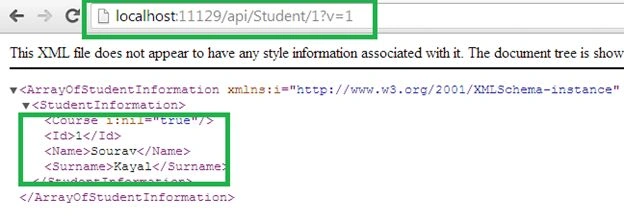
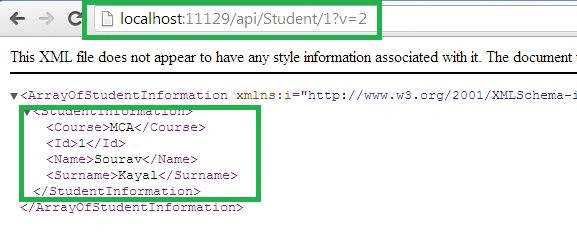
If they do not pass any value in the query then by default Version 1 will execute. If they specify Version 1 in the query string then it will execute Version 1 and if they specify Version 2 then as expected Version 2 will execute.
URL for Version 1
http://localhost:11129/api/Student/1?v=1
URL for Version 2
http://localhost:11129/api/Student/1?v=2
Fine, we understand how to call a different version of the same Web API service. Now let’s implement it practically.
Implement the Student Model class with the following. This class has two constructors and the two constructors will be called at the time of object creation for a different version.
- using System;
- using System.Collections.Generic;
- using System.Linq;
- using System.Web;
- namespace TestWEB_API.Models
- {
- [Serializable]
- public class StudentInformation
- {
- public int Id;
- public string Name;
- public string Surname;
- public string Course;
- public StudentInformation(int Id, string Name, string Surname)
- {
- this.Id = Id;
- this.Name = Name;
- this.Surname = Surname;
- }
- public StudentInformation(int Id, string Name, string Surname, String Course)
- {
- this.Id = Id;
- this.Name = Name;
- this.Surname = Surname;
- this.Course = Course;
- }
- }
- }
If the query string value is 1 then we are considering that the user wants to consume Version 1 of the Student Information service.
If the value is 2 then user wants to consume Version 2 of the Student Information service. Have a look at the following implementation.
Join the conversation! Your thoughts help the community grow.