

In my previous post, I explained about:
In this post, I am going to explain about implementing Star Rating in MVC 5 Web Applications, using AngularUI, as a part of the AngularUI series.You may have seen in many websites, that they ask for feedback in the form of rating stars. No problem -- it very easy to implement. Just follow the below steps to create a StarRating system in your Web Application.
Implementing StarRating in MVC using AngularUI
- Create a Web Application using the MVC template (Here, I am using Visual studio 2015).
- It is better (Recommended) to implement an Application in Visual studio 2015 because VS2015 shows intelligence for Angular JS. This feature is not present in the previous versions.
The final output is like the screenshot shown below:
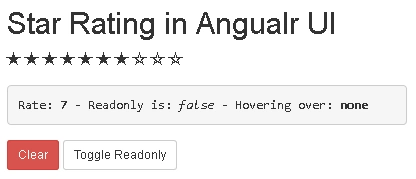
Step 1: Add Controller and View
- Add a controller and name it (Here, I named it HomeController).
- Create an Index Action method and add view to it.
- Now, add the script ,given below, and reference file to an Index page.
- <script src="~/Scripts/angular.js"></script>
- <script src="~/Scripts/angular-animate.js"></script>
- <script src="~/Scripts/angular-ui/ui-bootstrap-tpls.js"></script>
- <script src="~/Scripts/app.js"></script><!--This is application script we wrote-->
- <link href="~/Content/bootstrap.css" rel="stylesheet" />
Step 2: Add Angular Script file
- Now, create another script file for Angular code to implement StarRating in the Application.
- Replace the Java Script file, with the code, given below:
- angular.module('ui.bootstrap.demo', ['ngAnimate', 'ui.bootstrap']);
- angular.module('ui.bootstrap.demo').controller('RatingDemoCtrl', function ($scope) {
- //These are properties of the Rating object
- $scope.rate = 7; //gets or sets the rating value
- $scope.max = 10; //displays number of icons(stars) to show in UI
- $scope.isReadonly = false; //prevents the user interaction if set to true.
- $scope.hoveringOver = function (value) {
- $scope.overStar = value;
- $scope.percent = 100 * (value / $scope.max);
- };
- //Below are the rating states
- //These are array of objects defining properties for all icons.
- //In default template below 'stateOn&stateOff' properties are used to specify icon's class.
- $scope.ratingStates = [
- { stateOn: 'glyphicon-ok-sign', stateOff: 'glyphicon-ok-circle' },
- { stateOn: 'glyphicon-star', stateOff: 'glyphicon-star-empty' },
- { stateOn: 'glyphicon-heart', stateOff: 'glyphicon-ban-circle' },
- { stateOn: 'glyphicon-heart' },
- { stateOff: 'glyphicon-off' }
- ];
- });
Step 3: Create UI
Vasanth KumarPosted Jun 11, 2018, 3:26 AM
How Can i get all hotels related to what i give the rating using WebApi services in mvc
Vignesh ManiPosted Jul 4, 2016, 11:07 AM
Nice