
First need to add the reference "Microsoft ADO Ext. 2.8". You can easily add it from COM components.
Add an open Dialog box control on form
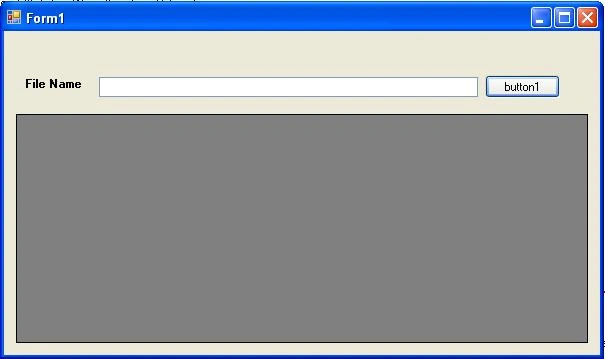
Put the following code on Browser button click events…..
- private void button1_Click_1(object sender, EventArgs e)
- {
- OpenFileDialog fdlg = new OpenFileDialog();
- fdlg.Title = "Select file";
- fdlg.InitialDirectory = @"c:\";
- fdlg.FileName = txtFileName.Text;
- fdlg.Filter = "Excel Sheet(*.xls)|*.xls|All Files(*.*)|*.*";
- fdlg.FilterIndex = 1;
- fdlg.RestoreDirectory = true;
- if (fdlg.ShowDialog() == DialogResult.OK)
- {
- txtFileName.Text = fdlg.FileName;
- Import();
- Application.DoEvents();
- }
- }
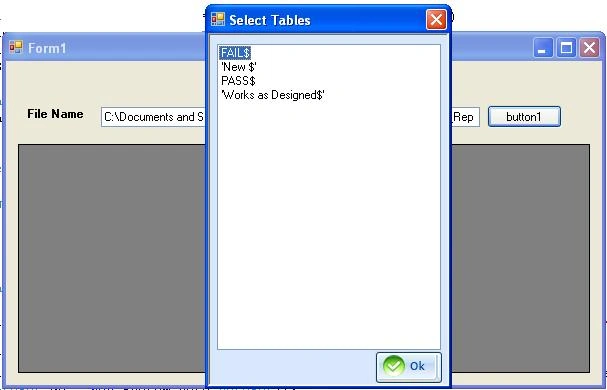
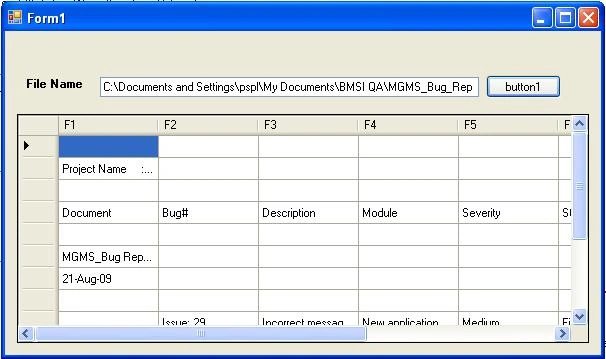
This Excel file can contains more than one Sheet. You need to add another form to all excel sheets name so that user can select any one excel sheet which he want to import.
Write the following code on Page Load even of this form
- private void Select_Tables_Load(object sender, EventArgs e)
- {
- if (!DataTables)
- {
- if (Tables != null)
- {
- for (int tables = 0; tables < Tables.Length; tables++)
- {
- try
- {
- ListViewItem lv = new ListViewItem();
- lv.Text = Tables[tables].ToString();
- lv.Tag = tables;
- lstViewTables.Items.Add(lv);
- }
- catch (Exception ex)
- { }
- }
- }
- }
- else
- {
- if (dtTable.Rows.Count>0)
- {
- for (int tables = 0; tables < dtTable.Rows.Count; tables++)
- {
- try
- {
- ListViewItem lv = new ListViewItem();
- lv.Text = dtTable.Rows[tables][0].ToString();
- lv.Tag = dtTable.Rows[tables][0];
- lstViewTables.Items.Add(lv);
- }
- catch (Exception ex)
- { }
- }
- }
- }
- }
Joerg FritzPosted Dec 11, 2020, 7:01 PM
Thanks for this sample
Dinesh GabhanePosted Nov 12, 2019, 6:40 AM
Good One. Thanks
Jomel SuyodPosted Mar 14, 2018, 2:58 PM
How to compare the data from excel to database? for example: if the name "JOHN" is imported from the excel file to database then when you import it again the message box will show that the data contain in the excel file is already imported
Jose GranadosPosted Dec 28, 2016, 1:05 PM
How do I feed data to third party forms from Excel list?
Samuel P KPosted Oct 9, 2015, 7:14 AM
Thanks so much, Ankur. My excel workbook has has only one sheet and I would like to select contents in A1:A50, B1:B50, C1:C50 and D1:D50. I would appreciate your help. Would like to follow you on twitter. I'm @bigcaptsammy
Nitin SharmaPosted Jul 25, 2015, 12:27 AM
how can i import image from excel file into datagridview ?
will morsePosted Apr 30, 2015, 2:58 PM
Ken H
Ken HPosted Apr 19, 2015, 11:00 PM
Provider is not found. The program may not be installed correctly.
Pranita GuptaPosted Feb 21, 2015, 9:25 AM
hello Ankur sir, the above code is not working properly...the error is "Provider cannot be found. It may not be properly installed." and the sheet data is not view can u help me...thx in advance....
Pranita GuptaPosted Feb 21, 2015, 9:24 AM
--------------------------- --------------------------- Provider cannot be found. It may not be properly installed. --------------------------- OK ---------------------------
sathish pPosted Oct 1, 2014, 8:57 AM
Thank you...........
Abiud PeralesPosted Feb 19, 2014, 5:18 PM
the use for xlsx not require change, only change the filter *.xls|*.xlsx that all to do it.
naman sharmaPosted Mar 6, 2013, 4:36 AM
can you suggest me the code change for .xlsx file...
yogesh daymaPosted Feb 16, 2013, 4:51 AM
i want to load external sql database file to my project and want to show it on datagrid view and when the database change want to change in datagrid view in runtime how can i do that. plz help
mahmut namliPosted Oct 6, 2012, 5:58 PM
why i cant download zip file?
Ankur GuptaPosted Aug 17, 2012, 3:56 AM
Current provider will be used only with .xls file not with .xlsx if you are using .xlsx file then please let me know i will suggest you the changes according to that. Ankur
wi maPosted Aug 13, 2012, 4:46 PM
modified ur code more to get past that error: private void Select_Tables_Load(object sender, EventArgs e) { int tCount = Tables.Count(); if (!DataTables) { if (Tables != null) { for (int tables = 0; tables <= Tables.Length-1; tables++) { if (Tables[tables] != null) { try { ListViewItem lv = new ListViewItem(); lv.Text = Tables[tables].ToString(); lv.Tag = tables; lstViewTables.Items.Add(lv); } catch (Exception ex) { MessageBox.Show("Select_Tables_Load Tables - " + ex.Message.ToString()); } } } }
wi maPosted Aug 13, 2012, 4:28 PM
got past those two errors but there is this one now: private void Select_Tables_Load(object sender, EventArgs e) { if (!DataTables) { if (Tables != null) { for (int tables = 0; tables < Tables.Length; tables++) { try { ListViewItem lv = new ListViewItem(); lv.Text = Tables[tables].ToString(); lv.Tag = tables; lstViewTables.Items.Add(lv); } catch (Exception ex) { MessageBox.Show("Select_Tables_Load Tables - " + ex.Message.ToString()); } produces this error as the catch: Object reference not set to an instance of an object
wi maPosted Aug 13, 2012, 4:09 PM
objSelectTable.ShowDialog(this); //shows form but nothing populated in list view and I've got a spreadsheet with two workbooks -- not sure why they are not showing up in the select table listview
wi maPosted Aug 13, 2012, 11:04 AM
error: External table is not in the expected format oConn.Open("Provider=Microsoft.Jet.OleDb.4.0; Data Source = " + strFileName + "; Extended Properties = \"Excel 8.0;HDR=Yes;IMEX=1\";", "", "", 0);
Bilal KONUKPosted Jul 25, 2012, 8:41 AM
Thank you bro. Awesome
Ankur GuptaPosted Jul 23, 2012, 2:17 AM
you need to set Target Platform X86 instead of Any CPU.
jerie mubayyinPosted Jul 10, 2012, 4:02 AM
I have Message : "Provider cannot be found. It may not be properly installed." what should I do ? any one can help ?
Ankur GuptaPosted May 8, 2012, 4:24 AM
Thanks
znaneswar kodavantiPosted May 7, 2012, 3:37 AM
Nice one really awesome
das mierPosted Apr 22, 2012, 4:33 AM
I already added the reference "Microsoft ADO Ext. 2.8". But it still doesn't work...
Nanda KumarPosted Mar 25, 2012, 3:16 PM
Thanks a lot..... Nice Coding and Simple.....
ShukyPosted Feb 2, 2012, 12:42 AM
can this program support both "xls" and "xlsx"? how i can implement it Thanks Shuky: [email protected]
Ali AlfarajPosted Jan 18, 2012, 4:21 AM
Thanks for the great article. What if I want to select a specific range of cells from a specific sheet? Say selecting the range [A1:B45] from the sheet FAIL$. Thank you again, Ali
nishant dasvantPosted Sep 15, 2011, 3:39 PM
if i m using this library System.Windows.Documents & System.Windows.Controls this two library Show Following Error 1 The type or namespace name 'Documents' does not exist in the namespace 'System.Windows' (are you missing an assembly reference?) D:\Nishant\Studies\C#\Windows Forms Application\123Application\123Application\Form1.cs 9 22 123Application & Error 2 The type or namespace name 'Controls' does not exist in the namespace 'System.Windows' (are you missing an assembly reference?) D:\Nishant\Studies\C#\Windows Forms Application\123Application\123Application\Form1.cs 10 22 123Application
nishant dasvantPosted Sep 13, 2011, 6:54 AM
i having combo box,listbox and (Add) button & i want to show excel data within combo box who show and read header line if i select value this value add in listbox plz can u help me
Onair NopphunPosted Feb 8, 2011, 5:50 AM
?????
elnaz zPosted Feb 8, 2011, 2:16 AM
hi how to delete a row of gridview and then it deleted from excel?
usman RajaeditedPosted Feb 3, 2011, 1:45 PMEdited Feb 3, 2011, 1:48 PM
have the same error....as discussed aboveee......what to do????
rolando zaratePosted Oct 11, 2010, 8:57 PM
sir if i run the example program it prompt that the "Provider cannot be found.it may not properly installed."what can i do to run this properly