

In this article I will explain how to import gmail contacts of a user by using GContacts Data API provided by Google. This article will help the developers, who are willing to develop social networking applications like facebook, orkut, hi5, twitter etc. In social network applications objective is to promote their website worldwide to n number of users. For this they targets gmail, yahoomail, AOL, hotmail etc. where you need to invite more people. By keeping that motive in mind I prepared this article with help of Google Contacts API and their suggested source code, I customized according to my requirement. Its just like kids play. There is no need to think more and more with hazards of knowledge. I will explain this article with Step by Step.
Hands on Experiment:
I used ASP.NET and C# for developing this application. This article targets intermediate developers who are having minimal knowledge on ASP.NET and C#.
Step 1:
Download Google data API setup from the specified URL
http://code.google.com/p/google-gdata/
Or you can directly download from the following URL
http://google-gdata.googlecode.com/files/Google%20Data%20API%20Setup%281.4.0.2%29.msi
This setup will install set of Google Data dll's (Google.GData.Apps.dll, Google.GData.Client.dll, Google.GData.Contacts.dll, Google.GData.Extensions.dll) into client machine.
Step 2:
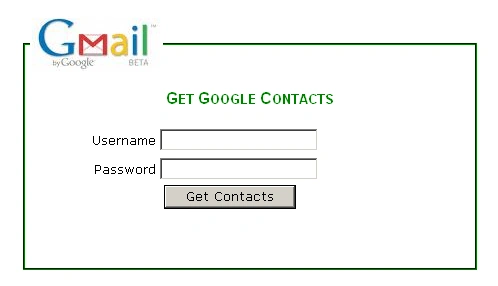
Design one page (Default.aspx) as shown below.
Step 3:
Add one new Class file to App_Code Folder->Now add the dll's(Google.GData.Apps.dll, Google.GData.Client.dll, Google.GData.Contacts.dll, and Google.GData.Extensions.dll) as a reference to your website by using a good option in visual studio->Solution Explorer ->Right Click-> Click on Add Reference->Browse ->Get dll's from Installed Location->Press OK.
Step 4:
a) Import Name spaces.
using Google.GData.Contacts;
using Google.GData.Client;
using Google.GData.Extensions;
using Google.Contacts;
b) Write Function As
public static DataSet GetGmailContacts(string App_Name, string Uname, string UPassword)
{
DataSet ds = new DataSet();
DataTable dt = new DataTable();
DataColumn C2 = new DataColumn();
C2.DataType = Type.GetType("System.String");
C2.ColumnName = "EmailID";
dt.Columns.Add(C2);
RequestSettings rs = new RequestSettings(App_NAme, Uname,UPassword);
rs.AutoPaging = true;
ContactsRequest cr = new ContactsRequest(rs);
Feed<Contact> f = cr.GetContacts();
foreach (Contact t in f.Entries)
{
foreach (EMail email in t.Emails)
{
DataRow dr1 = dt.NewRow();
dr1["EmailID"] = email.Address.ToString();
dt.Rows.Add(dr1);
}
}
ds.Tables.Add(dt);
return ds;
}
Step 5:
a) Open default.aspx->In button_Click(Get Contacts) event, you are required to write the code as follows
Session["username"] = txtgmailusername.Text;
Session["password"] = txtpassword.Text;
Session["App_Name"] = "MyNetwork Web Application!";
Response.Redirect("~/PopulateGcontacts.aspx");
b) Add one new page named (PopulateGcontacts.aspx). Place one GridView control and write the code as follows.
protected void Page_Load(object sender, EventArgs e)
{
string App_Name= Session["App_Name"].ToString();
string username= Session["username"].ToString();
string password= Session["password"].ToString();
DataSet ds = GContactsImport.GetGmailContacts(App_Name,username ,password);
GridView1.DataSource = ds;
GridView1.DataBind();
}
protected void GridView1_PageIndexChanging(object sender, GridViewPageEventArgs e)
{
GridView1.PageIndex = e.NewPageIndex;
}
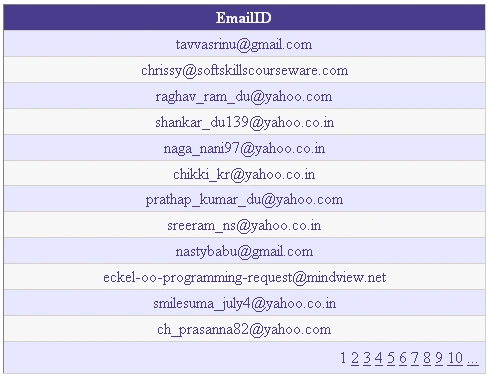
Finally our output screen will be like this
My Resource:
http://code.google.com/apis/contacts/docs/2.0/developers_guide_dotnet.html
Note: You need internet connection at the time of executing this application. Soon I will post hotmail, yahoomail, AOL contacts import into asp.net application as a group.
Conclusion:
In this example I left to catch exceptions and validations. This article will definitly help in to make the above mentioned scenario in real development. For this work I made lot of google search but I never get any exact solution to solve my requirement in easy manner. Finally I solved it with GContacts DataApi.
Saurabh SarkarPosted Jun 21, 2016, 7:23 AM
Very helpful article
Mateus CairesPosted Nov 10, 2011, 11:51 AM
Very good you code, thank you for this post, do you know how do it for hotmail, yahoo! ? TKS, Mateus Caires
Andile ChokoPosted Sep 12, 2011, 8:34 AM
how do i import the name of the contact
Andile ChokoPosted Sep 12, 2011, 8:27 AM
Hi, Thanx for a well intsructive solution. How do i also import the name of the contact? I'll be grateful hearing from You.
Jake KoornhofPosted Jan 1, 2011, 12:41 PM
Thank you for you codes this is excellent I found your article on another page where the download link was working..thank you again:) http://www.dotnetspider.com/resources/37275-Import-Gmail-Contacts-into-ASP-NET.aspx
bhagat shekhawatPosted Dec 18, 2010, 7:40 AM
Thaks sir its help full for me
Cuong Nguyen CaoPosted Nov 12, 2010, 9:04 PM
I'm need yahoo mail
Cuong Nguyen CaoPosted Nov 12, 2010, 3:09 AM
Thank you very much I'm can search Soon I will post hotmail, yahoomail, AOL contacts import into asp.net application as a group where? Thank you
Ranjan KUMARPosted Oct 5, 2010, 5:15 AM
virtual platform that delivers next-generation Windows Server 2008 Hyper-V virtualization technology from a managed hosting partner you can truly depend on. Visit www.maximumasp.com/max for a FREE 30 day trial. Hurry offer ends soon. Climb aboard the MaxV platform and take advantage of High Availability, Intelligent Monitoring, Recurrent Backups, and Scalability – with no hassle or hidden fees. As a managed hosting partner focused solely on Microsoft technologies since 2000, MaximumASP is uniquely qualified to provide the superior support that our business is built on. Unparalleled expertise with Microsoft technologies lead to working directly with Microsoft as first to offer IIS 7 and SQL 2008 betas in a hosted environment; partnering in the Go Live Program for Hyper-V; and product co-launches built on WS 2008 with Hyper-V technology.
satyendra chauhanPosted Sep 26, 2010, 6:46 AM
Hi, Its giving timeout problem on server while working fine on local machine. please help. Satyendra
ankit champaneriyaPosted Sep 4, 2010, 3:11 AM
Hay I want to fetch yahoo,gmail contact in my grid I am unable to download that zip file.So If you get any letest code so can you provide me solution. it's very urgent. regards, ANKIT CHAMPANERIYA([email protected])
vidz pvPosted Jul 26, 2010, 10:17 AM
Thanks alott Bangaru....this helped me alottt...
gagan chhatwalPosted May 13, 2010, 3:59 AM
can't u give us easy solution plz mail me [email protected]. thanks
darshanPosted May 7, 2010, 1:14 AM
thanks u so much......................
vilas gaykwadPosted Apr 29, 2010, 2:39 AM
vilas
Dipa AhujaPosted Apr 20, 2010, 12:35 PM
I AM Unable to download this zip... do something...
chinni bujjiPosted Apr 20, 2010, 1:07 AM
My name is sasidhar yesterday i sent my problem. thank you for reply and it is working fine. Can i get source code of Yahoo contacts,Hotmail.
chinni bujjiPosted Apr 19, 2010, 5:12 AM
hi, i am using the code but i not get this GContactsImport in my application can u help me
nachom cohenPosted Apr 3, 2010, 7:25 PM
Thank you very much. I looked for it for a while
sudheer kumarPosted Mar 25, 2010, 7:42 AM
Hi, I am unable to download the zip folder, please rectify and upload the URL
Mohammad ElsheimyPosted Mar 24, 2010, 4:26 PM
Thank you very much. This was very helpful. What about creating a fully-featured Gmail client app?