

Introduction
This article will help to understand and learn the basic concepts of Power Platform.
Below are some of the important concepts of 'Power Platform Fundamentals'
1. Microsoft products that are part of Power Platform
- Power Apps
- Power Automate
- Power BI
- Power Virtual Agent
Refer: What is Microsoft Power Platform? - Learn | Microsoft Docs
2. Components of Model Driven App
- Data Component
- Table
- Relationship
- Column
- Choice column
- UI Component
- App
- Site map
- Form
- View
- Custom page
- Logic Component
- Business process flow
- Workflow
- Actions
- Business rule
- Power Automate flow
- Visualizations
- Chart
- Dashboard
- Embedded Power BI
Refer: Understand model-driven app components in Power Apps - Power Apps | Microsoft Docs
3. Types of Filters in Power BI Reports
- Automatic Filter
- Manual Filter Include & Exclude Filter
- Drill Down Filter
- Cross Drill Filter
- URL Filter
- Drill Through Filter
- Pass Through Filter
Refer: Types of filters in Power BI reports - Power BI | Microsoft Docs
4. Connectors in Canvas App
- Tables
- Actions
Refer: Overview of connectors for canvas apps - Power Apps | Microsoft Docs
5. Types of Real time dataset in Power BI
- Push dataset
- Streaming dataset
- PubNub streaming dataset
Refer: Real-time streaming in Power BI - Power BI | Microsoft Docs
6. Different Types of PowerApps Portals Templates
- Customer self-service portal
- Partner portal
- Employee self service portal
- Community portal
- Customer portal
Refer: Portal templates - Power Apps | Microsoft Docs
7. Steps to share Model Driven App
- Select an app from PowerApps list
- Select share
- Select the app and select a security role
- Select a user and choose a security role
Refer: Share a model-driven app using Power Apps - Power Apps | Microsoft Docs
8. Venn diagram comparing Power BI Desktop and the Power BI service
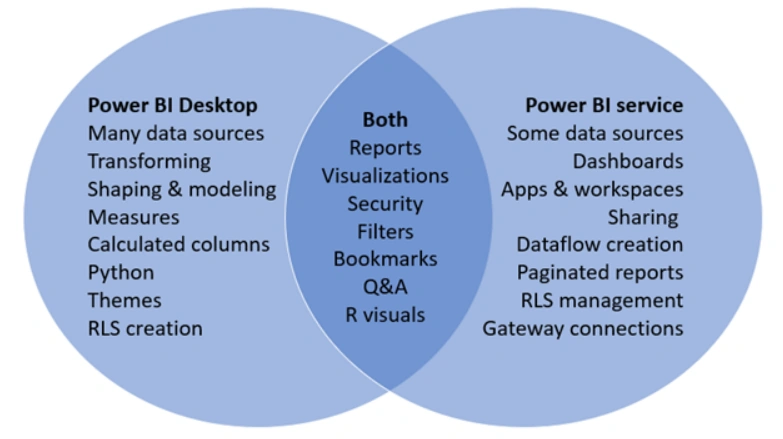
Refer: Comparing Power BI Desktop and the Power BI service - Power BI | Microsoft Docs
9. Site issues in PowerApps Portal
- Disable Custom Errors - Replaces brief error or notification with detailed errors
- Diagnostic logging - Logs will be stored in Azure blob storage container called a Telemetry log
Refer: Introduction - Learn | Microsoft Docs
10. Key Capabilities of AI Builders
- Binary Classification
- Text Classification
- Object Detection
- Form Processing
- Business Card reader
- Customer Testimonial
Refer: Introducing AI Builder for Power Platform | Microsoft Power Apps
SUMMARY:
This article will help you in understanding basic concepts of Power Platform. Thank you:)
Join the conversation! Your thoughts help the community grow.