If you have ever found yourself juggling several development projects at once and bouncing from solution-to-solution making minor fixes, changes and improvements, then you know how easily it can be to just get overwhelmed or off-task in situations like these. Everyone has their own methods of handling these scenarios and as with most things simple software products can make dealing with these much easier.
Trello is a online product management and collaboration system from the folks over at Fog Creek Software that utilizes the Kanban paradigm to help break down tasks into individual items and improve productivity. It is commonly used within agile-centric development environments and I believe that it can be quite an effective tool to allow groups to collaborate and ultimately get things done.
Enter the Kanban
The Kanban system was a system introduced by Toyota in the 1950s to help improve productivity and uses a system of "boards" and "cards" to help break tasks and scheduling into smaller components which can be handled more easily. An inherent benefit of the system is that it help reveal bottlenecks within the development process that have ultimately been slowing things down, which allows the organization to address the issue and achieve what all organizations are looking for: improved productivity.
Trello: Kanban of the Future
Trello easily eliminates those marker fumes and piles of crumpled-up Post-It notes in exchange for a very simple web application that allows its users to easily log in, create, update, assign and manage projects and tasks to which they are assigned. Some of the many benefits that it offers are as follows:
- Easy Access - Trello is easily accessible from the web and works in a responsive manner so it can easily be used on tablets and mobile devices as well. It supports drag-and-drop and uses inline-editing to make the interface very user-friendly.
- Free - Several Project Management suites out there offer similar functionality and a Kanbanequse area, however a large percentage of those are not free.
- Collaboration - A Role-based system allows a Project Manager or Administrator to assign tasks to specific users for projects. User’s access can be limited based on the Projects that they are assigned. The system also permits commits, notes and uploads to make collaborating easier.
- Notifications - Seamless notifications through the application will alert users when items have been assigned to them or tasks related to them have been updated, commented or moved.
- Eco-Friendly - Eliminates the need for those marker fumes and eventual piles of crumpled and discarded Post-It notes.
- Time Management and Accountability - By separating each of the stages of a Project, this allows users to see what their teammates are working on and when. Trello also time-stamps each action which creates a very basic audit trail which can be helpful if things go wrong.
Getting Started
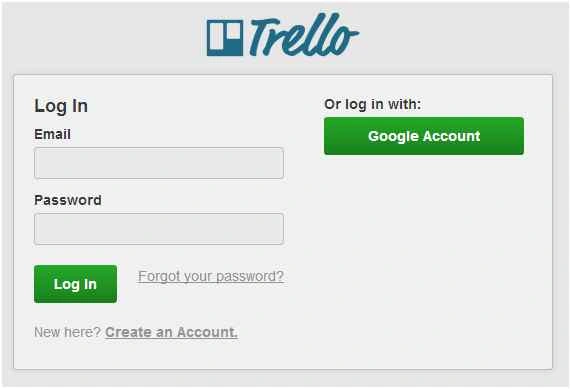
Creating an account takes no time at all and once you are in you’ll be presented with your Home Screen. This will contain all of your major boards as well as areas to view your notifications, update your profile and create new cards, boards, organizations and more:

Next, we will move on and actually take a look at what an example "board" might look like. These can be accessed by simply clicking on any of the available boards from the Home Area.
The Boards
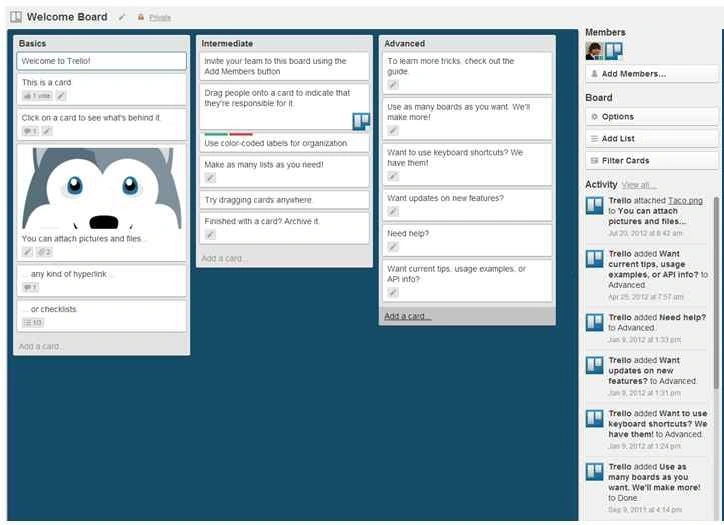
Trello will automatically generate an example board after creating a new account which functions as an excellent tutorial. It reviews over each of the major features available within a board and how to use each of them on a new card. This example covers Basic, Intermediate and Advanced functionality and I would highly recommend at least reviewing over it before diving into Trello so that you get the best out of your experience:
Creating a new Board dedicated to your own Project takes a matter of seconds. You’ll simply need to Add a new Board and then get started throwing together Lists and individual tasks within those Lists.

Since Trello wasn't designed with any specific type of organization in mind, you can easily tailor your boards to suit the workflow of your organization or company.
Give it a shot!
I’ve been using Trello for a few months and I have found that it has greatly helped me stay on task, especially when juggling multiple different projects concurrently or facing frequent interruptions.
By being mindful of updating my statuses within the application frequently, I can always reference the “Doing” column to see what I was working on prior to any unrelated conversations. It may not be for everyone, but I would definitely recommend giving it a try, especially if you are a person that works well when you have a list in front of you.
Zero dollars is never a lot to pay, especially if it can make your life a bit easier.


Muhammad Aqib ShehzadPosted Nov 6, 2015, 4:48 AM
good share
Gowtham KPosted Oct 29, 2015, 1:35 PM
Thanks for sharing
Manoj KulkarniPosted Oct 29, 2015, 11:19 AM
After reading your article. I started to use it. Thank you for sharing.
Mahesh ChandPosted Oct 29, 2015, 7:14 AM
Love it. Thanks for sharing. Many developers do not know these tools. I use Trello, Basecamp, Asana and couple of other tools, depending on the client but Trello seems to provide more than those. Cheers!
Sibeesh VenuPosted Oct 29, 2015, 1:33 AM
I have used this. It was a great experience :)