
Introduction
It frequently occurs that in order to improve memory management and to lessen the number of objects being created (especially those objects that are making over-the-network calls), the singleton pattern is used.
Often it is justified by the concern that some sloppy code may not be releasing the objects properly or in-time for the Garbage Collector to keep the application memory low.
So, one of those 'over-the-network' objects is a WCF Service Client (or Web Reference instance).
In this article, I would like to demonstrate that
- Using a Singleton client to access the WCF Web Service has some serious performance issues.
- Creating a new Client object from the Web Reference every time you need to call a WCF Service performs much faster than a Singleton Client.
- Using an object pool (object pooling) is as speedy as option two, but also uses less application memory.
Let's go over the projects quickly, how and why they were created.
First, this is how a WCF web service Application is created.
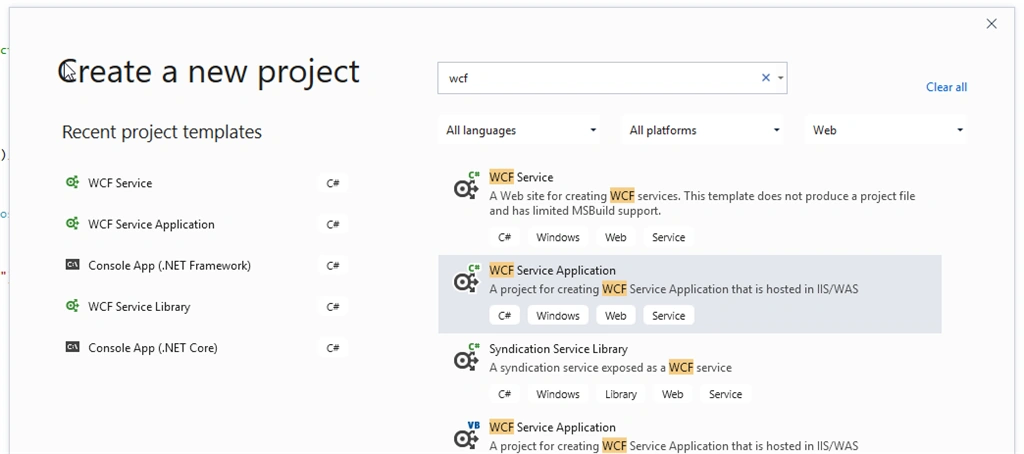
I named my Project 'WcfDataService'.
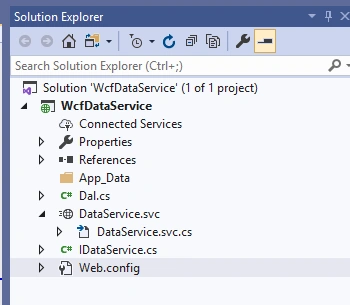
You'll see that besides standard files like .svc and an Interface for it IDataService, there is also a data access class that actually performs some data manipulations. In this case, it has one insert and one select method Implemented in class "Dal" in Dal.cs. This is to make a service more realistic, which would in turn, make a Testing console app somewhat real as well.
Dal.cs
- public class Dal
- {
- const string connectionString = "data source=localhost\\dev400;Initial Catalog=World;User id=sa; Password=xyz";
- public DataSet QeuryProduct()
- {
- using (SqlConnection cn = new SqlConnection(connectionString))
- {
- SqlDataAdapter da = new SqlDataAdapter("Select Top(50) * From [WorldAndCapitals]", cn);
- DataSet ds = new DataSet();
- da.Fill(ds);
- return ds;
- }
- }
- public int InsertContryContinent(string continent, string country, string capital, int population, string totalArea)
- {
- using (SqlConnection cn = new SqlConnection(connectionString))
- {
- SqlCommand cmd = new SqlCommand();
- cmd.Connection = cn;
- cmd.CommandText = "INSERT INTO [dbo].[Continents2] ([Continent] ,[Country],[Capital],[Population] ,[Total area]) VALUES(@continent,@country,@capital,@population,@totalArea)";
- cmd.Parameters.AddWithValue("@continent", continent);
- cmd.Parameters.AddWithValue("@country", country);
- cmd.Parameters.AddWithValue("@capital", capital);
- cmd.Parameters.AddWithValue("@population", population);
- cmd.Parameters.AddWithValue("@totalArea", totalArea);
- cn.Open();
- int rowsInserted = cmd.ExecuteNonQuery();
- return rowsInserted;
- }
- }
- }
DataService.svc.cs
- public class DataService : IDataService
- {
- public int InsertContryContinent(string continent, string country, string capital, int population, string totalArea)
- {
- var dal = new Dal();
- return dal.InsertContryContinent(continent, country, capital, population, totalArea);
- }
- public DataSet QueryProduct()
- {
- var dal = new Dal();
- return dal.QeuryProduct();
- }
- }
Next, I created an IIS website to publish the service. Basically, I used a Project folder as a directory path of the new web site and port number chose 8055.
The web.config is:
- <?xml version="1.0"?>
- <configuration>
- <appSettings>
- <add key="aspnet:UseTaskFriendlySynchronizationContext" value="true"/>
- </appSettings>
- <system.web>
- <compilation targetFramework="4.7.2" debug="true"/>
- <httpRuntime targetFramework="4.7.2"/>
- </system.web>
- <system.serviceModel>
- <services>
- <service behaviorConfiguration="Default2" name="WcfDataService.DataService">
- <endpoint address="WcfDataService" binding="basicHttpBinding" contract="WcfDataService.IDataService"/>
- <host>
- <baseAddresses>
- <add baseAddress="http://localhost"/>
- </baseAddresses>
- </host>
- </service>
- </services>
- <behaviors>
- <serviceBehaviors>
- <behavior name="Default2">
- <serviceMetadata httpGetEnabled="true"/>
- </behavior>
- </serviceBehaviors>
- </behaviors>
- </system.serviceModel>
- </configuration>
Navigate to the newly created web site:
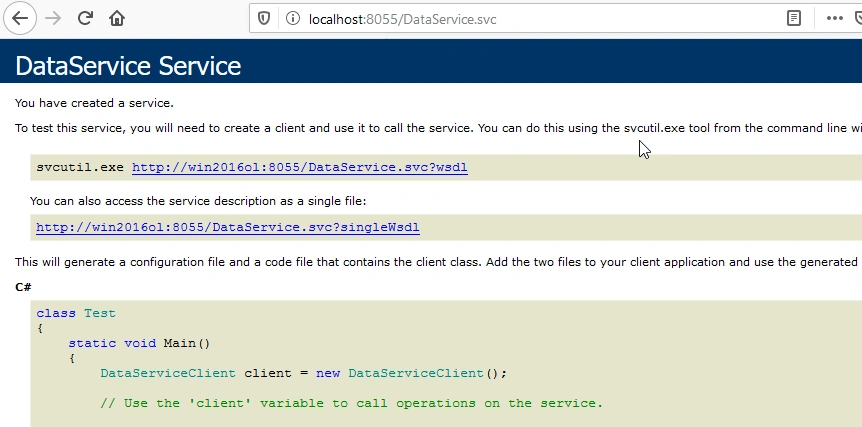
Next, I created a testing project called WcfPoolTest. It's just a Windows Console application.
I used a .wsdl link from the previous picture to create a reference to the service DataServiceReference from the project called WcfPoolTest.
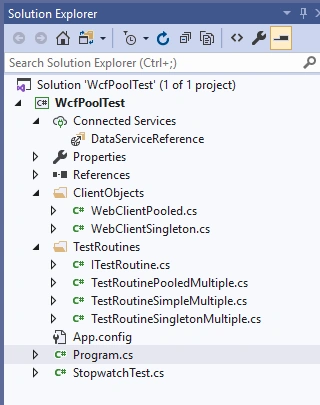
The test is basically doing an insert operation of 1000 records. There are 10 threads. Each thread inserts 100 times.
There are 3 test routines: Test Routine Simple, Test Routine Singleton, Test Routine Pooled (implemented by TestRoutineSimpleMultiple, TestRoutineSingletonMultiple, TestRoutinePooledMultiple classes).
Join the conversation! Your thoughts help the community grow.