This article explains how to do insert, update and delete operations in a XML file using C#.
Use the following procedure to create a sample of doing that in XML using C#.
Step 1: Create a solution.
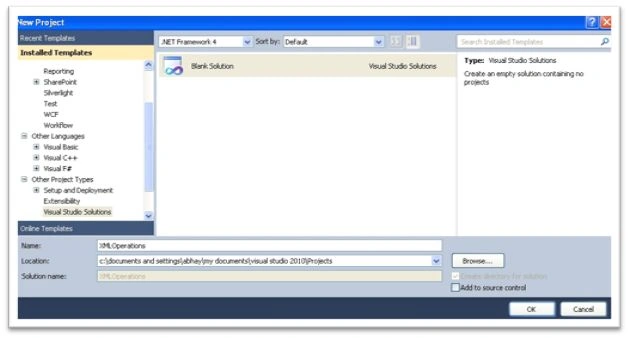 Step 2:
 Add a web application.
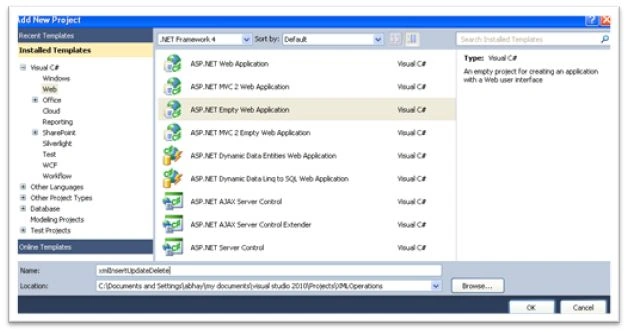 Step 3:
 Right-click the web application and add the XML file. The solution will be as shown below:
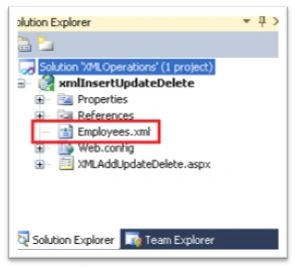 Step 4:
 Open the XML file and the fields as below:
<?xml version="1.0" standalone="yes"?>
<Employees>
<Employee>
<ID>101</ID>
<Name>Abhay</Name>
<Designation>Senior Software Engineer</Designation>
<EmailID>[email protected]</EmailID>
<City>Pune</City>
<Country>India</Country>
<Technology>.Net</Technology>
</Employee>
</Employees>
Step 5: Go to the .aspx page and design the form as below:
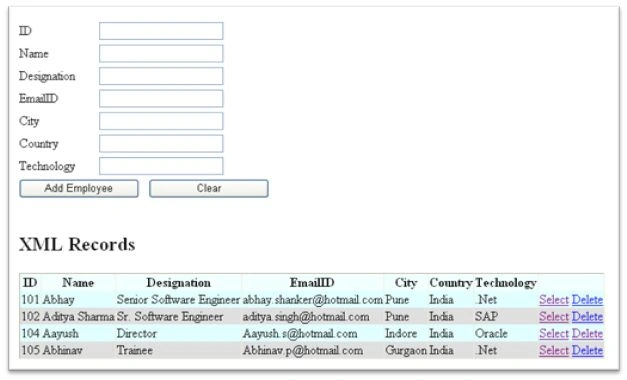 Step 6:
 Go to the .aspx.cs page and write the code for the add, update and delete in XML.
To add the record write the code as:
XmlDocument xmlEmloyeeDoc = new XmlDocument();
xmlEmloyeeDoc.Load(Server.MapPath("~/Employees.xml"));
XmlElement ParentElement = xmlEmloyeeDoc.CreateElement("Employee");
XmlElement ID = xmlEmloyeeDoc.CreateElement("ID");
ID.InnerText = txtID.Text;
XmlElement Name = xmlEmloyeeDoc.CreateElement("Name");
Name.InnerText = txtName.Text;
XmlElement Designation = xmlEmloyeeDoc.CreateElement("Designation");
Designation.InnerText = txtDesignation.Text;
XmlElement EmailID = xmlEmloyeeDoc.CreateElement("EmailID");
EmailID.InnerText = txtEmailID.Text;
XmlElement City = xmlEmloyeeDoc.CreateElement("City");
City.InnerText = txtCity.Text;
XmlElement Country = xmlEmloyeeDoc.CreateElement("Country");
Country.InnerText = txtCountry.Text;
XmlElement Technology = xmlEmloyeeDoc.CreateElement("Technology");
Technology.InnerText = txtTechnology.Text;
ParentElement.AppendChild(ID);
ParentElement.AppendChild(Name);
ParentElement.AppendChild(Designation);
ParentElement.AppendChild(EmailID);
ParentElement.AppendChild(City);
ParentElement.AppendChild(Country);
ParentElement.AppendChild(Technology);
xmlEmloyeeDoc.DocumentElement.AppendChild(ParentElement);
xmlEmloyeeDoc.Save(Server.MapPath("~/Employees.xml"));
BindGrid();
To update the record write the code as:
DataSet ds = new DataSet();
ds.ReadXml(Server.MapPath("~/Employees.xml"));
int xmlRow = Convert.ToInt32(Convert.ToString(ViewState["gridrow"]));
ds.Tables[0].Rows[xmlRow]["Name"] = txtName.Text;
ds.Tables[0].Rows[xmlRow]["Designation"] = txtDesignation.Text;
ds.Tables[0].Rows[xmlRow]["EmailID"] = txtEmailID.Text;
ds.Tables[0].Rows[xmlRow]["City"] = txtCity.Text;
ds.Tables[0].Rows[xmlRow]["Country"] = txtCountry.Text;
ds.Tables[0].Rows[xmlRow]["Technology"] = txtTechnology.Text;
ds.WriteXml(Server.MapPath("~/Employees.xml"));
BindGrid();
To delete the record write the code as:
DataSet ds = new DataSet();
ds.ReadXml(Server.MapPath("~/Employees.xml"));
ds.Tables[0].Rows.RemoveAt(e.RowIndex);
ds.WriteXml(Server.MapPath("~/Employees.xml"));
BindGrid();
For binding the Grid:
DataSet ds = new DataSet();
ds.ReadXml(Server.MapPath("~/Employees.xml"));
if (ds != null && ds.HasChanges())
{
grdxml.DataSource = ds;
grdxml.DataBind();
}
else
{
grdxml.DataBind();
}


Mohd TaufeequePosted Dec 11, 2018, 11:04 AM
<?xml version="1.0" standalone="yes"?><Employees> <Employee> <ID>101</ID> <Name>Anil</Name> <Salary>20000</Salary> </Employee> <Employee> <ID>102</ID> <Name>Sunil</Name> <Salary>30000</Salary> </Employee> <Employee> <ID>103</ID> <Name>Ajay</Name> <Salary>35000</Salary> </Employee> <Employee> <ID>104</ID> <Name>Vijay</Name> <Salary>40000</Salary> </Employee> <Employee> <ID>105</ID> <Name>John</Name> <Salary>55000</Salary> </Employee> <Employee> <ID>106</ID> <Name>Mark</Name> <Salary>65000</Salary> </Employee> </Employees>====================== <%@ Page Language="C#" AutoEventWireup="true" CodeBehind="WebForm1.aspx.cs" Inherits="XMLExample.WebForm1" %> <!DOCTYPE html> <html xmlns="http://www.w3.org/1999/xhtml"> <head runat="server"> <title></title> <style type="text/css"> .auto-style1 { width: 100%; } .auto-style2 { } .auto-style3 { width: 120px; height: 23px; font-weight: bold; font-size: x-large; } .auto-style4 { height: 23px; } .auto-style5 { height: 26px; } .auto-style6 { font-weight: bold; font-size: x-large; } .auto-style7 { height: 26px; font-weight: bold; font-size: x-large; } </style> </head> <body> <form id="form1" runat="server"> <div> <table class="auto-style1"> <tr> <td class="auto-style7">Id</td> <td class="auto-style5"> <asp:TextBox ID="txtEno" runat="server" CssClass="auto-style6"></asp:TextBox> </td> </tr> <tr> <td class="auto-style6"> </td> <td> </td> </tr> <tr> <td class="auto-style3">Name</td> <td class="auto-style4"> <asp:TextBox ID="txtEname" runat="server" CssClass="auto-style6"></asp:TextBox> </td> </tr> <tr> <td class="auto-style6"> </td> <td> </td> </tr> <tr> <td class="auto-style7">Salary</td> <td class="auto-style5"> <asp:TextBox ID="txtSalary" runat="server" CssClass="auto-style6"></asp:TextBox> </td> </tr> <tr> <td class="auto-style6"> </td> <td> </td> </tr> <tr> <td class="auto-style2"> <asp:Button ID="btnAdd" runat="server" Text="Add" CssClass="auto-style6" OnClick="btnAdd_Click" /> </td> <td> <asp:Button ID="btnUpdate" runat="server" Text="Update" CssClass="auto-style6" OnClick="btnUpdate_Click" /> <span class="auto-style6"> </span> </td> </tr> <tr> <td class="auto-style6"> </td> <td> </td> </tr> <tr> <td class="auto-style2" colspan="2"> <asp:GridView ID="GridView1" runat="server" AutoGenerateDeleteButton="True" AutoGenerateSelectButton="True" CellPadding="4" ForeColor="#333333" GridLines="None" OnRowDeleting="GridView1_RowDeleting" OnSelectedIndexChanging="GridView1_SelectedIndexChanging" AutoGenerateEditButton="True" OnRowEditing="GridView1_RowEditing" OnRowUpdating="GridView1_RowUpdating"> <AlternatingRowStyle BackColor="White" /> <FooterStyle BackColor="#990000" Font-Bold="True" ForeColor="White" /> <HeaderStyle BackColor="#990000" Font-Bold="True" ForeColor="White" /> <PagerStyle BackColor="#FFCC66" ForeColor="#333333" HorizontalAlign="Center" /> <RowStyle BackColor="#FFFBD6" ForeColor="#333333" /> <SelectedRowStyle BackColor="#FFCC66" Font-Bold="True" ForeColor="Navy" /> <SortedAscendingCellStyle BackColor="#FDF5AC" /> <SortedAscendingHeaderStyle BackColor="#4D0000" /> <SortedDescendingCellStyle BackColor="#FCF6C0" /> <SortedDescendingHeaderStyle BackColor="#820000" /> </asp:GridView> </td> </tr> </table> </div> </form> </body> </html> ========================================== using System; using System.Collections.Generic; using System.Linq; using System.Web; using System.Web.UI; using System.Web.UI.WebControls; using System.Xml; using System.Data; using System.Data.SqlClient; namespace XMLExample { public partial class WebForm1 : System.Web.UI.Page { protected void FillData() { DataSet ds = new DataSet(); ds.ReadXml(Server.MapPath("~/Employees.xml")); GridView1.DataSource = ds; GridView1.DataBind(); } protected void Page_Load(object sender, EventArgs e) { if(!IsPostBack) { FillData(); } } protected void btnAdd_Click(object sender, EventArgs e) { XmlDocument xmlEmloyeeDoc = new XmlDocument(); xmlEmloyeeDoc.Load(Server.MapPath("~/Employees.xml")); XmlElement ParentElement = xmlEmloyeeDoc.CreateElement("Employee"); XmlElement ID = xmlEmloyeeDoc.CreateElement("ID"); ID.InnerText = txtEno.Text; XmlElement Name = xmlEmloyeeDoc.CreateElement("Name"); Name.InnerText = txtEname.Text; XmlElement Salary = xmlEmloyeeDoc.CreateElement("Salary"); Salary.InnerText = txtSalary.Text; ParentElement.AppendChild(ID); ParentElement.AppendChild(Name); ParentElement.AppendChild(Salary); xmlEmloyeeDoc.DocumentElement.AppendChild(ParentElement); xmlEmloyeeDoc.Save(Server.MapPath("~/Employees.xml")); FillData(); //To update the record write the code as: /* DataSet ds = new DataSet(); ds.ReadXml(Server.MapPath("~/Employees.xml")); int xmlRow = Convert.ToInt32(Convert.ToString(ViewState["gridrow"])); ds.Tables[0].Rows[xmlRow]["Name"] = txtName.Text; ds.Tables[0].Rows[xmlRow]["Designation"] = txtDesignation.Text; ds.Tables[0].Rows[xmlRow]["EmailID"] = txtEmailID.Text; ds.Tables[0].Rows[xmlRow]["City"] = txtCity.Text; ds.Tables[0].Rows[xmlRow]["Country"] = txtCountry.Text; ds.Tables[0].Rows[xmlRow]["Technology"] = txtTechnology.Text; ds.WriteXml(Server.MapPath("~/Employees.xml")); BindGrid(); */ //To delete the record write the code as: /* DataSet ds = new DataSet(); ds.ReadXml(Server.MapPath("~/Employees.xml")); ds.Tables[0].Rows.RemoveAt(e.RowIndex); ds.WriteXml(Server.MapPath("~/Employees.xml")); BindGrid(); For binding the Grid: DataSet ds = new DataSet(); ds.ReadXml(Server.MapPath("~/Employees.xml")); if (ds != null && ds.HasChanges()) { grdxml.DataSource = ds; grdxml.DataBind(); } else { grdxml.DataBind(); } * */ } protected void GridView1_RowDeleting(object sender, GridViewDeleteEventArgs e) { DataSet ds = new DataSet(); ds.ReadXml(Server.MapPath("~Employees.xml")); ds.Tables[0].Rows.RemoveAt(e.RowIndex); ds.WriteXml(Server.MapPath("~/Employees.xml")); FillData(); } protected void btnUpdate_Click(object sender, EventArgs e) { DataSet ds = new DataSet(); ds.ReadXml(Server.MapPath("~/Employees.xml")); int index = GridView1.SelectedIndex; ViewState["index"] = index; ds.Tables[0].Rows[index]["ID"] = txtEno.Text; ds.Tables[0].Rows[index]["Name"] = txtEname.Text; ds.Tables[0].Rows[index]["Salary"] = txtSalary.Text; ds.WriteXml(Server.MapPath("~/Employees.xml")); FillData(); } protected void GridView1_SelectedIndexChanging(object sender, GridViewSelectEventArgs e) { txtEno.Text = GridView1.Rows[e.NewSelectedIndex].Cells[1].Text; txtEname.Text = GridView1.Rows[e.NewSelectedIndex].Cells[2].Text; txtSalary.Text = GridView1.Rows[e.NewSelectedIndex].Cells[3].Text; } protected void GridView1_RowEditing(object sender, GridViewEditEventArgs e) { GridView1.EditIndex = e.NewEditIndex; FillData(); } protected void GridView1_RowUpdating(object sender, GridViewUpdateEventArgs e) { GridViewRow row = GridView1.Rows[e.RowIndex]; TextBox t1 = (TextBox)row.FindControl("TextBox1"); TextBox t2 = (TextBox)row.FindControl("TextBox2"); TextBox t3 = (TextBox)row.FindControl("TextBox3"); DataSet ds = new DataSet(); ds.ReadXml(Server.MapPath("~/Employees.xml")); int index = GridView1.SelectedIndex; ViewState["index"] = index; ds.Tables[0].Rows[index]["ID"] = t1.Text; ds.Tables[0].Rows[index]["Name"] = t2.Text; ds.Tables[0].Rows[index]["Salary"] = t3.Text; ds.WriteXml(Server.MapPath("~/Employees.xml")); FillData(); } } }
EnosPosted Feb 12, 2015, 10:42 AM
what if i want to edit from the datagridview without texboxes
Abhay ShankerPosted Apr 18, 2014, 3:35 AM
Thanks...
kalu singh raoPosted Apr 18, 2014, 3:30 AM
well done......