

Command objects use parameters to pass values to stored procedures, which facilitates type checking and validation.
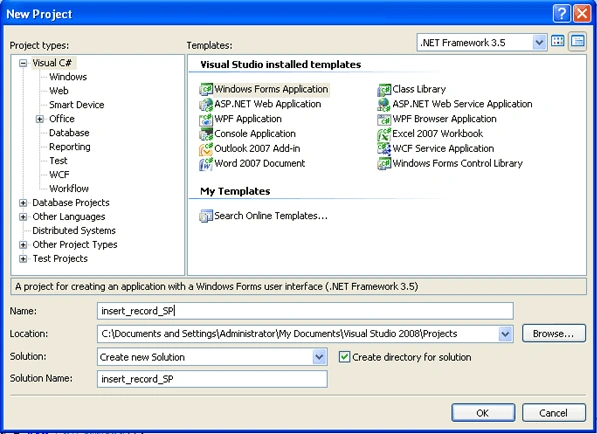
Begin your application by launching VS.NET and creating a new project using File - > Project and choose C# Windows Application template as shown in figure below:
Add a new item application configuration file as shown below from Project -> Add New Item
The code for the application configuration file:
<?xml version="1.0" encoding="utf-8" ?>
<configuration>
  <connectionStrings>
    <add name="constr" connectionString="initial catalog=puran; data source=MCN002; integrated security=sspi"/>
   </connectionStrings>
</configuration>
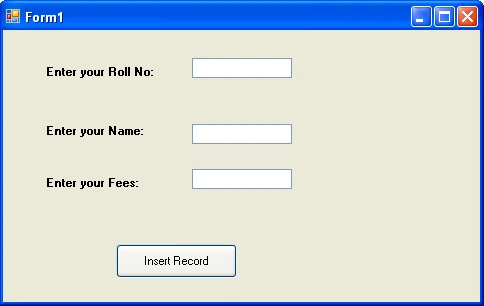
In the form design and button, textboxes and labels as follow:
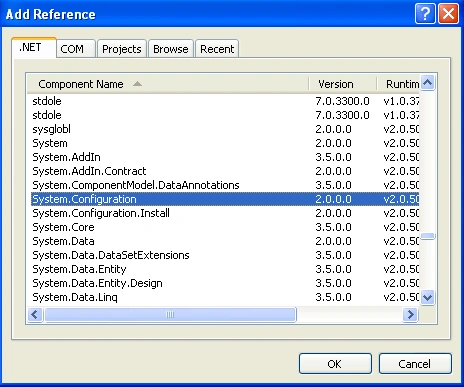
Add the necessary reference file from the solution explorer, Reference as below:
Code using stored procedure for adding records in a database through textbox using parameterized query in disconnected model.
using System;
using System.Collections.Generic;
using System.ComponentModel;
using System.Data;
using System.Drawing;
using System.Linq;
using System.Text;
using System.Windows.Forms;
using System.Data.SqlClient;
using System.Data.Common;
using System.Configuration;
namespace insert_record_SP
{
    public partial class Form1 : Form
    {
        public Form1()
        {
            InitializeComponent();
        }
        SqlConnection con;
        SqlCommand cmd;
        private void button1_Click(object sender, EventArgs e)
        {
            con = new SqlConnection(ConfigurationManager.ConnectionStrings["constr"].ConnectionString);
            cmd = new SqlCommand();
            cmd.Connection = con;
            cmd.Parameters.Add(new SqlParameter("@RollNo", SqlDbType.Int));
            cmd.Parameters["@RollNo"].Value = textBox1.Text;
            cmd.Parameters.Add(new SqlParameter("@Name", SqlDbType.VarChar));
            cmd.Parameters["@Name"].Value = textBox2.Text;
            cmd.Parameters.Add(new SqlParameter("@Fees", SqlDbType.Float));
            cmd.Parameters["@Fees"].Value = textBox3.Text;
            cmd.CommandType = CommandType.StoredProcedure;
            cmd.CommandText = "insertData";
            con.Open();
            cmd.ExecuteNonQuery();
            con.Close();
            MessageBox.Show("Record inserted");
        }
    }
}
There are three types of command in .NET
- Text
- Table Direct
- Stored Procedure
Text
CommandType.Text;
As SQL text command (Default)
TableDirect
cmd.CommandType = CommandType.TableDirect;
The name of a table. Works with OleDb only.
StoredProcedure
CommandType.StoredProcedure;
The name of a stored procedure
Note: You can read my previous article:
to get better understanding of this article as it using parameters commands, DbParameter Object and parameters data types which I have explained in my previous article.
Why I have used stored procedure as CommandType?
Every time you write a query it is parsed in database. If you have written a stored procedure for it, it will be parsed once and can be executed N number of times.
Stored procedures can also improve performance. All the conditional logic and is written into a stored procedure which is a single execution block on the database server.
Stored procedures provide:
- Modular programming i.e. stored procedures are precompiled code.
- Performance in terms of faster execution and reduced network traffic.
- Security. As commands are not directly executed. They are executed as stored procedure.
Conclusion
Hope the article would have helped you in understanding stored procedure as CommandType.
Your feedback and constructive contributions are welcome. Please feel free to contact me for feedback or comments you may have about this article.
GrishmaPosted Dec 4, 2010, 1:23 AM
I am making an application of inserting data in SOLdatabase.I am using visual Studio 2008 and SQL Server 2005.But when I am inserting data in table,the table is not modified.It is only modified in bin\debug\database. please help me.
arthur llanoeditedPosted Mar 26, 2010, 10:06 AMEdited Mar 26, 2010, 10:09 AM
How can I call a stored procedure from MS SQL in C# and insert records to it. I'm using Visual Basic 2005 C# now. Please answer this immediately, thanks! Please leave a reply on my Email at least tomorrow. I really appreciate this..thanks again!
Tim BurgaPosted Aug 13, 2009, 2:06 PM
This hasn't been true for years, at least not for SQL Server. Parameterized queries run just as fast as stored procs.