

Introduction
This article explains the GridView control and the operations performed in a GridView such as insertion in disconnected mode.
GridView
GridView is a server control in ASP.Net.The GridView control allows you to display the values of a data source in a tabular format. A GridView control has the ability to be built with sort capability. Other built-in capabilities are updated and delete, paging, and row selection. Programming access to the GridView object model allows properties and event handlers to be set dynamically.
Features
The Features of a GridView are:
- Built-in support for sorting and paging.
- Data source binding for direct interaction with a DataSource.
- A GridView allows you to display the data in a tabular form.
- Adding your own code to the functionality of the GridView control by handling events.
GridView Events
You can customize the functionality of the GridView control by handlings the events. The GridView control provides events that occur both before and after navigation or manipulating an operation such as insertion, deletion and updates.
Insertion on GridView
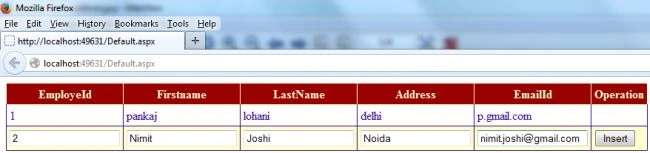
In this section I will make a web application. You just need to use the following procedure to do the insertion in the GridView server control.
Step 1
Create the table in database SQL Server and define the fields names.
- CREATE TABLE [dbo].[EmployeeDetails](
- [EmployeeId] [int] NULL,
- [FirstName] [char](50) NULL,
- [LastName] [char](50) NULL,
- [Address] [nvarchar](max) NULL,
- [EmailId] [nvarchar](max) NULL
- )
Step 2
Open Visual Studio and go to "File" --> "New" --> "Website".
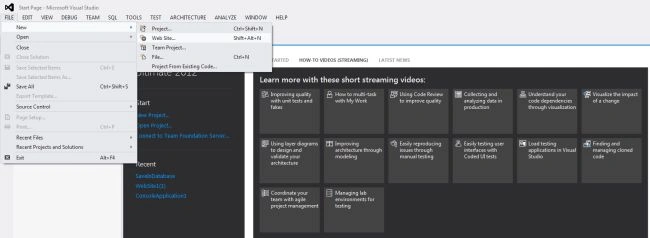
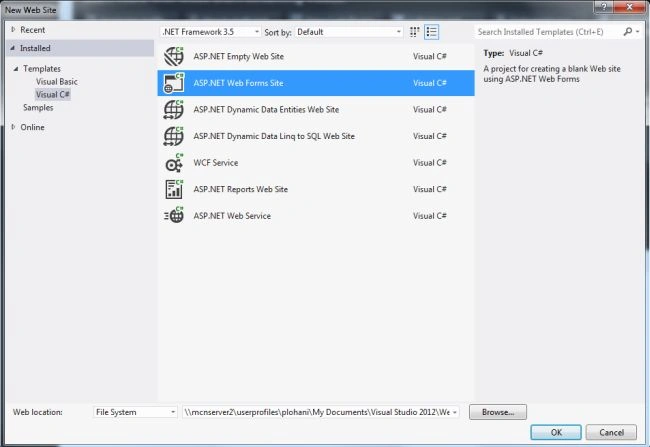
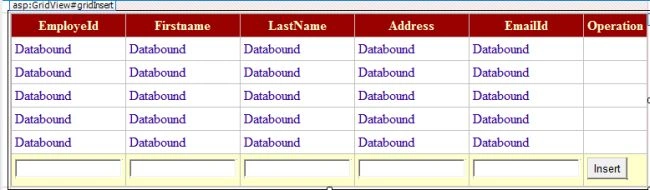
After selecting the Website you need to design a GridView in the webform named "default.aspx".
- <%@ Page Language="C#" AutoEventWireup="true" CodeFile="Default.aspx.cs" Inherits="_Default" %>
- <!DOCTYPE html PUBLIC "-//W3C//DTD XHTML 1.0 Transitional//EN" "http://www.w3.org/TR/xhtml1/DTD/xhtml1-transitional.dtd">
- <html xmlns="http://www.w3.org/1999/xhtml">
- <head runat="server">
- <title></title>
- </head>
- <body>
- <form id="form1" runat="server">
- <div>
- <asp:GridView ID="gridInsert" runat="server" AutoGenerateColumns="False" ShowFooter="True" BackColor="White" BorderColor="#CC9966" BorderStyle="None" BorderWidth="1px" CellPadding="4" EnableModelValidation="True" OnSelectedIndexChanged="gridInsert_SelectedIndexChanged">
- <Columns>
- <asp:TemplateField HeaderText="EmployeId">
- <ItemTemplate>
- <asp:Label ID="lblempid" runat="server" Text='<%#Eval("EmployeeId")%>'></asp:Label>
- </ItemTemplate>
- <FooterTemplate>
- <asp:TextBox ID="txtempid" runat="server">
- </asp:TextBox>
- </FooterTemplate>
- </asp:TemplateField>
- <asp:TemplateField HeaderText="Firstname">
- <ItemTemplate>
- <asp:Label ID="lblname" runat="server" Text='<%#Eval("FirstName")%>'></asp:Label>
- </ItemTemplate>
- <FooterTemplate>
- <asp:TextBox ID="txtname" runat="server">
- </asp:TextBox>
- </FooterTemplate>
- </asp:TemplateField>
- <asp:TemplateField HeaderText="LastName">
- <ItemTemplate>
- <asp:Label ID="lbllname" runat="server" Text='<%#Eval("LastName")%>'></asp:Label>
- </ItemTemplate>
- <FooterTemplate>
- <asp:TextBox ID="txtlname" runat="server">
- </asp:TextBox>
- </FooterTemplate>
- </asp:TemplateField>
- <asp:TemplateField HeaderText="Address">
- <ItemTemplate>
- <asp:Label ID="lbladdress" runat="server" Text='<%#Eval("Address")%>'></asp:Label>
- </ItemTemplate>
- <FooterTemplate>
- <asp:TextBox ID="txtaddress" runat="server">
- </asp:TextBox>
- </FooterTemplate>
- </asp:TemplateField>
- <asp:TemplateField HeaderText="EmailId">
- <ItemTemplate>
- <asp:Label ID="lblemailid" runat="server" Text='<%#Eval("EmailId")%>'></asp:Label>
- </ItemTemplate>
- <FooterTemplate>
- <asp:TextBox ID="txtEmailid" runat="server">
- </asp:TextBox>
- </FooterTemplate>
- </asp:TemplateField>
- <asp:TemplateField HeaderText="Operation">
- <FooterTemplate>
- <asp:Button ID="btnsave" runat="server" Text="Insert" OnClick="gridInsert_SelectedIndexChanged" />
- </FooterTemplate>
- </asp:TemplateField>
- </Columns>
- <FooterStyle BackColor="#FFFFCC" ForeColor="#330099" />
- <HeaderStyle BackColor="#990000" Font-Bold="True" ForeColor="#FFFFCC" />
- <PagerStyle BackColor="#FFFFCC" ForeColor="#330099" HorizontalAlign="Center" />
- <RowStyle BackColor="White" ForeColor="#330099" />
- <SelectedRowStyle BackColor="#FFCC66" Font-Bold="True" ForeColor="#663399" />
- </asp:GridView>
- </div>
- </form>
- </body>
- </html>
Sandeep SharmaPosted Jul 22, 2014, 1:40 AM
good article...
Mohammed Hassan MellasPosted May 26, 2014, 8:36 AM
Supprimer et modifier ,selectionner ,filtrer
raj EshPosted Sep 28, 2013, 5:44 AM
nyc:)
Amit SenwalPosted Sep 15, 2013, 4:04 AM
Very Nice description...