

In this article I will tell you how to install a new tamplate and use it in Joomla. In the previous article I described installation and use of a simple image gallery in a Joomla site.
First of all we will download a new template from this link: http://www.joomskins.com/
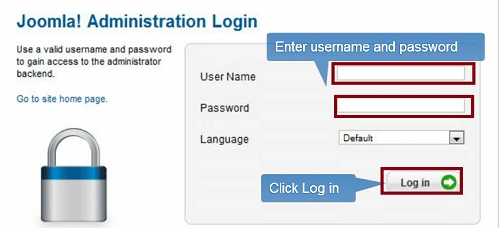
Step 1. After downloading the template we will go to the admin panel of the Joomla site, such as in the following image:
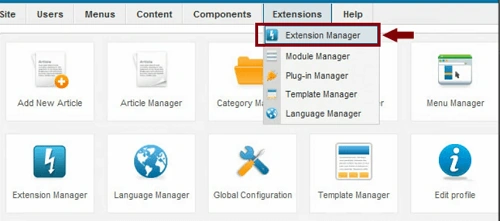
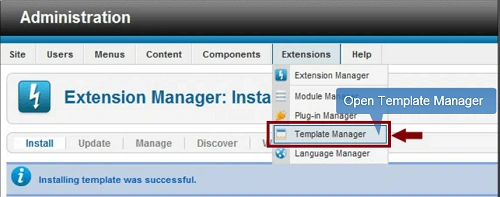
Step 2. After login to the admin panel we will go to Extension -> Extension Manager.
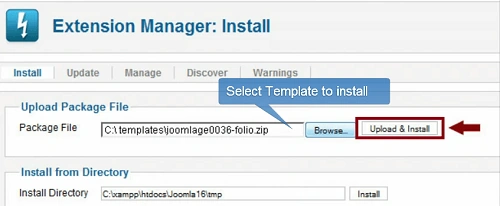
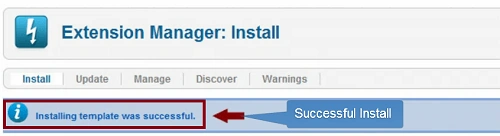
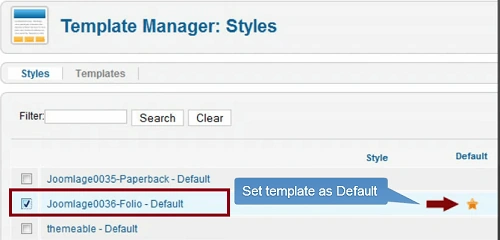
Step 3. Now we will browse to the template and then Upload & Install.
Vineet Kumar SainiPosted Jun 21, 2012, 1:12 AM
Hi Rohtash Sir!! When we install joomla then its have all inbuilt functionality but if you want to change template, image gallery, component, akeeba backup then you will be do extra work.
Rohatash KumarPosted Jun 20, 2012, 10:58 PM
Good article Vineet. you have pretty much covered it all here about Joomla Site. Please tell me when we install joomla its have all inbuild functionality. Thank you.