

Now, we will discuss many Grids which are used by many developers across the globe. In this tutorial, I am going to introduce MVC Grid, which is created to help ASP.NET MVC developers and the companies, because it comes with an open source license( not like Kendogrid, as a licensed one). Implementation of this MVCGrid is very easy.
MVC GRID
It is a grid for ASP.NET MVC and Bootstrap with AJAX paging and sorting. It also has a filtering support, export to CSV back button support and graceful degradation.You can add it to your project very easily and get it running with minimal effort, but it also has the extensibility to customize, when required.
To learn more about MVCGRID.NET, visit the official site mvcgrid.net. For support on this product, refer to this link.
Note: There are other open source grid plugins, I explained here, which are Jquery Grid, Angular Grid (for angular applications, Jquery Data Tables and Web Grid helper for ASP.NET MVC Applications).
Prerequisites for MVC GRID
- ASP.NET MVC 3 or higher versions.
- Jquery plugin.
- Twitter Bootstrap framework.
Note: You can use either Twitter Bootstrap or Your own styles for the grid.
Features of MVC GRID
- Uses your existing model objects for the data.
- Server-side sorting and paging, using AJAX.
- Updates the query string to support maintaining grid state, when navigating back.
- It gracefully degrades on the older Browsers (Ex: IE8).
- Built-in exporting to CSV.
- Filtering and column visibility support with the minimal client-side code.
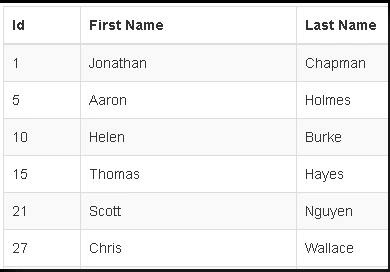
Installing MVC GRID in ASP.NET MVC application
We can install MVC Grid in ASP.NET MVC Web Application in two ways.
Using Nuget Package
- Install, using NuGet Package Manager Console --> Go To Menu --> Tools --> Nuget package manager --> Package Manager Console
- Paste the command, given below. Click enter.
PM> Install-Package MVCGrid.Net
- Go to Solution Explorer --> Right click on the project name --> Manage NuGet Packages -->search for "mvcgrid".
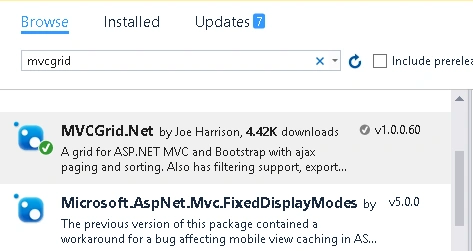
- Install MVCGrid.NET..
- Add JavaScript reference to your _Layout page after jQuery is referenced
- <!-- add this after jquery reference -->
- <script src="~/MVCGridHandler.axd/script.js"></script>
- Add your grid definitions to the RegisterGrids method in MVCGridConfig file under the App_Start folder.
- Use the grids in your view by adding the using @using MVCGrid.Web and then HTML helper @Html.MVCGrid("YourGridName")
Timothy VandeweerdPosted Jun 16, 2017, 10:40 AM
Hi, I am trying the manual installation by adding the MVCGrid.dll. Where do I download it from?
RajaPosted Aug 20, 2016, 1:00 AM
Good One...
Ramesh PalaniappanPosted Aug 9, 2016, 9:27 AM
Good Article :)
Vipan SharmaPosted Aug 8, 2016, 2:34 AM
Nice
Humayun Kabir MamunPosted Aug 8, 2016, 12:47 AM
Nice, please write some more details in next article, like advantages, problems...
Vignesh ManiPosted Aug 7, 2016, 2:07 PM
Nice