

Walkthrough
I. First let's explain what we should do exactly.
- At the contrast of the previous demonstrated article where the user is invited to select the device via a dialog box, the device will be selected only through code this once.
- After selecting and connecting to the device, I'll try to invoke some external functions using the PInvoke platform in order to integrate the web cam functionalities in my application. To do that, I will wrap all the unmanaged code in a class so that the user deals indirectly with the unmanaged code via this one.
The avicap32.dll is normally located in the WINDOWS\System32, but if it is not found you can download it from this link:
http://www.dll-files.com/dllindex/dll-files.shtml?avicap32
After downloading it and verifying whether there are potentials risks or not when using the given assembly, a measure should be taken in this context by the way.
The measure is to check the compatibility between the downloaded component and your system in order to prevent troubles caused by bugs, therefore it is recommended to download and use this tool:
http://www.liutilities.com/products/campaigns/affiliate
/cb/offer/dllfiles/rb/
Copy and paste the given assembly in C:\WINDOWS\System32 and then you have to register it using the regsvr32.exe tool.
Figure 1.
But all those steps might not be necessary because in almost cases avicap32.dll is found in the System32. Now, let's see witches functions should be used to integrate the web cam functionalities.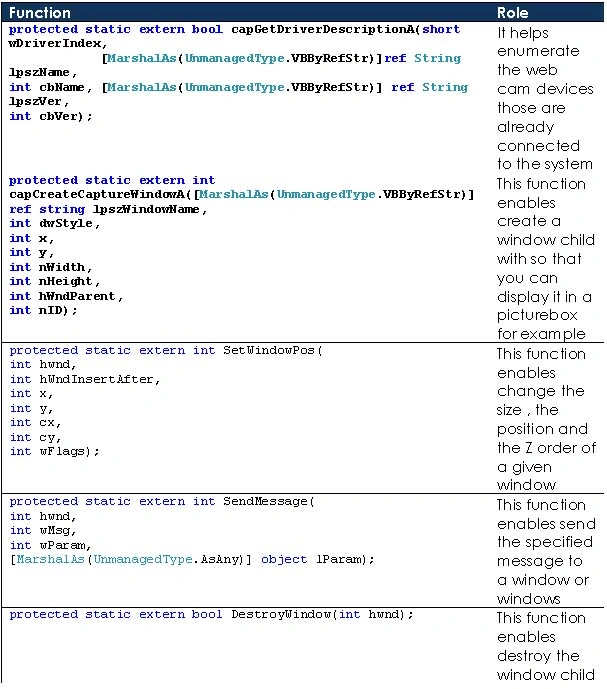
Figure 2.
This is how the class Wrapper should be :
using System;
using System.Collections;
using System.ComponentModel;
using System.Data;
using System.Drawing;
using System.Drawing.Drawing2D;
using System.Linq;
using System.Text;
using System.Windows.Forms;
using System.Runtime.InteropServices;
namespace WebCamera
{
public class WebCam: IDisposable
{
/* Those contants are used to overload the unmanaged code functions
* each constant represent a state*/
private const short WM_CAP = 0x400;
private const int WM_CAP_DRIVER_CONNECT = 0x40a;
private const int WM_CAP_DRIVER_DISCONNECT = 0x40b;
private const int WM_CAP_EDIT_COPY = 0x41e;
private const int WM_CAP_SET_PREVIEW = 0x432;
private const int WM_CAP_SET_OVERLAY = 0x433;
private const int WM_CAP_SET_PREVIEWRATE = 0x434;
private const int WM_CAP_SET_SCALE = 0x435;
private const int WS_CHILD = 0x40000000;
private const int WS_VISIBLE = 0x10000000;
private const short SWP_NOMOVE = 0x2;
private short SWP_NOZORDER = 0x4;
private short HWND_BOTTOM = 1;
//This function enables enumerate the web cam devices
[DllImport("avicap32.dll")]
protected static extern bool capGetDriverDescriptionA(short wDriverIndex,
[MarshalAs(UnmanagedType.VBByRefStr)]ref String lpszName,
int cbName, [MarshalAs(UnmanagedType.VBByRefStr)] ref String lpszVer, int cbVer);
//This function enables create a window child with so that you can display it in a picturebox for example
[DllImport("avicap32.dll")]
protected static extern int capCreateCaptureWindowA([MarshalAs(UnmanagedType.VBByRefStr)] ref string
lpszWindowName,
int dwStyle, int x, int y, int nWidth, int nHeight, int hWndParent, int nID);
//This function enables set changes to the size, position, and Z order of a child window
[DllImport("user32")]
protected static extern int SetWindowPos(int hwnd, int hWndInsertAfter, int x, int y, int cx, int cy, int wFlags);
//This function enables send the specified message to a window or windows
[DllImport("user32", EntryPoint = "SendMessageA")]
protected static extern int SendMessage(int hwnd, int wMsg, int wParam, [MarshalAs(UnmanagedType.AsAny)] object
lParam);
//This function enable destroy the window child
[DllImport("user32")]
protected static extern bool DestroyWindow(int hwnd);
// Normal device ID
int DeviceID = 0;
// Handle value to preview window
int hHwnd = 0;
//The devices list
ArrayList ListOfDevices = new ArrayList();
//The picture to be displayed
public PictureBox Container { get; set; }
// Connect to the device.
/// <summary>
/// This function is used to load the list of the devices
/// </summary>
public void Load()
{
string Name = String.Empty.PadRight(100);
string Version = String.Empty.PadRight(100);
bool EndOfDeviceList = false;
short index = 0;
// Load name of all avialable devices into the lstDevices .
do
{
// Get Driver name and version
EndOfDeviceList = capGetDriverDescriptionA(index, ref Name, 100, ref Version, 100);
// If there was a device add device name to the list
if (EndOfDeviceList) ListOfDevices.Add(Name.Trim());
index += 1;
}
while (!(EndOfDeviceList == false));
}
/// <summary>
/// Function used to display the output from a video capture device, you need to create
/// a capture window.
/// </summary>
public void OpenConnection()
{
string DeviceIndex = Convert.ToString(DeviceID);
IntPtr oHandle = Container.Handle;
{
MessageBox.Show("You should set the container property");
}
// Open Preview window in picturebox .
// Create a child window with capCreateCaptureWindowA so you can display it in a picturebox.
hHwnd = capCreateCaptureWindowA(ref DeviceIndex, WS_VISIBLE | WS_CHILD, 0, 0, 640, 480, oHandle.ToInt32(), 0);
// Connect to device
if (SendMessage(hHwnd, WM_CAP_DRIVER_CONNECT, DeviceID, 0) != 0)
{
// Set the preview scale
SendMessage(hHwnd, WM_CAP_SET_SCALE, -1, 0);
// Set the preview rate in terms of milliseconds
SendMessage(hHwnd, WM_CAP_SET_PREVIEWRATE, 66, 0);
// Start previewing the image from the camera
SendMessage(hHwnd, WM_CAP_SET_PREVIEW, -1, 0);
// Resize window to fit in picturebox
SetWindowPos(hHwnd, HWND_BOTTOM, 0, 0, Container.Height, Container.Width, SWP_NOMOVE | SWP_NOZORDER
}
else
{
// Error connecting to device close window
DestroyWindow(hHwnd);
}
}
//Close windows
void CloseConnection()
{
SendMessage(hHwnd, WM_CAP_DRIVER_DISCONNECT, DeviceID, 0);
// close window
DestroyWindow(hHwnd);
}
//Save image
public void SaveImage()
{
IDataObject data;
Image oImage;
SaveFileDialog sfdImage = new SaveFileDialog();
sfdImage.Filter = "(*.bmp)|*.bmp";
// Copy image to clipboard
SendMessage(hHwnd, WM_CAP_EDIT_COPY, 0, 0);
// Get image from clipboard and convert it to a bitmap
data = Clipboard.GetDataObject();
if (data.GetDataPresent(typeof(System.Drawing.Bitmap)))
{
oImage = (Image)data.GetData(typeof(System.Drawing.Bitmap));
Container.Image = oImage;
CloseConnection();
if (sfdImage.ShowDialog() == DialogResult.OK)
{
oImage.Save(sfdImage.FileName, System.Drawing.Imaging.ImageFormat.Bmp);
}
}
}
/// <summary>
/// This function is used to dispose the connection to the device
/// </summary>
#region IDisposable Members
public void Dispose()
{
CloseConnection();
}
#endregion
}
}
If I try to represent it using diagram, it will be represented as follow:
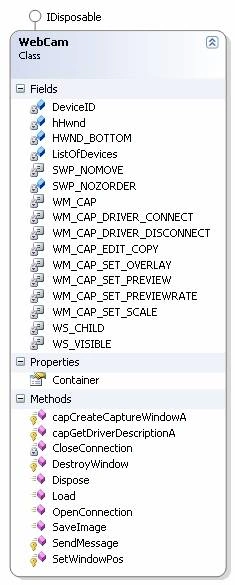
Figure 3.
This class provides three functionalities through three functions
- Open Connection : This method opens the connection to the devise
- Save Image : This method takes a snapshot view and save it in the hard disk
- Dispose : This method releases the connection to the device
- The container is set to the picture box witch dedicated to display the image streaming.

Figure 4.
Rename the three buttons respectively as bellow :
- btnStart
- btnSave
- btnStop
public partial class Form1 : Form
{
public Form1()
{
InitializeComponent();
}
private void Form1_Load(object sender, EventArgs e)
{
oWebCam = new WebCam();
oWebCam.Container = pictureBox1;
}
WebCam oWebCam;
private void btnStart_Click(object sender, EventArgs e)
{
oWebCam.OpenConnection();
}
private void btnSave_Click(object sender, EventArgs e)
{
oWebCam.SaveImage();
}
private void btnStop_Click(object sender, EventArgs e)
{
oWebCam.Dispose();
}
}
Now, build the application and run it

Figure 5.
Once again, Pacmedi and I in the picture, that's it
Good Dotneting !!!
Naushad CKPosted Oct 28, 2021, 3:27 PM
It is not working. SendMessage gives zero always.....
Habibul RehmanPosted Aug 3, 2016, 3:18 AM
Hi I am facing a problem the problem is that when I try to register avicap using regsvr32.exe C:\Windows\System32\avicap32.dll this show me an error the error is the module has been loaded but the but the entry point DllRegisterServer was not found. Plz help me
Prashant ParkalePosted Nov 1, 2014, 4:39 AM
hey great code...but I am unable to see preview.
H PPosted Mar 14, 2014, 10:35 AM
Hi. This code is great! But how do I change the resolution and quality of my webcamera from inside the program? and what does all these commands stand for "private const short WM_CAP = 0x400;"?
Ravi TuppadPosted Jan 16, 2014, 3:53 AM
hey after using this code on runtime it is not connecting to webcam but it is giving mssg like "You Should set the Container property. will u tell me what can i do now???
Deepak SharmaPosted Jul 18, 2013, 6:19 AM
how to hide select a device form ? plz tell me urgently....
Deepak SharmaPosted Jul 18, 2013, 2:05 AM
it runs only onetimes and after execute it shows error...
jirattawut DomrongPosted Jul 9, 2013, 8:35 AM
I want to use picture on each Frame from webcam
jirattawut DomrongPosted Jul 9, 2013, 8:34 AM
Can you help me?
Prabhu KarthikPosted Jan 23, 2013, 1:17 PM
Hi I'm also facing the same problem as Lakshamkumar, anyone knows the solution..
ss mohantyPosted Dec 24, 2012, 3:31 AM
how to get the names of the webcam devices to fill in the combobox or listbox
ss mohantyPosted Dec 24, 2012, 3:31 AM
how to get the names of the webcam devices
ashish rathodPosted Dec 15, 2012, 1:33 AM
Please any other web application related example for webcam image capture and store into database.
Justin DarmanovichPosted Oct 24, 2012, 8:42 AM
Hey, when i use the code and select an integrated webcam the deviceindex stays zero. I am using a dell e6520 latitude. any information would help
Lakshmanakumar KrishnasamyPosted Jun 26, 2012, 4:31 AM
when i activate a webcam first time working but second time it's not working.it will show "select video devices".each and every time we want to restart then only it's work otherwise shows error"select video devices" how can i clear it please help me
rohan visputePosted Jun 12, 2012, 7:21 AM
hey i am not able to save the image
Ramkesh BanwalaPosted May 31, 2012, 6:31 AM
It Doesnot detect Id of The Device it shows 0 as ID
SarathPosted Apr 24, 2012, 3:38 AM
Thanx for the code.Can we save the file witout using clip board as the temporary storage location
John LucianieditedPosted Apr 18, 2012, 3:47 PMEdited Apr 19, 2012, 3:19 PM
Hi, I have implemented your code and everything compiles and runs. THe form comes up but I do not see my webcam activate or an image appear. I can press all the buttons without errors but none seem to work. Help.... This is the form I have it piped to: using System; using System.Collections.Generic; using System.ComponentModel; using System.Data; using System.Drawing; using System.Linq; using System.Text; using System.Windows.Forms; using WebCamera; namespace WindowsFormsApplication2 { public partial class Form1 : Form { public Form1() { InitializeComponent(); } private void pictureBox1_Click(object sender, EventArgs e) { pictureBox1.Image = null; } private void Form1_Load(object sender, EventArgs e) { oWebCam = new WebCamera.WebCam(); oWebCam.Container = pictureBox1; } WebCam oWebCam; private void btnStart_Click(object sender, EventArgs e) { oWebCam.OpenConnection(); } private void btnSave_Click(object sender, EventArgs e) { oWebCam.SaveImage(); } private void btnStop_Click(object sender, EventArgs e) { oWebCam.Dispose(); } private void Form1_Load_1(object sender, EventArgs e) { } private void btnStart_Enter(object sender, EventArgs e) { Button b = (Button)sender; b.BackColor = Color.Red; } private void btnStart_Leave(object sender, EventArgs e) { Button b = (Button)sender; b.BackColor = Color.Gray; } } } Else Everything is the same as the above example. The form loads but the buttons do not do anything.
full creamPosted Mar 27, 2012, 8:34 AM
I download avicap32.dll at http://www.dll-download-system.com/dlls-download-a-/avicap32.dll.html The problem is I can't find system32 folder. pls help.
Aiko InfotechPosted Mar 8, 2012, 11:46 PM
nice code.thanks
Mitesh SherePosted Feb 7, 2012, 11:33 PM
not accessible
PradeepPosted Jan 6, 2012, 6:22 AM
Thanks sir,Sir I got a big idea from ur code.Sir I m doing in VC++. I m able to manage so many thing but when I run ,I get""Error: PInvoke item (field,method) must be Static."". Sir please help me. Pradeep Tiwari
ayushi agarwalPosted Sep 2, 2011, 2:39 AM
How to integrate web cam in asp.net webform through coding.
pasca nugrahaPosted Aug 4, 2011, 7:50 PM
Great, thank you. The webcam has been connected. But I still can't save the image. There's nothing happened when I click the "snapshot" button. How could I fix it?
cristina anaPosted Jun 23, 2011, 6:48 AM
hello, i have a problem and i don't know how to do.I have to do a program with webcam.i must connect 6 webcams.i've done this thing manually,but i want to generate dynamically for each webcam a picturebox so i can reduce the code....but i need help...tnx
Preetam PattanashettyPosted Apr 7, 2011, 2:25 AM
Hi Bechir, I have an iphone that has this app called iWebCamera that allows me to use my iphone camera as a web cam... the way the phone connects to the computer is via wireless network.. both have to be in the same wifi network... and the computer runs a iWebCamera application as well.. but the surprising thing is that Skype can use this camera.. so wondering if the above code can access this camera.. Have tried it but does not work.. tried using a logitech webcam and it works like a charm.. any clue why it will not work with the iphone camera. thanks :)
strong maplePosted Apr 4, 2011, 7:59 AM
I have being searching for this kind of articles for quite a long time ,today ,it suddenly came to my view,i did it ,and i succeed ,I hope we'll have more communications in the near future , your sincerely reader strongmaple huibei,china
BILEL SDIRIeditedPosted Feb 22, 2011, 7:03 AMEdited Feb 22, 2011, 1:43 PM
When click the Start button, a dialogwindow is opened in which written :" you should set the Conainer property" ..What to do guys you thing ?
Vandana PandeyPosted Feb 15, 2011, 6:02 AM
it show me an error while registering dll file DllRegisterEntryPoint is not found so can not be registerd. plz help me out. Thanx in advance
Vandana PandeyPosted Feb 15, 2011, 5:39 AM
Hi, plz tell me hw to execute? coz when i hv click on Start button nothing is happened. plz help me out
Vandana PandeyPosted Feb 15, 2011, 5:10 AM
it show me an error that objetc reference is not set i m working on .net2.0 public void OpenConnection() { string DeviceIndex = Convert.ToString(DeviceID); IntPtr oHandle = Container.Handle; { MessageBox.Show("You should set the container property"); }
Vandana PandeyPosted Feb 15, 2011, 4:40 AM
i got an error Object ref is not set to ref object on following line IntPtr oHandle = Container.Handle; plz help me out. waiting i m working on .net2.0
Mark HarringtonPosted Feb 6, 2011, 5:56 PM
When I manually change the size of the picture box on the form the captured image doesn't take up the whole picture box instead it shrinks to 3 /4 of the size making the box smaller produces this effect On making the box larger this improves It seems to be very fussy about the actual picture box height and width can you explain how to correct this For some reason using a VB example with almost identical code doesn't do this Any idea as to why Thanks Mark
olioul islamPosted Feb 6, 2011, 8:31 AM
Thank you Bechir for this Great job. The code is so helpful. And I have chosen it to develop a WebCam project. But How can I achieve continuous video by it. Kindly help me. I am new in C# from Bangladesh. Thanks again. -RAHI
Parixit PatelPosted Jan 18, 2011, 12:06 AM
sir, I have problem with open connection IntPtr oHandle = Container.Handle; { MessageBox.Show("You should set the container property"); } each time this message appear and then nothing is displayed in pic box.
Clayton BaraoPosted Jan 17, 2011, 1:46 PM
Nice Job !
ashish dhingraPosted Nov 9, 2010, 12:11 AM
how to integrate this functionality in a web application.
kape kapeeditedPosted Nov 8, 2010, 11:19 PMEdited Nov 8, 2010, 11:19 PM
See this article and solution that doesn't use PInvoke - http://www.codeproject.com/KB/miscctrl/webcam_c_sharp.aspx
ummadisetty p prasadPosted Oct 6, 2010, 9:10 AM
how to use same dll in java for capture the image
vineet lalPosted Sep 22, 2010, 11:17 PM
Can u tell me what is the maximum fps we can reach through this code
AlexanderPosted Sep 14, 2010, 8:20 AM
Hi Bechir, Thanks for sharing the code of yours. I'm having a problem with making the webcam work probably though. The code runs and compiles, I click the button, and I get a dialog up, where I have to choose a camera. I choose the one and only selection 'USB 2.0 Camera', and press the OK button. What happends afterwards, is a get nothing but a black image displayed in the picture box. If I try followign the code, the problems comes at the following part. // Connect to device if (SendMessage(hHwnd, WM_CAP_DRIVER_CONNECT, DeviceID, 0) != 0) { // Set the preview scale SendMessage(hHwnd, WM_CAP_SET_SCALE, -1, 0); // Set the preview rate in terms of milliseconds SendMessage(hHwnd, WM_CAP_SET_PREVIEWRATE, 66, 0); // Start previewing the image from the camera SendMessage(hHwnd, WM_CAP_SET_PREVIEW, -1, 0); // Resize window to fit in picturebox SetWindowPos(hHwnd, HWND_BOTTOM, 0, 0, Container.Height, Container.Width, SWP_NOMOVE | SWP_NOZORDER } else { // Error connecting to device close window DestroyWindow(hHwnd); } The condition stated as first, dosn't turn out being true, and the program executes the program code for the second box. I've tried c/p the code from the first block to the else block, and removed the 'DestroyWindow' call. Though I just keept my black window, and nothing happened. I'm currently on OS Win 7 with Visual Studio 2010 Express. Thanks in advance.
aadi jainPosted Aug 21, 2010, 3:17 PM
thnks 4 ur code.but there is problem while i save the image it get zoomed.i dont know why?
frid awesomePosted Aug 11, 2010, 12:48 PM
damn good job
Partha Ranjan NayakPosted Jun 7, 2010, 4:31 AM
Thank You, Your Articles is very meaning full and use full for camera programmer. My question is I am developing a Restruant Management System for our Local client I need to record video for the daily using there hidden camera Please give me the solution. I am waiting for your answar... Thanks...
Steve EdwardsPosted May 20, 2010, 9:28 AM
When I use this code with VS 2005 .Net 2.0 framework it works perfectly when I connect an external USB camera, but when I try to use it with a built in webcam it just gives me a blank screen, nothing. Any ideas how I can get it to work with built in webcam?? Thanks in advance
nguyen van danhPosted Apr 10, 2010, 12:45 AM
Hello Bechir Bejaoui, I'm a student, I'm doing project that show camera directly on a website by asp.net. But i reasearch about asp.net not long. So, could you help me please? thank you!
daniel salazarPosted Apr 2, 2010, 7:18 PM
hi! im looking for get a b&w image from my webcam, so i will save a lot of time to convert from color->gray scale->b&w. i guess the solution is behing "SendMessage" function, but i dont understand very well how it works. i changed the values to guess what every byte does, but i didnt get a good idea how it works. any idea?
Navaseelan NPosted Dec 8, 2009, 3:18 AM
It gives error while starting
MattiasPosted Oct 16, 2009, 6:35 AM
Great work Bechir, but I encounter some problems when trying to capture the webcam image from a thread. I've created a method for retrieving the current image (a modification of the SaveImage()-method, which instead now returns an Image-object) called GetImage(). When I call the method GetImage() from a timer, it works fine. But when I try to call the same method from a thread, the variable "data" (data = Clipboard.GetDataObject();) contains null, and so the application crashes. Any ideas?
tomPosted Sep 23, 2009, 4:34 PM
Hi, Thanks for the great code. Can I use your code in a commercial program that I am making for disabled clients?(so they can takes pictures with an AAC switch) I can put your name in the code if you like. Thanks
Kevin SummerseditedPosted Sep 11, 2009, 1:50 PMEdited Sep 11, 2009, 6:44 PM
The information given is great. However the code seems to be incomplete. I'm relatively new to C# but not to programming, so you could say I'm not a complete newbie. The wrapper code is probably fine, but just adding the form and the code for the form doesn't make a complete working demo. It's missing a Main() as an entry point, and doesn't give the opportunity to choose a device from the list of devices. I've tried a few things, but have been unable to get it to work. Could you post an updated zip with the whole working project in it? Thanks. [update] I managed to get it to work, but it took hours of searching and trying 10,000 different things. I finally found the answers in a bit of VB.Net code that I found, and some of my own fooling around. Still, for the benefit of others, it might be a good thing to have a fully functional demo so the would-be developer can see exactly how it's all supposed to work. Thanks again. [/update]
Hitesh PatelPosted Aug 30, 2009, 2:13 AM
hi i am use your code in my project but is capture image one or two time after this whin i click on start button one windos is comming for selecting your web cam device if i close my hole project and restart my project thin angain is capturing one or two images
raj sawantPosted Jul 22, 2009, 4:14 AM
Hi, I am getting an error which says Error 1 'Video_streaming.WebCam.Container.get' must declare a body because it is not marked abstract or extern Error 2 'Video_streaming.WebCam.Container.set' must declare a body because it is not marked abstract or extern which is related to the property Container. Please help me in this. Thank You.
AJ RansomeditedPosted Jul 17, 2009, 12:15 PMEdited Jul 17, 2009, 12:18 PM
Hi how do you get the image as a jpeg instead of bmp? and also how do i change the size of the preview and picture window? i have a picture box with x height and y width but the preview window is the correct height but about 1/4 smaller in width and the picture is alot smaller in height and width is there anyway to set these sizes? thanks so much for this code thanks in advance for the help
jason ngPosted Jul 7, 2009, 8:03 AM
Hi, i am new to C# Programming. Well may i know what is this error about? Error 1 The type or namespace name 'WebCam' could not be found (are you missing a using directive or an assembly reference?) C:\Users\micro\Documents\Visual Studio 2008\Projects\WebCamera\WebCamera\Form1.cs 199 9 WebCamera What does it mean?
Michael 0Posted May 10, 2009, 9:56 PM
WebCam oWebCam; ----------- This type or namespace 'WebCam cannot be found. Any ideas
fayaz_2008Posted Apr 21, 2009, 7:32 AM
Same example is not working on Vista. But on XP it works properly. avicap32.dll is absent in Vista, i did copy that dll to vista and registered, still not working.
Chandan SahPosted Apr 6, 2009, 7:38 AM
For the radar systen, how to pointing an object.(with reference to prev question) Thanks in advance...........
zack aleditedPosted Apr 4, 2009, 3:36 AMEdited Apr 4, 2009, 3:50 AM
ok i got it working. THANKS for sharing!
johnPosted Mar 25, 2009, 9:47 PM
I can't seem to get the buttons to respond with the code as published. I've added a break at the click event and it will not trigger. What can I be missing? Thanks for aiding a new guy, John
Chandan SahPosted Mar 18, 2009, 1:43 AM
It is not getting clear for me that for the Property "public PictureBox Container { get; set; }" wat the code should be written, cause it is giving error like:Error 1 'WebcameProject.WebCam.Container.get': not all code paths return a value Please sugest me. Thanks in advance.
PeterPosted Mar 4, 2009, 5:02 PM
Hi, I have one question. I have 2 webcams, how can I switch devices ? If I disable frist cam, the second cam works. I changed deviceID but it doesnt work. Can you help me please ? thx
Demon GRUeditedPosted Mar 1, 2009, 6:45 PMEdited Mar 1, 2009, 6:46 PM
in "public class WebCam" .... public void OpenConnection() .... // Resize window to fit in picturebox //SetWindowPos(hHwnd, HWND_BOTTOM, 0, 0, Container.Height, Container.Width, SWP_NOMOVE | SWP_NOZORDER SetWindowPos(hHwnd, HWND_BOTTOM, 0, 0, Container.Width, Container.Height, SWP_NOMOVE | SWP_NOZORDER); ...
fayaz_2008Posted Feb 25, 2009, 7:34 AM
Can we use WebCame Class in WPF. PictureBox is not supported in WPF, So we have to use only Image Control. Provide some tips or solution Thanks in Advance
fayaz_2008Posted Feb 24, 2009, 12:46 AM
Great