In a previous article Integrate XML data Within your ASP page using XslCompiledTransform class: Part I, I provided a technique of how to integrate XML content within a given ASP page using the new XslCompiledTransform class which plays the role of the processor which apply the XSL transformation on a given XML file. In this tutorial I will expose a second technique to achieve the same goal but using XLINQ API instead.
Always we consider the famous NorthAfrica.xml file which is represented as follow:
<?xml version='1.0'?>
<Countries>
<Country>
<Name>Lybia</Name>
<Area>1,759,541 km2</Area>
<Population>6,173,579</Population>
<Capital>Triapolis</Capital>
<Currency>Dinar</Currency>
<TLD>ly</TLD>
</Country>
<Country>
<Name>Tunisia</Name>
<Area>163,610 km2</Area>
<Population>10,327,800</Population>
<Capital>Tunis</Capital>
<Currency>Dinar</Currency>
<TLD>tn</TLD>
</Country>
<Country>
<Name>Algeria</Name>
<Area>2,381,741 km2</Area>
<Population>33,769,669</Population>
<Capital>Alger</Capital>
<Currency>Dinar</Currency>
<TLD>dz</TLD>
</Country>
<Country >
<Name>Morroco</Name>
<Area>446,550 km2</Area>
<Population>31,352,000</Population>
<Capital>Ribat</Capital>
<Currency>Dirham</Currency>
<TLD>ma</TLD>
</Country>
<Country>
<Name>Mauritania</Name>
<Area>1,030,700 km2</Area>
<Population>3,069,000</Population>
<Capital>Nouag Chot</Capital>
<Currency>Ouguiya</Currency>
<TLD>mr</TLD>
</Country>
</Countries>
Let's save it within our D:\ hard drive partition. Then we add those three namespaces
using System.Xml;
using System.Xml.Linq;
using System.IO;
Then we apply this code:
public partial class _Default : System.Web.UI.Page
{
//Define an XElement
XElement input;
protected void Page_Load(object sender, EventArgs e)
{
//Read the xml file using a StreamReader
StreamReader oReader = new StreamReader(@"D:\NorthAfrica.xml");
//Load the contents of the xml file in a string
string Content = oReader.ReadToEnd();
//Close the reader
oReader.Close();
//The method parse will map the content of the string
input = XElement.Parse(Content);
/* We try to get the parent node as it contains the child nodes
* whiches integrate data
*/
XElement xe = input.Element("Country");
//Print out the title
Response.Write("<h1>North African countries</h1>");
//Print out the data about the Area
Response.Write("<h2>Area of each counrty</h2>");
Response.Write("<table>");
foreach (XElement el in input.Elements())
{
Response.Write("<tr>");
Response.Write("<th align='left'>" +
el.Element("Name").Value + "</th>");
Response.Write("<td align='left'>" + el.Element("Area").Value + "</td>");
Response.Write("</tr>");
}
Response.Write("</table>");
//Print out the data about the Population
Response.Write("<h2>Population of each counrty</h2>");
Response.Write("<table>");
foreach (XElement el in input.Elements())
{
Response.Write("<tr>");
Response.Write("<th align='left'>" +
el.Element("Name").Value + "</th>");
Response.Write("<td align='left'>" +
el.Element("Population").Value + "</td>");
Response.Write("</tr>");
}
Response.Write("</table>");
//Print out the data about the Capital
Response.Write("<h2>Capital of each counrty</h2>");
Response.Write("<table>");
foreach (XElement el in input.Elements())
{
Response.Write("<tr>");
Response.Write("<th align='left'>" +
el.Element("Name").Value + "</th>");
Response.Write("<td align='left'>" +
el.Element("Capital").Value + "</td>");
Response.Write("</tr>");
}
Response.Write("</table>");
//Print out the data about the Currency
Response.Write("<h2>Currency of each counrty</h2>");
Response.Write("<table>");
foreach (XElement el in input.Elements())
{
Response.Write("<tr>");
Response.Write("<th align='left'>" +
el.Element("Name").Value + "</th>");
Response.Write("<td align='left'>" +
el.Element("Currency").Value + "</td>");
Response.Write("</tr>");
}
Response.Write("</table>");
//Print out the data about the TLD
Response.Write("<h2>TLD of each counrty</h2>");
Response.Write("<table>");
foreach (XElement el in input.Elements())
{
Response.Write("<tr>");
Response.Write("<th align='left'>" +
el.Element("Name").Value + "</th>");
Response.Write("<td align='left'>" +
el.Element("TLD").Value + "</td>");
Response.Write("</tr>");
}
Response.Write("</table>");
}
}
And then the result will be:
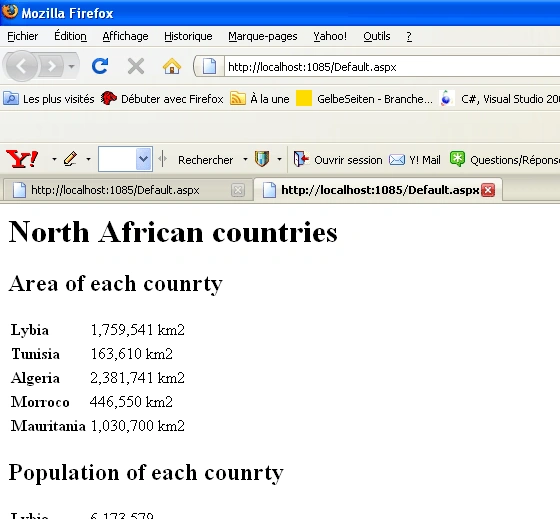
Figure 1
That's it
Good Dotneting!!!


dhaneswar jeevansinghPosted Dec 8, 2011, 1:32 AM
what's my requirement is... i have a word resume with xml schema, i need to attach that xml-schema to the different resume documents using c#.net can anybody help in this matter plz... thanks a ton in advance...!!! and pls send the code to [email protected] regards, -djs...
Bechir BejaouiPosted Feb 19, 2009, 11:23 AM
Thank you mamta Take a look on this one too http://www.dotnetspider.com/resources/26243-Parse-an-XML-file-map-with-given.aspx I deployed it as a C# code snipet
Mamta MPosted Feb 19, 2009, 10:21 AM
Great article. Keep up the good work.