

In the era of big data, optimizing storage costs while maintaining performance is crucial for organizations leveraging cloud storage solutions. This document explores the concept of intelligent tiering for Amazon S3 tables, with a particular focus on Apache Iceberg tables. By analyzing access patterns, businesses can significantly reduce data storage costs without sacrificing accessibility or performance.
Introduction to Intelligent Tiering
Intelligent tiering is a storage management feature that automatically moves data between different storage classes based on changing access patterns. Amazon S3 offers multiple storage classes, each designed for specific use cases, such as frequent access, infrequent access, and archival storage. By implementing intelligent tiering, organizations can optimize their storage costs while ensuring that data is readily available when needed.
Understanding Apache Iceberg
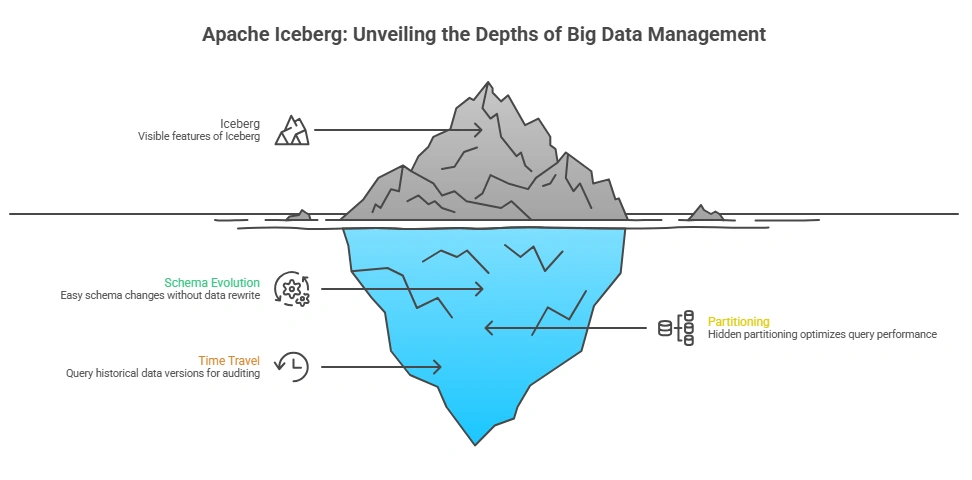
Apache Iceberg is an open table format for huge analytic datasets. It provides features like schema evolution, partitioning, and time travel, making it an ideal choice for managing large datasets in cloud storage. Iceberg tables are designed to work seamlessly with various data processing engines, such as Apache Spark and Presto, allowing for efficient querying and data manipulation.
Apache Iceberg
Cost Optimization Strategies
To effectively implement intelligent tiering for Apache Iceberg tables in Amazon S3, organizations should consider the following strategies:
1. Analyze Access Patterns
Understanding how frequently data is accessed is the first step in optimizing storage costs. Organizations can use AWS CloudTrail and S3 Storage Lens to gather insights into access patterns. By identifying which datasets are frequently accessed and which are rarely used, businesses can make informed decisions about data placement.
2. Implement Lifecycle Policies
Amazon S3 allows users to set lifecycle policies that automatically transition objects between storage classes based on predefined rules. For example, data that hasn’t been accessed in 30 days can be moved from the S3 Standard storage class to S3 Infrequent Access (IA) or even to S3 Glacier for archival purposes. This automated process ensures that data is stored cost-effectively without manual intervention.
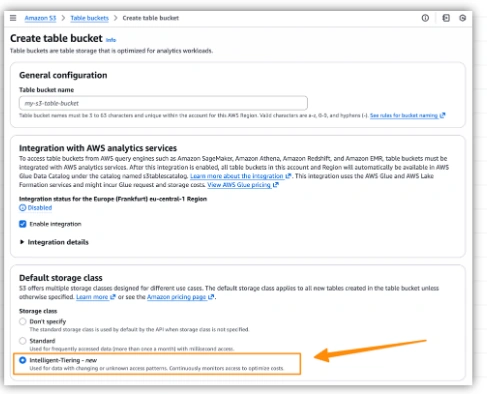
3. Use Intelligent-Tiering Storage Class
The S3 Intelligent-Tiering storage class automatically moves data between two access tiers when access patterns change. This is particularly useful for datasets with unpredictable access patterns. By utilizing this storage class, organizations can benefit from lower storage costs while ensuring that frequently accessed data remains readily available.
4. Optimize Data Formats
Choosing the right data format can also impact storage costs. Apache Iceberg supports various file formats, including Parquet and ORC, which are optimized for analytical queries. By storing data in a columnar format, organizations can reduce the amount of data read during queries, leading to cost savings on both storage and compute resources.
5. Regularly Review and Adjust
Data access patterns can change over time, so it’s essential to regularly review and adjust storage strategies. Organizations should periodically analyze their data usage and refine lifecycle policies and tiering strategies to ensure ongoing cost optimization.
Implementing Intelligent Tiering with Apache Iceberg
To implement intelligent tiering for Apache Iceberg tables in Amazon S3, follow these steps:
Step 1: Set Up Your Iceberg Table
Create an Iceberg table using your preferred data processing engine. Ensure that the table is configured to use a suitable file format, such as Parquet, for optimal performance.
Step 2: Enable S3 Lifecycle Policies
In the AWS Management Console, navigate to the S3 bucket containing your Iceberg table. Set up lifecycle policies that define when and how data should transition between storage classes based on access patterns.
Step 3: Monitor Access Patterns
Utilize AWS CloudTrail and S3 Storage Lens to monitor access patterns. Analyze the data to identify which datasets are frequently accessed and which can be transitioned to lower-cost storage classes.
Step 4: Adjust Storage Classes
Based on the insights gained from monitoring, adjust the storage classes of your Iceberg table. Move infrequently accessed data to S3 IA or S3 Glacier, while keeping frequently accessed data in S3 Standard or S3 Intelligent-Tiering.
Step 5: Review and Optimize
Regularly review your storage strategy and access patterns. Adjust lifecycle policies and storage classes as needed to ensure ongoing cost optimization.
Conclusion
Intelligent tiering for Amazon S3 tables, particularly with Apache Iceberg, offers a powerful approach to optimizing storage costs based on access patterns. By leveraging features like lifecycle policies, intelligent-tiering storage classes, and regular monitoring, organizations can effectively manage their data storage while ensuring that performance remains high. Implementing these strategies not only reduces costs but also enhances the overall efficiency of data management in the cloud.
Join the conversation! Your thoughts help the community grow.