

In many business workflows, working with structured PDF forms — especially IPO forms, application documents, and reports — demands a system that can help place dynamic text elements accurately over predefined areas. This tool was built with that goal in mind.
✅ Key Features
-
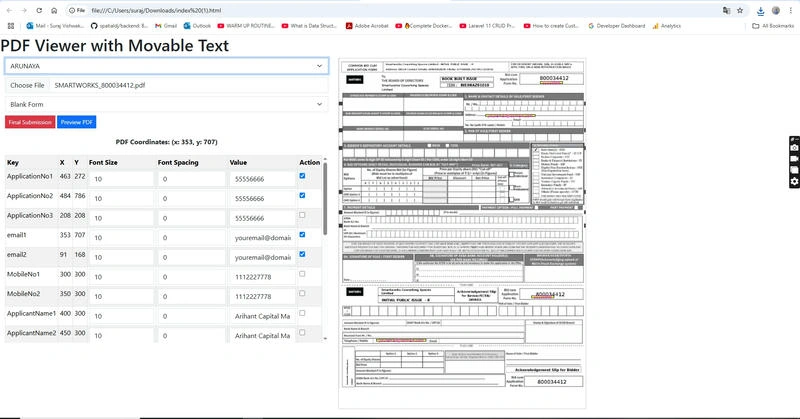
PDF Rendering: Uses
pdf.jsto load and render any standard PDF on an HTML5<canvas>. -
Text Placement: Overlay text blocks on the canvas that are movable by drag, styled with custom font size and word spacing, and mapped to real PDF coordinates.
-
Dynamic Form Controls: A Bootstrap-powered form allows the user to:
- Upload a PDF
- Choose a symbol and form type
- Select rows to activate
- Edit data values inline
- strong>Coordinate Tracking: Displays real-time X/Y coordinates during drag, synced with a table that can be exported as JSON.
- Data Export: With a single click, extract all the selected annotations into a structured JSON for backend storage or integration.
🛠️ Tech Stack Used
- Frontend: HTML, Bootstrap 5
- PDF Rendering: Mozilla PDF.js
- Interactivity & DOM Handling: jQuery
- Responsive Design: Bootstrap Grid System
- Data Structure: JavaScript Object with keys like
x,y,key,fontSize,value, andwordSpacing
💡 Use Case Examples
- IPO or Application Form Field Mapping
- Designing Printed Blank Forms
- PDF Certificate Generator Interface
- Creating Coordinate Maps for Data Entry Software
- Template-based Dynamic Document Builders
📝 How It Works
-
User uploads a PDF file.
-
Table lists all possible text placeholders.
-
Check a row to activate and display it on the canvas.
-
Drag to reposition; live coordinates and form updates follow.
-
Adjust text attributes (size, spacing, value).
-
Click "Final Submission" to export the structure as a JSON object.
📤 Future Enhancements (Ideas)
-
Add support for multiple PDF pages.
-
Save and reload configurations from local storage or server.
-
Integrate real-time preview rendering with actual PDF.
-
Include text rotation and alignment options.
-
Add a rich text editor with color/font family selections.
This tool is a solid foundation for any PDF-related form processing application. With clean design principles and real-time interactivity, it makes data mapping a breeze for end-users and developers alike.
If you'd like, I can also help you turn this into a reusable component or deploy it online.
Join the conversation! Your thoughts help the community grow.