

In working in New York and talking to programmers all over Wall Street, I've noticed a common thread of knowledge expected in most real time programming applications. That knowledge is known as multithreading. As I have migrated around the programming world, and performed interviews on potential programming candidates, it never ceases to amaze me how little is known about multithreading or why or how threading is applied. In a series of excellent articles written by Vance Morrison, MSDN has tried to address this problem: (See the August Issue of MSDN, What every Developer Must Know about Multithreaded Apps, and the October issue Understand the Impact of Low-Lock Techniques in Multithreaded Apps.
In this article I will attempt to give an introductory discussion on threading, why it is used, and how you use it in .NET. I hope to once and for all unveil the mystery behind multithreading, and in explaining it, help avert potential threading disasters in your code.
What is a thread?
Every application runs with at least one thread. So what is a thread? A thread is nothing more than a process. My guess is that the word thread comes from the Greek mythology of supernatural Muses weaving threads on a loom, where each thread represents a path in time of someone's life. If you mess with that thread, then you disturb the fabric of life or change the process of life. On the computer, a thread is a process moving through time. The process performs sets of sequential steps, each step executing a line of code. Because the steps are sequential, each step takes a given amount of time. The time it takes to complete a series of steps is the sum of the time it takes to perform each programming step.
What are multithreaded applications?
For a long time, most programming applications (except for embedded system programs) were single-threaded. That means there was only one thread in the entire application. You could never do computation A until completing computation B. A program starts at step 1 and continues sequentially (step 2, step 3, step 4) until it hits the final step (call it step 10). A multithreaded application allows you to run several threads, each thread running in its own process. So theoretically you can run step 1 in one thread and at the same time run step 2 in another thread. At the same time you could run step 3 in its own thread, and even step 4 in its own thread. Hence step 1, step 2, step 3, and step 4 would run concurrently. Theoretically, if all four steps took about the same time, you could finish your program in a quarter of the time it takes to run a single thread (assuming you had a 4 processor machine). So why isn't every program multithreaded? Because along with speed, you face complexity. Imagine if step 1 somehow depends on the information in step 2. The program might not run correctly if step 1 finishes calculating before step 2 or visa versa.
An Unusual Analogy
Another way to think of multiple threading is to consider the human body. Each one of the body's organs (heart, lungs, liver, brain) are all involved in processes. Each process is running simultaneously. Imagine if each organ ran as a step in a process: first the heart, then the brain, then the liver, then the lungs. We would probably drop dead. So the human body is like one big multithreaded application. All organs are processes running simultaneously, and all of these processes depend upon one another. All of these processes communicate through nerve signals, blood flow and chemical triggers. As with all multithreaded applications, the human body is very complex. If some processes don't get information from other processes, or certain processes slow down or speed up, we end up with a medical problem. That's why (as with all multithreaded applications) these processes need to be synchronized properly in order to function normally.
When to Thread
Multiple threading is most often used in situations where you want programs to run more efficiently. For example, let's say your Window Form program contains a method (call it method_A) inside it that takes more than a second to run and needs to run repetitively. Well, if the entire program ran in a single thread, you would notice times when button presses didn't work correctly, or your typing was a bit sluggish. If method_A was computationally intensive enough, you might even notice certain parts of your Window Form not working at all. This unacceptable program behavior is a sure sign that you need multithreading in your program. Another common scenario where you would need threading is in a messaging system. If you have numerous messages being sent into your application, you need to capture them at the same time your main processing program is running and distribute them appropriately. You can't efficiently capture a series of messages at the same time you are doing any heavy processing, because otherwise you may miss messages. Multiple threading can also be used in an assembly line fashion where several processes run simultaneously. For example once process collects data in a thread, one process filters the data, and one process matches the data against a database. Each of these scenarios are common uses for multithreading and will significantly improve performance of similar applications running in a single thread.
When not to Thread
It is possible that when a beginning programmer first learns threading, they may be fascinated with the possibility of using threading in their program. They may actually become thread-happy. Let me elaborate,
Day 1) Programmer learns the that they can spawn a thread and begins creating a single new thread in their program, Cool!
Day 2) Programmer says, "I can make this even more efficient by spawning other threads in parts of my program!"
Day 3) P: "Wow, I can even fork threads within threads and REALLY improve efficiency!!"
Day 4) P: "I seem to be getting some odd results, but that's okay, we'll just ignore them for now."
Day 5) "Hmmmm, sometimes my widgetX variable has a value, but other times it never seems to get set at all, must be my computer isn't working, I'll just run the debugger".
Day 9) "This darn (stronger language) program is jumping all over the place!! I can't figure out what is going on!"
Week 2) Sometimes the program just sits there and does absolutely nothing! H-E-L-P!!!!!
Sound familiar? Almost anyone who has attempted to design a multi-threaded program for the first time, even with good design knowledge of threading, has probably experienced at least 1 or 2 of these daily bullet points. I am not insinuating that threading is a bad thing, I'm just pointing out that in the process of creating threading efficiency in your programs, be very, very careful. Because unlike a single threaded program, you are handling many processes at the same time, and multiple processes, with multiple dependent variables, can be very tricky to follow. Think of multithreading like you would think of juggling. Juggling a single ball in your hand (although kind of boring) is fairly simple. However, if you are challenged to put two of those balls in the air, the task is a bit more difficult. 3, 4, and 5, balls are progressively more difficult. As the ball count increases, you have a better and better chance of really dropping the ball. Juggling a lot of balls at once requires knowledge, skill, and precise timing. So does multiple threading.

Figure 1 - Multithreading is like juggling processes
Problems with Threading
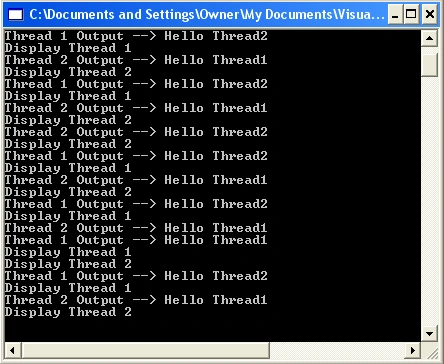
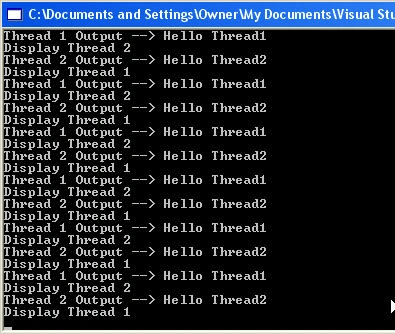
If every process in your program was mutually exclusive - that is, no process depended in any way upon another, then multiple threading would be very easy and very few problems would occur. Each process would run along in its own happy course and not bother the other processes. However, when more than one process needs to read or write the memory used by other processes, problems can occur. For example let's say there are two processes, process #1 and process #2. Both processes share variable X. If thread process #1 writes variable X with the value 5 first and thread process #2 writes variable X with value -3 next, the final value of X is -3. However if process #2 writes variable X with value -3 first and then process #1 writes variable X with value 5, the final value of X is 5. So you see, if the process that allows you to set X has no knowledge of process #1 or process #2, X can end up with different final values depending upon which thread got to X first. In a single threaded program, there is no way this could happen, because everything follows in sequence. In a single threaded program, since no processes are running in parallel, X is always set by method #1 first, (if it is called first) and then set by method #2. There are no surprises in a single threaded program, it's just step by step. With a mulithreaded program, two threads can enter a piece of code at the same time, and wreak havoc on the results. The problem with threads is that you need some way to control one thread accessing a shared piece of memory while another thread running at the same time is allowed to enter the same code and manipulate the shared data.
Thread Safety
Imagine if every time you juggled three balls, the ball in the air, by some freak of nature, was never allowed to reach your right hand until the ball already sitting in your right hand was thrown. Boy, would juggling be a lot easier! This is what thread safety is all about. In our program we force one thread to wait inside our code block while the other thread is finishing its business. This activity, known as thread blocking or synchronizing threads, allows us to control the timing of simultaneous threads running inside our program. In C# we lock on a particular part of memory (usually an instance of an object) and don't allow any thread to enter code of this object's memory until another thread is done using the object. By now you are probably thirsting for a code example, so here you go.
Let's take a look at a two-threaded scenario. In our example, we will create two threads in C#: Thread 1 and Thread 2, both running in their own while loop. The threads won't do anything useful, they will just print out a message saying which thread they are part of. We will utilize a shared memory class member called _threadOutput. _threadOutput will be assigned a message based upon the thread in which it is running. Listing #1 shows the two threads contained in DisplayThread1 and DisplayThread2 respectively.
Listing 1 - Creating two threads sharing a common variable in memory
- // shared memory variable between the two threads
- // used to indicate which thread we are in
- private string _threadOutput = "";
- /// <summary>
- /// Thread 1: Loop continuously,
- /// Thread 1: Displays that we are in thread 1
- /// </summary>
- void DisplayThread1()
- {
- while (_stopThreads == false)
- {
- Console.WriteLine("Display Thread 1");
- // Assign the shared memory to a message about thread #1
- _threadOutput = "Hello Thread1";
- Thread.Sleep(1000); // simulate a lot of processing
- // tell the user what thread we are in thread #1, and display shared memory
- Console.WriteLine("Thread 1 Output --> {0}", _threadOutput);
- }
- }
- /// <summary>
- /// Thread 2: Loop continuously,
- /// Thread 2: Displays that we are in thread 2
- /// </summary>
- void DisplayThread2()
- {
- while (_stopThreads == false)
- {
- Console.WriteLine("Display Thread 2");
- // Assign the shared memory to a message about thread #2
- _threadOutput = "Hello Thread2";
- Thread.Sleep(1000); // simulate a lot of processing
- // tell the user we are in thread #2
- Console.WriteLine("Thread 2 Output --> {0}", _threadOutput);
- }
- }
- Class1()
- {
- // construct two threads for our demonstration;
- Thread thread1 = new Thread(new ThreadStart(DisplayThread1));
- Thread thread2 = new Thread(new ThreadStart(DisplayThread2));
- // start them
- thread1.Start();
- thread2.Start();
- }
Jesús HagiwaraPosted Aug 11, 2019, 11:39 AM
This article is really useful, it's easy and didactic for a newbie to this topic to understand it, and the analogy was really nice.
Jorge UribePosted May 25, 2018, 11:27 AM
Great and excellent example
Sunil KumarPosted Dec 7, 2017, 2:01 AM
Great Article. Thanks
shobhit bhallaPosted Sep 7, 2017, 6:14 AM
Its awesome example..
Guest UserPosted Jan 13, 2017, 12:28 PM
Easy to learn for everyone. Thanks for the post!
Ranjith KumarPosted Oct 19, 2016, 1:35 AM
Steps are clear and easy to learn
kalu singh raoPosted Jul 9, 2016, 10:31 AM
Nice...
Former memberPosted Nov 17, 2015, 4:09 AM
Its very power full article, thanks for sharing
Cesar BravoPosted Jul 27, 2015, 7:10 PM
Thank you, nice article
SharadPosted Jul 17, 2015, 3:41 AM
good one...
Debendra DashPosted Jun 23, 2015, 6:29 AM
Great info...
Amol SarkatePosted Apr 2, 2015, 2:47 PM
MOST VALUABLE INFORMATION
Chiheb ChebbiPosted Feb 8, 2015, 8:51 AM
This article is simply amazing
Vithal WadjePosted Nov 23, 2014, 11:37 AM
I am searching same thanks
Navratna PawalePosted Nov 23, 2014, 10:12 AM
i alwys wntd to know multithreading.... And this article helps a lot.... thanks...
Kisan PatelPosted Oct 10, 2014, 3:19 AM
Here, you can read great Beginner and Advance C# Programming tutorials... C# Programming Tutorials
ashish guptaPosted Jun 6, 2013, 7:45 AM
Thanks its really helpful for me
robin staesPosted Apr 15, 2013, 3:08 PM
Hi, could I use multithreading for an multi device I²C bus? Because I would like to run 2 programs simultaneously each program would control 1 device (so I have 2 devices). But using the same GUI ,so the user has one form where he can control device 1 and device 2 simultaneously and see there output in one textblok .
Santosh YadavPosted Apr 5, 2013, 12:55 AM
Nice article indeed.
kumar gauravPosted Mar 4, 2013, 6:43 AM
What if there are three DisplayThread??
William MartinezPosted Jan 2, 2013, 12:27 PM
thread (n.) O.E. þræd "fine cord, especially when twisted" (related to þrawan "to twist"), from P.Gmc. *thrædus (cf. M.Du. draet, Du. draad, O.H.G. drat, Ger. Draht, O.N. þraðr),
Sumon ChakrobortyPosted Sep 26, 2012, 12:39 AM
Great article.
Ehsan KeshtgarPosted Jun 28, 2012, 5:57 AM
Nice article.Clear and easy to undrestand.Thank you
Kunal VaishyaPosted Jun 28, 2012, 2:46 AM
Good one i like it
Neela MugayaPosted Jan 12, 2012, 10:49 PM
Great job! I have been looking for this kind of explanation 4-5 years back. Thanks a lot.
Amit PathakPosted Mar 11, 2011, 9:20 AM
I want to read the MSMQ where queue data in byte and numbers of queues generated in 1 mins about 1500. If read continuously queue, cpu goes on 30%, and after some time it stopped. I need to read queue in high volume upto 4 hrs. I want safe thread reading in such a manner that shouldn't be blocked. Actually I am not good about threading so can you please help me out? Currently I am reading in this manner: bool ProcessStatus; //process Thread _UDPthreadConsme; private void btn_receive_Click(object sender, EventArgs e) { if (MessageQueue.Exists(@".\private$\myquelocal")) { ThreadStart _processrcs = new ThreadStart(receivemessages); _UDPthreadConsme = new Thread(_processrcs); ProcessStatus = true; _UDPthreadConsme.Start(); } } private void receivemessages() { MessageBox.Show("Start"); while (ProcessStatus) { try { // Connect to the a queue on the local computer. MessageQueue myQueue = new MessageQueue(@".\private$\myquelocal"); System.Messaging.Message[] myMessagecount = myQueue.GetAllMessages(); if (myMessagecount.Length <= 0) return; myQueue.Formatter = new BinaryMessageFormatter(); // Receive and format the message. System.Messaging.Message myMessage = myQueue.Receive(); byte[] buffer = (byte[])myMessage.Body; // here i convert buffer to its related structure and then insert the values in database sqlserver. } }
Abdul rehmanPosted Dec 22, 2010, 4:07 AM
there are some problems with it as the out put are different but when the threads are locked its working fine and _stopthreads variable is not declared more over there is no Main() mehtod in it as there will a problem for newbies...hmmm. rest is fine. Thank u...!
Christopher LeetomPosted Jul 28, 2010, 3:09 PM
Mike, Great article. The following links do not work: Understanding Threading in the .NET Framework by Chandrakant Parmar or the four part series by Manisha Mehta: Multithreading Part 1: Multithreading and Multitasking, Multithreading Part 2: Understanding the System.Threading.Thread Class, Multithreading Part 3: Thread Synchronization, and Multithreading Part 4: The ThreadPool, Timer Classes and Asynchronous Programming Discussed. Thanks
babak bagherzadehPosted Jun 15, 2010, 10:54 AM
It was great , You are not only a good developer but also a good teacher ;-)
Fabian FernandezPosted May 31, 2010, 9:51 AM
Thanks from Uruguay Mike! You helped me understand threading much better. I'm implementing it in a web site's global search and I wanted to do the searches of each entity in a separate thread so the searches were simultaneous to gain response time. Thankgs again!
BrianeditedPosted Feb 4, 2010, 11:07 AMEdited Feb 4, 2010, 11:14 AM
Good article on multi-threading but a few points could be added to it that would make it clearer to the new to the subject Mike... Threads are not processes but instead share the same process tree making the OS switching between them much quicker than between full processes e.g. they share the same memory and resources etc, they therefore inherit a lot of the basic process information. Most professional application developers don't use multi-threading not just because of complexity but because threads are either not workable or they hinder the application e.g. makes things slower or use vast amount of memory/resources. Before any multi-threading is done it is very important that an investigation into the benefits and pitfalls is covered but few who are new to the subject do this. Pitfalls are many and just a few are listed below... · System flogging – heavily using the available resources of the whole system, memory hogging – amount and bus bandwidth, disk thrashing. Especially an issue if the app is being targeted at a shared server and not a home PC. · Shared memory bus means memory thrashing can happen where a single thread would not cause issues. · Shared caches in multi-core chips can be greatly flogged meaning once again that the single thread version runs quicker than the multi-thread one. E.g. a shared 8MB level 3 cache (i7) could make a single thread run very quick while the multi-cored version splits this cache between all the threads and may lead to an overall slowing down. · Disk thrashing in disk I/O based threads can be very high as the single thread version may do loads of sequential block reads but the multi-thread version can end up moving the physical read head about a large amount so for this reason it is important that the number of disks in the RAID array is taken into consideration. · Memory hogging – many threads can add a lot of memory to the application footprint meaning that other processes have little or no memory to work with. Threads overheads can also be very high with thread switching and locks meaning once again that the single thread main process runs faster than the multi-threaded version. The number of threads should be adaptable so that the process checks before running how many threads are useful, e.g. checking number of cores and running less than that number of threads. I have used multi-threading in the past but limited it to cases where it worked well e.g. graphics where the code was doing lots of floating point maths all within the CPU core cache footprint or for messaging servers where it is a necessary thing to do. Even professional apps like SQL Server and Photoshop use it far less than expected and SQL has a limiting hint (MAXDOP) so you can stop thrashing if the query plan generated uses too much multi-threading and slows down the query. Brian
mahesh maheshPosted Jan 10, 2010, 3:30 AM
Very nice article. I had been to interview. but cought out because i was not good with multi threading concept. This article is really good to know everything about threading....
sjaak banaaneditedPosted Mar 23, 2009, 6:24 AMEdited Mar 23, 2009, 6:27 AM
Instead of using plain threading to develop concurrent software, please also consider task parallelism. Please read the following articles: http://blog.rednael.com/2009/02/05/ParallelProgrammingUsingTheParallelFramework.aspx http://blog.rednael.com/2009/03/16/ParallelFrameworkDownloadAndSupport.aspx These are articles about basic parallel programming and also contain references to other articles about the background of parallelism. Included are examples in C# .Net. Also, it describes a lightweight parallel framework to work with tasks. Opposed to some other frameworks, this one is very light and very easy to use. After reading these articles, you should be able to write code using parallelism. Regards, Martijn
thaiaspPosted Mar 9, 2009, 6:55 PM
Your explanation is so clearly, simple and easy to understand. I've got the idea now. Thanks :)
Nataraj GandhiPosted Dec 11, 2008, 7:54 AM
Excellent!!!!!