

Introduction To Web Service
Web Services are used for enabling an application to invoke a method of another application. These applications can either be on the same computer or on different computers. Web Services use protocols like HTTP, XML, and SOAP. Since these are open and well known protocols, applications built on any platform can interoperate with web services. For example, a PHP application can interoperate with a web service built using .NET. Similarly, a web service built using different platform can be consumed by a .NET application.
Hyper Text Transfer Protocol (HTTP) is the protocol widely used by web services to send and receive messages. The messaging protocol is SOAP. SOAP stands for Simple Object Access Protocol. SOAP messages are in XML format. Web Services have .asmx extension. For this reason web services are also often called as ASMX web services.
To know more details about SOAP request and response, visit the below reference site.
https://www.w3.org/2003/06/soap11-soap12.html
A web service is a web-based functionality accessed using the protocols of the web to be used by the web applications. There are three aspects of web service development.
- Creating the Web Service
- Creating a proxy
- Consuming the web service
Proxy In ASP.NET Web Service
A proxy is a major part for the web service codes. Before using the web service, a proxy must be created. The proxy is registered with the client application. Then the client application makes the calls to the web service as it were using a local method. The proxy takes the calls, wraps it in proper format and sends it as a SOAP request to the server. SOAP stands for Simple Object Access Protocol. This protocol is used for exchanging web service data.
When the Server returns the SOAP package to the client, the proxy decodes everything and presents it to the client application.
Relationship Between Visual Studio And Proxy
Visual Studio generates a proxy class using the Web Service Description Language document of the web service. The Web Service Description Language document formally defines a web service. It includes,
- All the methods that are exposed by the web service
- The parameters and their types
- The return types of the methods
Top 11 Notes While Writing Code For Web Services
- To use ASP.NET session object in a web service, the web service class must inherit from System.Web.Services.WebService class and EnableSession property of WebMethod attribute must be set to true. Hyper Text Transfer Protocol (HTTP) is the protocol widely used by web services to send and receive messages .The messaging protocol is SOAP. SOAP stands for Simple Object Access Protocol. SOAP messages are in XML format.
- Notice that a web service is a class that is decorated with [WebService] attribute and inherits from System.Web.Services.WebService base class. The [WebService] attribute tells that this class contains the code for a web service. Web Service Namespace is used to uniquely identify your web service on the internet from other services that are already there on the Web. Web Service Namespace can be any string, but it is common to give it a company's internet domain name as they are usually unique.
- To allow a web service to be called from JavaScript using ASP.NET AJAX, decorate the web service class with [System.Web.Script.Services.ScriptService] attribute.
- Web Method attribute used to specify description for the web service method.
- BufferResponse is a boolean property. Default is true. When this property is true, the response of the XML Web service method is not returned to the client until either the response is completely serialized or the buffer is full. On the other hand, when this property is false, the response of the XML Web service method is returned to the client as it is being serialized.
In general, set BufferResponse to false, only when the XML Web service method returns large amounts of data. - CacheDuration is the property, if you want to cache the results of a web service method. This is an integer property, and specifies the number of seconds that the response should be cached. The response is cached for each unique parameter.
- Web Methods in a web service can also be overloaded based on the number of parameters. Method overloading possible in web services by using MessageName property of WebMethod attribute. MessageName property is used to uniquely identify the individual XML Web service methods.
- Call the web service using ASP.NET AJAX, which allows partial page post back. With partial page post back, only specific portion of the page is updated without reloading the entire page.
- For smaller amounts of data, web service performance is better when BufferResponse is set to true.
- In Web.Config file When allowCookies attribute is set to true, the client application accepts the cookie returned from the ASMX web service, and copies it into all future requests that are made to the web service. This ensures that the same session is maintained between the client and the web service.
- To use ASP.NET session object in a web service, the web service class must inherit from System.Web.Services.WebService class, and the EnableSession property of WebMethod attribute must be set to true.
Introduction To AngularJS
AngularJS is an MVC based framework. Google developed AngularJS. AngularJS is an open source project, which can be used freely, modified and shared by others.
Top features Of AngularJS:
- Two Way Data-Binding
This means that any changes to the model updates the view and any changes to the view updates the model. - Dependency Injection
AngularJS has a built-in Dependency Injection, which makes application easier to develop, maintain and debug in addition to the test. - Testing
Angular will test any of its code through both unit testing and end-to-end testing. - Model View Controller
Split your application into MVC components. Maintaining these components and connecting them together means setting up Angular.
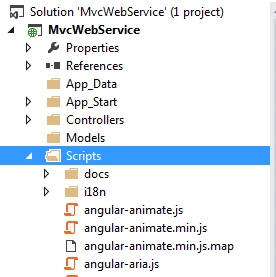
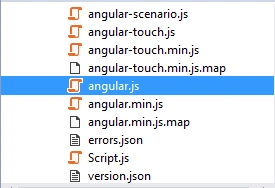
To build AngularJS Applications, you should download the script file and it is angular.js. To get the script file, visit https://angularjs.org.
To know more about AngularJS, visit my articles and blogs.
Steps to create a simple application
Step 1
Create one table named “tblEmployees”.
Script
- Create table tblEmployees
- (
- Id int primary key identity,
- Name nvarchar(50),
- Gender nvarchar(10),
- Salary int
- )
- Go
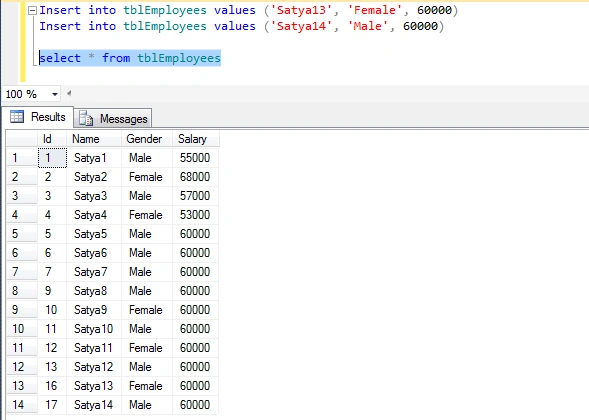
Enter some dummy records into this table.
Script
- Insert into tblEmployees values ('Satya1', 'Male', 55000)
- Insert into tblEmployees values ('Satya2', 'Female', 68000)
- Insert into tblEmployees values ('Satya3', 'Male', 57000)
- Insert into tblEmployees values ('Satya4', 'Female', 53000)
- Insert into tblEmployees values ('Satya5', 'Male', 60000)
- Insert into tblEmployees values ('Satya6', 'Male', 60000)
- Insert into tblEmployees values ('Satya7', 'Male', 60000)
- Go
Step2
Create one Stored Procedure named “AngularDB”.
Script
- Create Procedure AngularDB
- As
- Begin
- select * from tblEmployees
- End
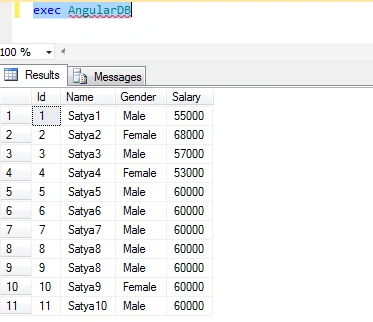
Then, execute this Stored Procedure to check the records.
exec AngularDB
Step3
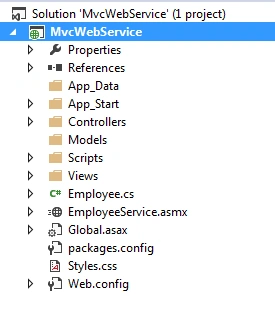
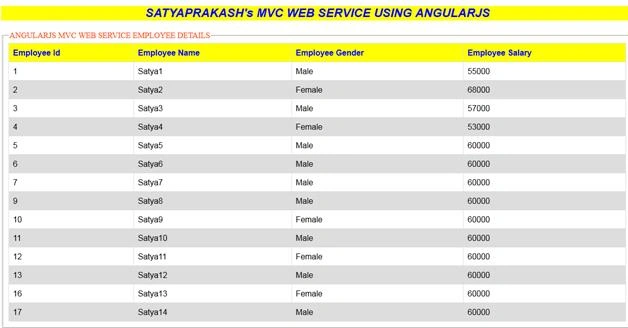
Then, create ASP.NET MVC 4 application using Empty Template named “MvcWebService”.
Step4
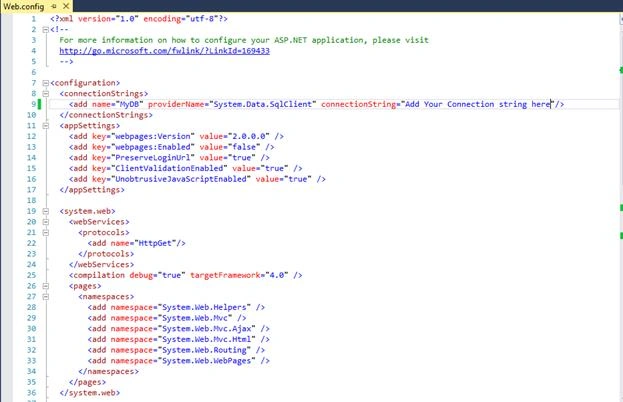
Add connection string in Web.Config file.
Code Ref
- <?xml version="1.0" encoding="utf-8"?>
- <!--
- For more information on how to configure your ASP.NET application, please visit
- http://go.microsoft.com/fwlink/?LinkId=169433
- -->
- <configuration>
- <connectionStrings>
- <add name="MyDB" providerName="System.Data.SqlClient" connectionString="Add Your Connection string here"/>
- </connectionStrings>
- <appSettings>
- <add key="webpages:Version" value="2.0.0.0" />
- <add key="webpages:Enabled" value="false" />
- <add key="PreserveLoginUrl" value="true" />
- <add key="ClientValidationEnabled" value="true" />
- <add key="UnobtrusiveJavaScriptEnabled" value="true" />
- </appSettings>
- <system.web>
- <webServices>
- <protocols>
- <add name="HttpGet"/>
- </protocols>
- </webServices>
- <compilation debug="true" targetFramework="4.0" />
- <pages>
- <namespaces>
- <add namespace="System.Web.Helpers" />
- <add namespace="System.Web.Mvc" />
- <add namespace="System.Web.Mvc.Ajax" />
- <add namespace="System.Web.Mvc.Html" />
- <add namespace="System.Web.Routing" />
- <add namespace="System.Web.WebPages" />
- </namespaces>
- </pages>
- </system.web>
- <system.webServer>
- <validation validateIntegratedModeConfiguration="false" />
- <modules runAllManagedModulesForAllRequests="false" />
- <!--<handlers> //comment these other wise web service will not work....
- <remove name="ExtensionlessUrlHandler-ISAPI-4.0_32bit" />
- <remove name="ExtensionlessUrlHandler-ISAPI-4.0_64bit" />
- <remove name="ExtensionlessUrlHandler-Integrated-4.0" />
- <add name="ExtensionlessUrlHandler-ISAPI-4.0_32bit" path="*." verb="GET,HEAD,POST,DEBUG,PUT,DELETE,PATCH,OPTIONS" modules="IsapiModule" scriptProcessor="%windir%\Microsoft.NET\Framework\v4.0.30319\aspnet_isapi.dll" preCondition="classicMode,runtimeVersionv4.0,bitness32" responseBufferLimit="0" />
- <add name="ExtensionlessUrlHandler-ISAPI-4.0_64bit" path="*." verb="GET,HEAD,POST,DEBUG,PUT,DELETE,PATCH,OPTIONS" modules="IsapiModule" scriptProcessor="%windir%\Microsoft.NET\Framework64\v4.0.30319\aspnet_isapi.dll" preCondition="classicMode,runtimeVersionv4.0,bitness64" responseBufferLimit="0" />
- <add name="ExtensionlessUrlHandler-Integrated-4.0" path="*." verb="GET,HEAD,POST,DEBUG,PUT,DELETE,PATCH,OPTIONS" type="System.Web.Handlers.TransferRequestHandler" preCondition="integratedMode,runtimeVersionv4.0" />
- </handlers>--></system.webServer>
- </configuration>
Code Description
Here, I have mentioned the name of the connection string “MyDB”.
- <connectionStrings>
- <add name="MyDB" providerName="System.Data.SqlClient" connectionString="Add Your Connection string here"/>
- </connectionStrings>
Created ASMX web service that can perform a HTTP GET request.
- <webServices>
- <protocols>
- <add name="HttpGet"/>
- </protocols>
- </webServices>
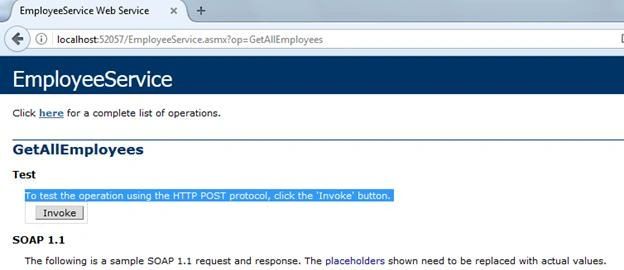
Enable a ASP.NET Web Service for HTTP POST and GET requests.
- <system.web>
- <webServices>
- <protocols>
- <add name="HttpGet"/>
- <add name="HttpPost"/>
- </protocols>
- </webServices>
- </system.web>
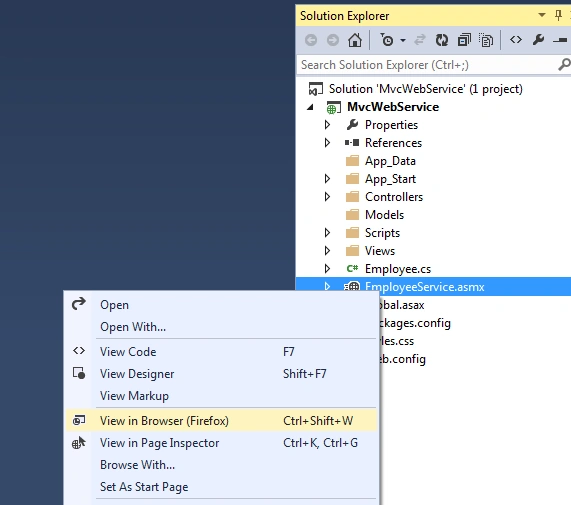
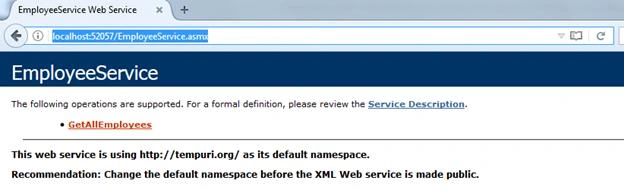
In handlers section, comment the code otherwise web service in .asmx file will not show the data. It will show the error page when right clicked on .asmx file and select View in browser (Firefox) as mentioned below.
- <handlers>
- <remove name="ExtensionlessUrlHandler-ISAPI-4.0_32bit" />
- <remove name="ExtensionlessUrlHandler-ISAPI-4.0_64bit" />
- <remove name="ExtensionlessUrlHandler-Integrated-4.0" />
- <add name="ExtensionlessUrlHandler-ISAPI-4.0_32bit" path="*." verb="GET,HEAD,POST,DEBUG,PUT,DELETE,PATCH,OPTIONS" modules="IsapiModule" scriptProcessor="%windir%\Microsoft.NET\Framework\v4.0.30319\aspnet_isapi.dll" preCondition="classicMode,runtimeVersionv4.0,bitness32" responseBufferLimit="0" />
- <add name="ExtensionlessUrlHandler-ISAPI-4.0_64bit" path="*." verb="GET,HEAD,POST,DEBUG,PUT,DELETE,PATCH,OPTIONS" modules="IsapiModule" scriptProcessor="%windir%\Microsoft.NET\Framework64\v4.0.30319\aspnet_isapi.dll" preCondition="classicMode,runtimeVersionv4.0,bitness64" responseBufferLimit="0" />
- <add name="ExtensionlessUrlHandler-Integrated-4.0" path="*." verb="GET,HEAD,POST,DEBUG,PUT,DELETE,PATCH,OPTIONS" type="System.Web.Handlers.TransferRequestHandler" preCondition="integratedMode,runtimeVersionv4.0" />
- </handlers>
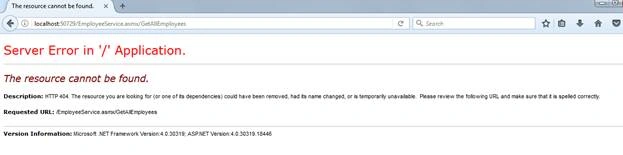
For better results, comment the code in handlers section. It will work fine.
Step5
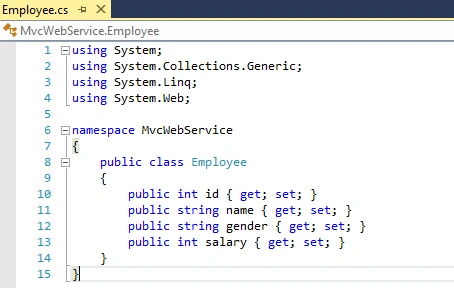
Then, create a class file named “Employee.cs”.
Code Ref
- using System;
- using System.Collections.Generic;
- using System.Linq;
- using System.Web;
- namespace MvcWebService
- {
- public class Employee
- {
- public int id { get; set; }
- public string name { get; set; }
- public string gender { get; set; }
- public int salary { get; set; }
- }
- }
Code Description
I have declared 4 entities using get and set properties inside Employee class.These 4 entities should be same as columns inside the earlier mentioned table “tblEmployees”.
- public int id { get; set; }
- public string name { get; set; }
- public string gender { get; set; }
- public int salary { get; set; }
Step6
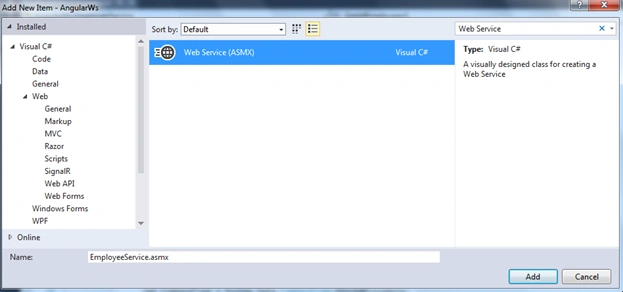
Add a new Web Service i.e. ASMX file. Name it as EmployeeService.asmx.
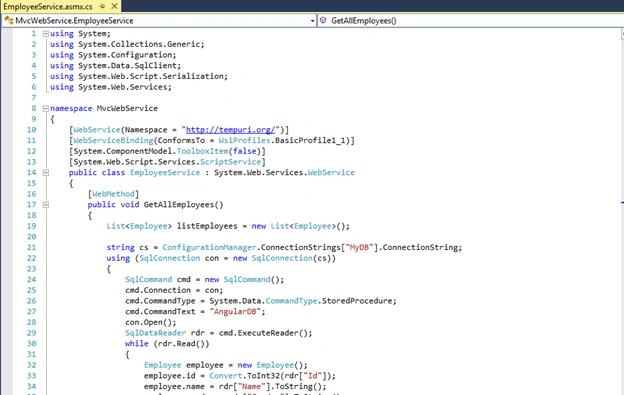
Code Ref
- using System;
- using System.Collections.Generic;
- using System.Configuration;
- using System.Data.SqlClient;
- using System.Web.Script.Serialization;
- using System.Web.Services;
- namespace MvcWebService
- {
- [WebService(Namespace = "http://tempuri.org/")]
- [WebServiceBinding(ConformsTo = WsiProfiles.BasicProfile1_1)]
- [System.ComponentModel.ToolboxItem(false)]
- [System.Web.Script.Services.ScriptService]
- public class EmployeeService : System.Web.Services.WebService
- {
- [WebMethod]
- public void GetAllEmployees()
- {
- List<Employee> listEmployees = new List<Employee>();
- string cs = ConfigurationManager.ConnectionStrings["MyDB"].ConnectionString;
- using (SqlConnection con = new SqlConnection(cs))
- {
- SqlCommand cmd = new SqlCommand();
- cmd.Connection = con;
- cmd.CommandType = System.Data.CommandType.StoredProcedure;
- cmd.CommandText = "AngularDB";
- con.Open();
- SqlDataReader rdr = cmd.ExecuteReader();
- while (rdr.Read())
- {
- Employee employee = new Employee();
- employee.id = Convert.ToInt32(rdr["Id"]);
- employee.name = rdr["Name"].ToString();
- employee.gender = rdr["Gender"].ToString();
- employee.salary = Convert.ToInt32(rdr["Salary"]);
- listEmployees.Add(employee);
- }
- }
- JavaScriptSerializer js = new JavaScriptSerializer();
- Context.Response.Write(js.Serialize(listEmployees));
- }
- }
- }



om prakash samantarayPosted May 10, 2017, 2:11 PM
Good one, try with web api
Vignesh ManiPosted May 4, 2017, 11:57 AM
Nice one. Thanks for sharing.
Thiruppathi RPosted May 3, 2017, 3:46 PM
Very Nice Sharing...