
Introduction
This simple Application helps to Create, Read, Update and Delete (CRUD) Application, operating on the ‘contacts’ table in the ‘test’ database in MySQL Database Server. It is a hibernate-annotation based Application. There is an option to delete more than one record in a Webpage at once.
Softwares used are-
- JDK8u25
- Netbeans 8.02
- MySQL 5.*(or XAMPP)
- MySQL Connector 5.*
- Hibernate 4.3.** (Bundled with Netbeans)
- Display Tag Library(For pagination, sorting and export)
Steps are-
- Install JDK8 or Jdk7, if not installed.
- Install Netbeans and associated ApacheTomcat Server.
- Install MySQL Database server or XAMPP(for easy MySQL management).create ‘test’ database.
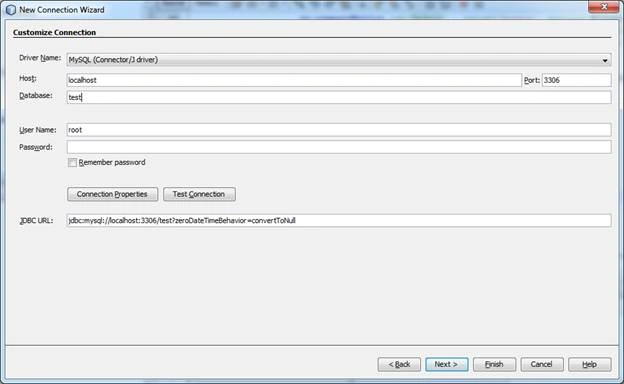
After installing Netbeans, click the Services tab on the left. Expand the Database node. Expand the Drivers node. Right-click MySQL(Connector/Jdriver) and then connect. Put the test as the database, as shown below. Put the password, if you have given the password at the time of installation of MySQL database Server. For XAMPP, no password was given, followed by the test connection. If successful, click Finish button.
 Create ‘contacts’ table, using the script, given below, in MySQL ‘test’ Database-
- CREATE TABLE IF NOT EXISTS `contacts` (
- `id` int(11) NOT NULL,
- `firstname` varchar(30) DEFAULT NULL,
- `lastname` varchar(30) DEFAULT NULL,
- `birthdate` date DEFAULT NULL,
- `cell_no` varchar(15) DEFAULT NULL,
- `country` varchar(20) DEFAULT NULL,
- `created` datetime NOT NULL,
- `email_id` varchar(30) DEFAULT NULL,
- `sex` varchar(10) DEFAULT NULL,
- `website` varchar(30) DEFAULT NULL
- ) ENGINE=InnoDB AUTO_INCREMENT=1 DEFAULT CHARSET=latin1;
- ALTER TABLE `contacts` ADD PRIMARY KEY (`id`);
- ALTER TABLE `contacts` ADD UNIQUE(`email_id`);
- ALTER TABLE `contacts` MODIFY `id` int(11) NOT NULL AUTO_INCREMENT,AUTO_INCREMENT=1;
- INSERT INTO `contacts` (`id`, `birthdate`, `cell_no`, `country`, `created`, `email_id`, `firstname`, `lastname`, `sex`, `website`) VALUES
- (1, '1980-05-06', '9834145667', 'USA', '2016-05-26 19:07:17', '[email protected]', 'Richard', 'Johnson', 'Male', 'www.richardinfo.com'),
- (2, '1982-05-05', '9839753298', 'USA', '2016-05-26 19:08:26', '[email protected]', 'Martha', 'Stewart', 'Female', 'www.martha.com'),
- (3, '1985-05-16', '9839753298', 'USA', '2016-05-26 19:09:29', '[email protected]', 'Clive', 'Sweetman', 'Male', 'www.clive.com');
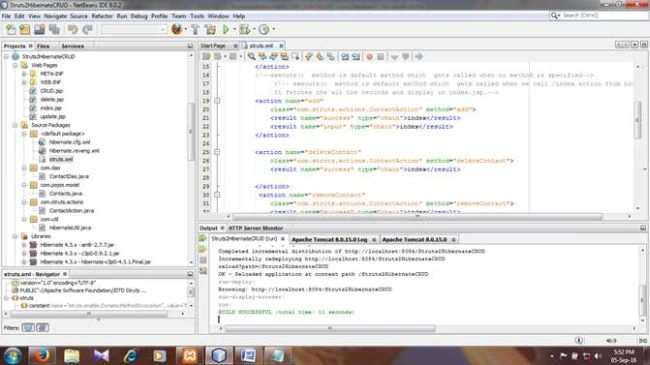
- MySQL-Connector.java-5.1.35-bin.jar
- Struts2-jquery-plugin-2.3.1.jar
- displaytag-1.2.jar
- displaytag-export-poi-1.2.jar
- displaytag-portlet-1.2.jar
- commons-beanutilis-1.8.0.jar
- commons-collections-3.1.jar
- commons-lang3-3.4.jar
- commons-digester-2.0.jar
- commons-lang-2.4.jar
- commons-logging-1.1.3.jar
- commons-logging-api-1.1.jar
- xwork-core-2.3.24.1.jar
- struts2-core-2.3.24.1.ja
- struts2-convention-plugin-2.3.24.1.jar
- ognl-3.0.6.jar
- freemaker-2.3.22.jar
- commons-lang3-3.2.jar
- commons-io-2.2.jar
- commons-fileupload-1.3.1.jar
- asm-tree-3.3.jar
- asm-commons-3.3.jar
- asm-3.3.jar
Creating Packages and Classes
Rightclick SourcePackages folder and create four packages, which are-
- com.dao-This would contain DAO(Data Access Object) class ContactDao.java.
- com.pojos.model-This would contain an entity class Contacts.java.
- com.struts.actions-This would contain struts action class ContactAction.java.
- com.util-This would contain HibernateUtil.java class.
Following files would be created, using Netbeans-
- hibernate.cfg.xml File-Automatically generated.
- Reverse Engineering File-hibernate.reveng.xml
- Entity(POJO) File-Contacts.java(POJO stands for Plain Old Java Objects)
- DataAccessObject(DAO) File-ContactDao.java
- HibernateUtil.java File
- web.xml(Automatically generated)
- Struts2 Action File-ContactAction.java
- Struts2 XMLFile-struts.xml
- index.jsp(opens CRUD.jsp page by executing execute method in action class ContactAction.java).
- CRUD.jsp(Add contact record and displays all contacts records).
- delete.jsp(Displays contact record before deleting).
- update.jsp(Displays contact record for updating).
- hibernate.cfg.xml
It contains the database connection credentialsIt is generated automatically when connected to test the database of MySQL through Netbeans by Netbeans Services Tab -Databases-Get connected to test the database.Here, XAMPP is used without the password, so there is no password. Otherwise, the password for connecting to the database is required.Copy and paste the code of the file given below, whose code is not generated.
- <?xml version="1.0" encoding="UTF-8"?>
- <!DOCTYPE hibernate-configuration PUBLIC "-//Hibernate/Hibernate Configuration DTD 3.0//EN" "http://hibernate.sourceforge.net/hibernate-configuration-3.0.dtd">
- <hibernate-configuration>
- <session-factory>
- <property name="hibernate.dialect">org.hibernate.dialect.MySQLDialect</property>
- <property name="hibernate.connection.driver_class">com.mysql.jdbc.Driver</property>
- <property name="hibernate.connection.url">jdbc:mysql://localhost:3306/test?zeroDateTimeBehavior=convertToNull</property>
- <property name="hibernate.connection.username">root</property>
- <property name="connection.password"></property>
- <property name="connection.pool_size">10</property>
- <!-- Enable Hibernate's automatic session context management -->
- <property name="current_session_context_class">thread</property>
- <property name="cache.provider_class">org.hibernate.cache.NoCacheProvider</property>
- <!-- Display all generated SQL to stdout -->
- <property name="show_sql">true</property>
- <property name="hbm2ddl.auto">update</property>
- <!-- Mapping with model class containing annotations -->
- <mapping class="com.pojos.model.Contacts"/>
- </session-factory>
- </hibernate-configuration>
- Create Reverse Engineering File-hibernate.reveng.xml.
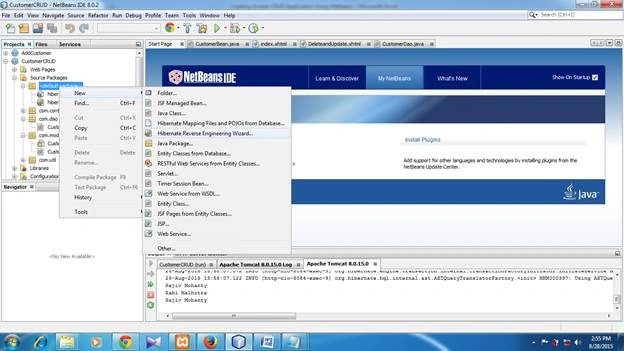 Right click on default package in the Source Package-new-choose Hibernate Reverse Engineering Wizard-click next-choose emp table-Add -click finish.CODE
- <?xml version="1.0" encoding="UTF-8"?>
- <!DOCTYPE hibernate-reverse-engineering PUBLIC "-//Hibernate/Hibernate Reverse Engineering DTD 3.0//EN" "http://hibernate.sourceforge.net/hibernate-reverse-engineering-3.0.dtd">
- <hibernate-reverse-engineering>
- <schema-selection match-catalog="test"/>
- <table-filter match-name="contacts"/>
- </hibernate-reverse-engineering>
- Create Annotation Based Entity (pojo) Class File Contacts.java.
Contacts.java Class FileImportant: To create this file, MySQL database tests most to be connected through Netbeans. Right-click com.model package--new-Hibernate Mapping Files and POJOs from the database-click Finish.Connect to the database. The Window, given below, opens. Check EJB3.0 annotation box. Uncheck Hibernate XML Mapping checkbox. Choose package com.pojos.model.
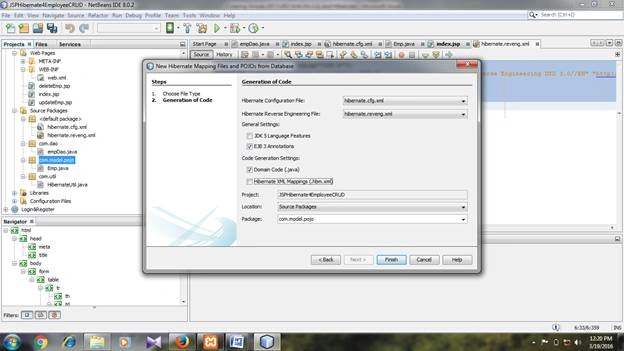 Contacts.java Class File is given.
- package com.pojos.model;
- // Generated Feb 15, 2016 8:57:30 AM by Hibernate Tools 4.3.1
- import java.util.Date;
- import javax.persistence.Column;
- import javax.persistence.Entity;
- import javax.persistence.GeneratedValue;
- import static javax.persistence.GenerationType.IDENTITY;
- import javax.persistence.Id;
- import javax.persistence.Table;
- import javax.persistence.Temporal;
- import javax.persistence.TemporalType;
- /**
- * Contacts generated by hbm2java
- */
- @Entity
- @Table(name="contacts"
- ,catalog="test"
- )
- public class Contacts implements java.io.Serializable {
- private Integer id;
- private String firstname;
- private String lastname;
- private String sex;
- private String cellno;
- private String emailId;
- private String country;
- private String website;
- private Date birthdate;
- private Date created;
- public Contacts() {
- }
- public Contacts(Date created) {
- this.created = created;
- }
- public Contacts(String firstname, String lastname, String sex, String cellno, String emailId, String country, String website, Date birthdate, Date created) {
- this.firstname = firstname;
- this.lastname = lastname;
- this.sex = sex;
- this.cellno = cellno;
- this.emailId = emailId;
- this.country = country;
- this.website = website;
- this.birthdate = birthdate;
- this.created = created;
- }
- @Id @GeneratedValue(strategy=IDENTITY)
- @Column(name="id", unique=true, nullable=false)
- public Integer getId() {
- return this.id;
- }
- public void setId(Integer id) {
- this.id = id;
- }
- @Column(name="firstname", length=30)
- public String getFirstname() {
- return this.firstname;
- }
- public void setFirstname(String firstname) {
- this.firstname = firstname;
- }
- @Column(name="lastname", length=30)
- public String getLastname() {
- return this.lastname;
- }
- public void setLastname(String lastname) {
- this.lastname = lastname;
- }
- @Column(name="sex", length=10)
- public String getSex() {
- return this.sex;
- }
- public void setSex(String sex) {
- this.sex = sex;
- }
- @Column(name="cell_no", length=15)
- public String getCellno() {
- return cellno;
- }
- public void setCellno(String cellno) {
- this.cellno = cellno;
- }
- @Column(name="email_id", length=30)
- public String getEmailId() {
- return this.emailId;
- }
- public void setEmailId(String emailId) {
- this.emailId = emailId;
- }
- @Column(name="country", length=30)
- public String getCountry() {
- return this.country;
- }
- public void setCountry(String country) {
- this.country = country;
- }
- @Column(name="website", length=30)
- public String getWebsite() {
- return this.website;
- }
- public void setWebsite(String website) {
- this.website = website;
- }
- @Temporal(TemporalType.DATE)
- @Column(name="birthdate", length=10)
- public Date getBirthdate() {
- return this.birthdate;
- }
- public void setBirthdate(Date birthdate) {
- this.birthdate = birthdate;
- }
- @Temporal(TemporalType.TIMESTAMP)
- @Column(name="created", nullable=false, length=19)
- public Date getCreated() {
- return this.created;
- }
- public void setCreated(Date created) {
- this.created = created;
- }
- //This method writes the values of contact object with System.out.println(contact.toString()) code
- @Override
- public String toString() {
- return "Contact"
- + "\n\t Id: " + this.id
- + "\n\t FirstName: " + this.firstname
- + "\n\t LastName: " + this.lastname
- + "\n\t Sex: " + this.sex
- + "\n\t CellNo: " + this.cellno
- + "\n\t Country: " + this.country
- + "\n\t WebSite: " + this.website
- + "\n\t EmailId: " + this.emailId
- + "\n\t BirthDate: " + this.birthdate
- + "\n\t Date Created: " + this.created;
- }
- }
- Creating DataAccessObject (DAO) File
Right-click on com. dao package-new-JavaClass. Give the class name as ContactDao and click Finish.
- package com.dao;
- import java.util.List;
- import java.util.ArrayList;
- import com.pojos.model.Contacts;
- import com.util.HibernateUtil;
- import org.hibernate.HibernateException;
- import org.hibernate.Session;
- import org.hibernate.Transaction;
- /**
- *
- * @author Raichand
- */
- public class ContactDao extends HibernateUtil{
- public void add(Contacts newcontact) {
- Session session = HibernateUtil.getSessionFactory().openSession();
- String fname = newcontact.getFirstname();
- System.out.println("FirstName=" + fname);
- //int newid = this.getNewContactId();
- // newcontact.setId(newid);
- //int contactid = newcontact.getId();
- //System.out.println("DaoContact id ;-" + contactid);
- System.out.println("From Dao:-" + newcontact);
- session.beginTransaction();
- //session.merge(newcontact);
- session.save(newcontact);
- session.getTransaction().commit();
- session.flush();
- session.close();
- }
- public void deleteContact(int id) {
- Session session = HibernateUtil.getSessionFactory().openSession();
- session.beginTransaction();
- try {
- Contacts contact = (Contacts) session.load(Contacts.class,id);
- if(null != contact) {
- session.delete(contact);
- }
- } catch (HibernateException e) {
- e.printStackTrace();
- session.getTransaction().rollback();
- }
- session.getTransaction().commit();
- session.flush();
- session.close();
- }
- public void update(Contacts contact) {
- Session session = HibernateUtil.getSessionFactory().openSession();
- session.beginTransaction();
- //Contacts contact = (Contacts) session.load(Contacts.class, id);
- try {
- if(contact != null) {
- session.saveOrUpdate(contact);
- }
- } catch (HibernateException e) {
- e.printStackTrace();
- session.getTransaction().rollback();
- }
- session.getTransaction().commit();
- session.flush();
- session.close();
- }
- public int getNewContactId() {
- Session session = HibernateUtil.getSessionFactory().getCurrentSession();
- Transaction trans = session.beginTransaction();
- String query = "SELECT max(c.id) FROM Contacts c";
- List list = session.createQuery(query).list();
- int maxId = ((Integer) list.get(0));
- trans.commit();
- session.close();
- return (maxId+1);
- }
- public List<Contacts> list(){
- Session session = HibernateUtil.getSessionFactory().openSession();
- List<Contacts> DaoAllContacts = null;
- session.beginTransaction();
- try {
- DaoAllContacts = session.createCriteria(Contacts.class).list();
- //DaoAllContacts = (List<Contacts>)session.createQuery("from Contacts").list();
- int count =DaoAllContacts.size();
- System.out.println("No of Record From Dao: " + count);
- } catch (HibernateException e) {
- e.printStackTrace();
- session.getTransaction().rollback();
- }
- session.getTransaction().commit();
- session.flush();
- session.close();
- return DaoAllContacts;
- }
- }
- HibernateUtil.java File
Right-click on com.util folder-new-javaclass-Class name. Give the name as HibernateUtil and click Finish.
- package com.util;
- import org.hibernate.SessionFactory;
- import org.hibernate.boot.registry.StandardServiceRegistryBuilder;
- import org.hibernate.cfg.Configuration;
- import org.hibernate.service.ServiceRegistry;
- /**
- *
- * @author Raichand
- */
- public class HibernateUtil {
- private static SessionFactory sessionFactory;
- private static ServiceRegistry serviceRegistry;
- private static SessionFactory createSessionFactory() {
- try {
- // Create the SessionFactory from hibernate.cfg.xml
- Configuration configuration = new Configuration();
- configuration.configure("hibernate.cfg.xml");
- System.out.println("Hibernate Annotation Configuration loaded");
- serviceRegistry = new StandardServiceRegistryBuilder().applySettings(configuration.getProperties()).build();
- System.out.println("Hibernate Annotation serviceRegistry created");
- sessionFactory = configuration.buildSessionFactory(serviceRegistry);
- return sessionFactory;
- }
- catch (Throwable ex) {
- // Make sure you log the exception, as it might be swallowed
- System.err.println("Initial SessionFactory creation failed." + ex);
- throw new ExceptionInInitializerError(ex);
- }
- }
- public static SessionFactory getSessionFactory() {
- if(sessionFactory == null) sessionFactory = createSessionFactory();
- return sessionFactory;
- }
- }
- web.xml (Automatically generated, followed by copying and pasting the code, given below)-
- <?xml version="1.0" encoding="UTF-8"?>
- <web-app version="3.1" xmlns="http://xmlns.jcp.org/xml/ns/javaee" xmlns:xsi="http://www.w3.org/2001/XMLSchema-instance" xsi:schemaLocation="http://xmlns.jcp.org/xml/ns/javaee http://xmlns.jcp.org/xml/ns/javaee/web-app_3_1.xsd">
- <filter>
- <filter-name>struts2</filter-name>
- <filter-class>org.apache.struts2.dispatcher.ng.filter.StrutsPrepareAndExecuteFilter</filter-class>
- </filter>
- <filter-mapping>
- <filter-name>struts2</filter-name>
- <url-pattern>/*</url-pattern>
- </filter-mapping>
- <welcome-file-list>
- <welcome-file>index.jsp</welcome-file>
- </welcome-file-list>
- </web-app>
- Creating Struts2 action File ContactAction.Java File
Right-click com.struts.actions folder-New-StrutsAction. Give the name ContactAction.java and click Finish.
- package com.struts.actions;
- import java.util.Date;
- import java.util.ArrayList;
- import java.util.List;
- import com.opensymphony.xwork2.ActionSupport;
- import com.dao.ContactDao;
- import com.pojos.model.Contacts;
- import java.text.ParseException;
- import java.text.SimpleDateFormat;
- import java.util.Locale;
- /**
- *
- * @author Raichand
- */
- public class ContactAction extends ActionSupport {
- private static final long serialVersionUID = 9149826260758390091L;
- private Contacts contact= new Contacts();
- private List<Contacts> ContactList= new ArrayList<Contacts>();
- private int id;
- private String birthdate;
- private Date date = new Date();
- private ContactDao dao;
- private Integer[] Checkbox;//stores id of selected(checked) records for deletion.
- public ContactAction() {
- dao= new ContactDao();
- }
- @Override
- public String execute() {
- this.ContactList = dao.list();
- int count = ContactList.size();
- System.out.println("contactList Size"+ count);
- //System.out.println("execute called");
- return SUCCESS;
- }
- public String add() throws ParseException {
- SimpleDateFormat sdf = new SimpleDateFormat("yyyy-MM-dd",Locale.ENGLISH);
- Date dob = sdf.parse(getBirthdate());
- contact.setCreated(date);
- contact.setBirthdate(dob);
- System.out.println(birthdate);
- System.out.println(contact);
- try {
- dao.add(contact);
- } catch (Exception e) {
- e.printStackTrace();
- }
- this.ContactList = dao.list();
- return SUCCESS;
- }
- public String update() throws ParseException{
- SimpleDateFormat sdf = new SimpleDateFormat("yyyy-MM-dd");
- Date dob = sdf.parse(getBirthdate());
- contact.setBirthdate(dob);
- contact.setCreated(date);
- System.out.println(getContact());
- try {
- dao.update(contact);
- } catch (Exception e) {
- e.printStackTrace();
- }
- this.ContactList = dao.list();
- return SUCCESS;
- }
- public String removeContact() throws ParseException {
- try {
- System.out.println("No of Selected Record:-" + Checkbox.length);
- for (int i=0;i<Checkbox.length; i++){
- System.out.println("Selected RecordId:-" + Checkbox[i]);
- dao.deleteContact((Checkbox[i]));
- }
- } catch (Exception e) {
- e.printStackTrace();
- }
- this.ContactList = dao.list();
- return SUCCESS;
- }
- public String deleteContact() {
- System.out.println("id value="+contact.getId());
- int id = contact.getId();
- try {
- dao.deleteContact(id);
- } catch (Exception e) {
- e.printStackTrace();
- }
- this.ContactList = dao.list();
- return SUCCESS;
- }
- public Contacts getContact() {
- return contact;
- }
- public void setContact(Contacts contact) {
- this.contact = contact;
- }
- public List<Contacts> getContactList() {
- return ContactList;
- }
- public void setContactList(List<Contacts> ContactList) {
- this.ContactList = ContactList;
- }
- public int getId() {
- return id;
- }
- public void setId(int id) {
- this.id = id;
- }
- public String getBirthdate() {
- return birthdate;
- }
- public void setBirthdate(String birthdate) {
- this.birthdate = birthdate;
- }
- public Integer[] getCheckbox() {
- return Checkbox;
- }
- public void setCheckbox(Integer[] Checkbox) {
- this.Checkbox = Checkbox;
- }
- }
- struts.xml File
- <?xml version="1.0" encoding="UTF-8"?>
- <!DOCTYPE struts PUBLIC
- "-//Apache Software Foundation//DTD Struts Configuration 2.0//EN"
- "http://struts.apache.org/dtds/struts-2.0.dtd">
- <struts>
- <constant name="struts.enable.DynamicMethodInvocation" value="false" />
- <constant name="struts.devMode" value="false" />
- <!-- Configuration for the default package. -->
- <package name="default" extends="struts-default">
- <default-action-ref name ="index"></default-action-ref>
- <action name="index" class="com.struts.actions.ContactAction">
- <result name="success">CRUD.jsp</result>
- </action>
- <!--execute() method is default method which gets called when no method is specified-->
- <!-- execute() method is default method which gets called when we call /index action from browser.
- It fetches the all the records and display in CRUD.jsp.-->
- <action name="add"
- class="com.struts.actions.ContactAction" method="add">
- <result name="success" type="chain">index</result>
- <result name="input" type="chain">index</result>
- </action>
- <action name="deleteContact"
- class="com.struts.actions.ContactAction" method="deleteContact">
- <result name="success" type="chain">index</result>
- </action>
- <action name="removeContact"
- class="com.struts.actions.ContactAction" method="removeContact">
- <result name="success" type="chain">index</result>
- </action>
- <action name="update"
- class="com.struts.actions.ContactAction" method="update">
- <result name="success" type="chain">index</result>
- </action>
- <action name="editLink"
- class="com.struts.actions.ContactAction">
- <result name="success">update.jsp</result>
- </action>
- <action name="listContacts" method="listContacts"
- class="com.struts.actions.ContactAction" >
- <result name="success">index.jsp</result>
- </action>
- </package>
- </struts>
- Creating index.jsp File
Right-click on WebPages folder-New-JSP-Give name index.jsp and click Finish. Similarly, create delete.jsp and update.jsp files.index.jsp code
- <%@page contentType="text/html" pageEncoding="UTF-8"%>
- <!DOCTYPE html PUBLIC "-//W3C//DTD HTML 4.01 Transitional//EN" "http://www.w3.org/TR/html4/loose.dtd">
- <head>
- <title></title>
- <meta http-equiv="Content-Type" content="text/html; charset=UTF-8">
- <!--This one opens CRUD.jsp page with all records in database when application starts-->
- <script type="text/javascript">
- window.location = "execute";
- </script>
- </head>
- Creating CRUD.jsp File
- <%@ page pageEncoding="UTF-8" contentType="text/html; charset=UTF-8" language="java"%>
- <%@ taglib prefix="s" uri="/struts-tags" %>
- <%@ taglib prefix="sj" uri="/struts-jquery-tags"%>
- <%@taglib prefix="display" uri="http://displaytag.sf.net" %>
- <head>
- <meta http-equiv="Content-Type" content="text/html; charset=UTF-8">
- <title>Contact List</title>
- <sj:head></sj:head>
- </head>
- <h1>Contact Manager</h1>
- <s:actionerror/>
- <s:form action="add" method="post" style="align:
- center">
- <s:textfield name="contact.firstname" label="Firstname"/>
- <s:textfield name="contact.lastname" label="Lastname"/>
- <s:radio name="contact.sex" label="Gender"
- list="{'Male','Female'}" />
- <s:textfield name="contact.emailId" label="Email"/>
- <s:select name="contact.country" list="{'India','USA','UK'}"
- headerKey="" headerValue="Select"
- label="Select a country" />
- <s:textfield name="contact.cellNo" label="Cell No."/>
- <s:textfield name="contact.website" label="Homepage"/>
- <sj:datepicker id="5" name="birthdate" label="Date of Birth" yearRange="-90:" changeMonth="true" changeYear="true" displayFormat= "yy-mm-dd" showButtonPanel="true"/>
- <s:submit value="Add Contact" align="center"/>
- </s:form>
- <%
- int count = 0;
- %>
- <s:form action="removeContact">
- <s:submit type="button" value="DeleteSelected" align="left"
- onClick="return confirm('Do you want to delete these contacts?');"/>
- <display:table id="row" class="dataTable" export="true" name="contactList" size="auto" pagesize="5" cellpadding="5px;"
- cellspacing="5px;" style="margin-left:25px;margin-top:20px;width:120%" requestURI="">
- <display:setProperty name="paging.banner.placement" value="bottom" />
- <display:column title="Select">
- <s:checkbox id="check" name="Checkbox" fieldValue="%{#attr.row.id}" theme="simple" value="#{attr.row.check}"/>
- </display:column>
- <display:column property="id" class="hidden" headerClass="hidden" media="none" title="ID" paramId="id" />
- <display:column property="firstname" title="First Name" sortable="true"/>
- <display:column property="lastname" title="Last Name"/>
- <display:column property="sex" class="hidden" headerClass="hidden" media="none" title="Gender"/>
- <display:column property="emailId" title="Email"/>
- <display:column property="country" title="Country"/>
- <display:column property="cellNo" title="Cell No"/>
- <display:column property="website" title="HomePage"/>
- <display:column property="birthdate" class="hidden" headerClass="hidden" media="none" format="{0,date,dd-MMM-yyyy}" title="BirthDate"/>
- <display:setProperty name="export.excel.filename" value="ContactDetails.xls" />
- <display:setProperty name="export.pdf.filename" value="ContactDetails.pdf" />
- <display:setProperty name="export.csv.filename" value="ContactDetails.csv" />
- <s:url id="editUrl" action="editLink">
- <s:param name="id" value="%{#attr.row.id}"/>
- <s:param name="firstname" value="%{#attr.row.firstname}"/>
- <s:param name="lastname" value="%{#attr.row.lastname}"/>
- <s:param name="sex" value="%{#attr.row.sex}"/>
- <s:param name="emailId" value="%{#attr.row.emailId}"/>
- <s:param name="country" value="%{#attr.row.country}"/>
- <s:param name="cellNo" value="%{#attr.row.cellNo}"/>
- <s:param name="website" value="%{#attr.row.website}"/>
- <s:param name="birthdate" value="%{#attr.row.birthdate}"/>
- </s:url>
- <display:column title="Action">
- <s:a href="%{editUrl}">Display&Edit</s:a>
- </display:column>
- <s:url id="delContact" action="deleteContact">
- <s:param name="contact.id" value="%{#attr.row.id}" />
- </s:url>
- <display:column title="Action">
- <s:a href="%{delContact}" onclick="return confirm('Are you sure you want to delete this record')">Delete</s:a>
- </display:column>
- </display:table>
- </s:form>
- Update.jsp file code
- <%@page contentType="text/html" pageEncoding="UTF-8"%>
- <%@ taglib prefix="s" uri="/struts-tags" %>
- <%@ taglib prefix="sj" uri="/struts-jquery-tags"%>
- <!DOCTYPE html PUBLIC "-//W3C//DTD HTML 4.01 Transitional//EN" "http://www.w3.org/TR/html4/loose.dtd">
- <html>
- <head>
- <meta http-equiv="Content-Type" content="text/html; charset=UTF-8">
- <title>Contact Detail & Update</title>
- <script type="text/javascript">
- function goBack(){
- <!--This one opens CRUD.jsp page with all records in database when back button is clicked-->
- window.open("/Struts2HibernateCRUD/index.jsp","_self");
- }
- </script>
- <sj:head></sj:head>
- </head>
- <body>
- <h1> Contact Detail & Update</h1>
- <s:form action="update" method="post" >
- <s:textfield name="contact.firstname" label="Firstname" value="%{#parameters.firstname}"/>
- <s:textfield name="contact.lastname" label="Lastname" value="%{#parameters.lastname}"/>
- <s:radio name="contact.sex" label="Gender" list="{'Male','Female'}" value="%{#parameters.sex}" />
- <s:textfield name="contact.emailId" label="Email" value="%{#parameters.emailId}" />
- <s:select name="contact.country" list="{'India','USA','UK'}"
- headerKey="" headerValue="Select" label="Select a country" value="%{#parameters.country}" />
- <s:textfield name="contact.cellNo" label="Cell No" value="%{#parameters.cellNo}" />
- <s:textfield name="contact.website" label="Homepage" value="%{#parameters.website}"/>
- <sj:datepicker id="5" name="birthdate" label="Date of Birth" changeMonth="true" changeYear="true" displayFormat= "yy-mm-dd" showButtonPanel="true"/>
- <s:hidden name="contact.id" value="%{#parameters.id}" label="Primary Key" />
- <table >
- <tr>
- <td colspan="2">
- <s:submit value="Update Contact" theme="simple" />
- <input type="button" value="Back" onclick="goBack()"/>
- </td>
- </tr>
- </table>
- </s:form>
- </body>
- </html>
CRUD.jsp
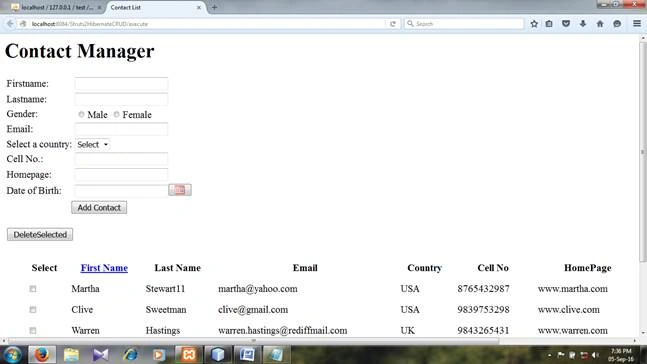 Update.jsp
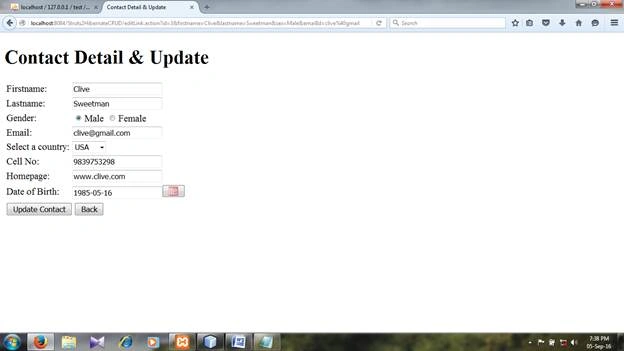 Modify the displayed record and click update contact.
Delete.jsp
Modify the displayed record and click update contact.
Delete.jsp
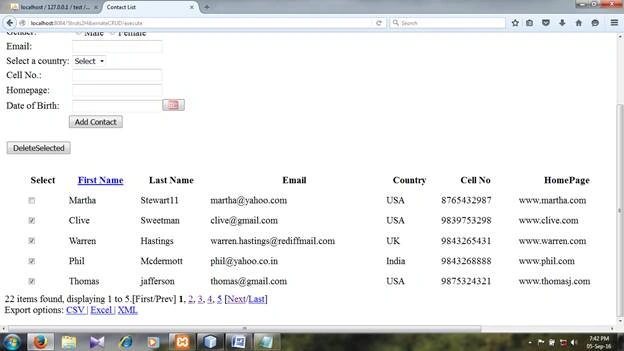
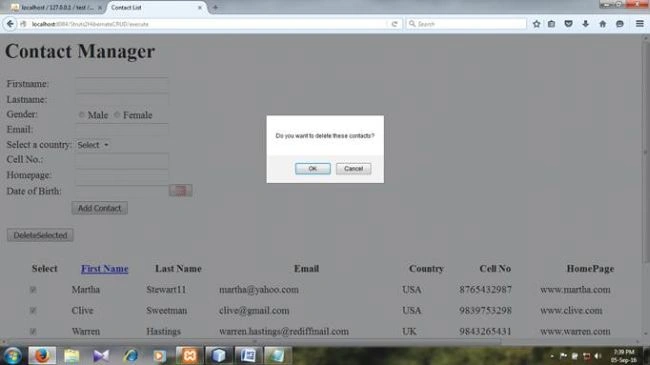 Click Delete link to delete the corresponding record. Select the record for deletion by selecting corresponding checkboxes and hit DeleteSelected button. Few columns are hidden and can be seen by clicking Display&Update Link.
Raichand RayPosted Jan 13, 2017, 1:43 AM
Hi, For Struts and SpringSecurity4 look at this blog post https://raichand-java.blogspot.in/2017/01/springsecurity4struts2jpahibernate4.html
Vignesh ManiPosted Sep 12, 2016, 8:40 AM
Nice