

Introduction
This article explains how to validate name, email and phone number in a web page using JavaScript validations in ASP.Net.
In this example, I am using three textboxes. The first TextBox is Name that allows only characters and spaces. The second TextBox is Email that only allows email format. A third TextBox is a phone number, it only allows numbers.
Coding
Validation.aspx
- <%@ Page Language="C#" AutoEventWireup="true" CodeFile="Validation.aspx.cs" Inherits="Validation" %>
- <html xmlns="http://www.w3.org/1999/xhtml">
- <head id="Head1" runat="server">
- <title>Vallidations Page</title>
- <script type="text/javascript">
- function Allvalidate()
- {
- var ValidationSummary = "";
- ValidationSummary += NameValidation();
- ValidationSummary += EmailValidation();
- ValidationSummary += PhonenoValidation();
- if (ValidationSummary != "")
- {
- alert(ValidationSummary);
- return false;
- }
- else
- {
- alert("Information submited successfuly");
- return true;
- }
- }
- function NameValidation()
- {
- var userid;
- var controlId = document.getElementById("<%=txtcontct.ClientID %>");
- userid = controlId.value;
- var val;
- val = /^[0-9]+$/;
- var digits = /\d(10)/;
- if (userid == "")
- {
- return ("Please Enter PhoneNo" + "\n");
- }
- else if (val.test(userid))
- {
- return "";
- }
- else
- {
- return ("PhoneNo should be only in digits" + "\n");
- }
- }
- function EmailValidation()
- {
- var userid;
- var controlId = document.getElementById("<%=txtname.ClientID %>");
- userid = controlId.value;
- var val = /^[a-zA-Z ]+$/
- if (userid == "")
- {
- return ("Please Enter Name" + "\n");
- }
- else if (val.test(userid))
- {
- return "";
- }
- else
- {
- return ("Name accepts only spaces and charcters" + "\n");
- }
- }
- function PhonenoValidation()
- {
- var userid;
- var controlId = document.getElementById("<%=txtemail.ClientID %>");
- userid = controlId.value;
- var val = /\w+([-+.']\w+)*@\w+([-.]\w+)*\.\w+([-.]\w+)*/;
- if (userid == "")
- {
- return ("Please Enter Email Id" + "\n");
- }
- else if (val.test(userid))
- {
- return "";
- }
- else
- {
- return ("Email should be in this form example: [email protected]" + "\n");
- }
- }
- </script>
- </head>
- <body>
- <form id="form1" runat="server">
- <h3 style="color:blue">Validation in JavaScript</h3>
- <table style="border-color: #333300; z-index: 1; left: 15px; top: 54px; position: absolute; height: 122px; width: 261px">
- <tr>
- <td>
- <asp:Label ID="lblname" runat="server" Text="FirstName"></asp:Label>
- </td>
- <td>
- <asp:TextBox ID="txtname" runat="server"></asp:TextBox>
- </td>
- </tr>
- <tr>
- <td>
- <asp:Label ID="lblemail" runat="server" Text="Email"></asp:Label>
- </td>
- <td>
- <asp:TextBox ID="txtemail" runat="server"></asp:TextBox>
- </td>
- </tr>
- <tr>
- <td>
- <asp:Label ID="lblCntno" runat="server" Text="Phone No"></asp:Label>
- </td>
- <td>
- <asp:TextBox ID="txtcontct" runat="server"></asp:TextBox>
- </td>
- </tr>
- <tr>
- <td>
- </td>
- <td>
- <asp:Button ID="bttnsubmit" runat="server" Text="Submit"
- OnClientClick ="javascript:Allvalidate()" Font-Bold="True" />
- </td>
- </tr>
- </table>
- </h3>
- </form>
- </body>
- </html>
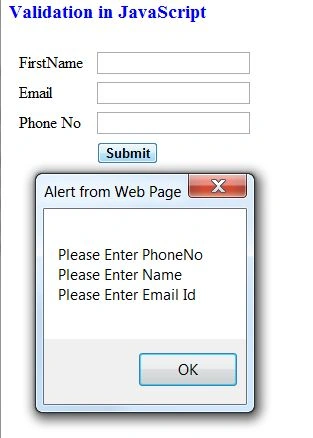
Output 1
We click on the "Submit" button without entering any values in the textboxes:
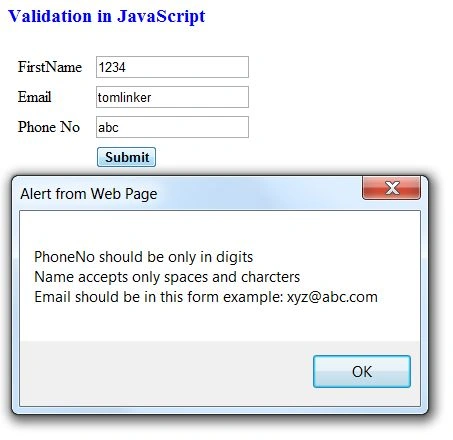
Output 2
We entered all incorrect values in the textboxes:
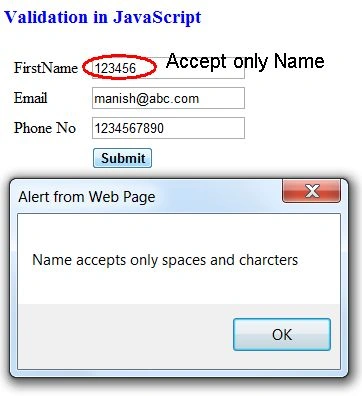
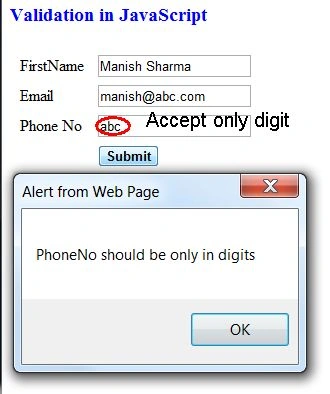
Output 3
We have entered an incorrect value in only the Name TextBox:
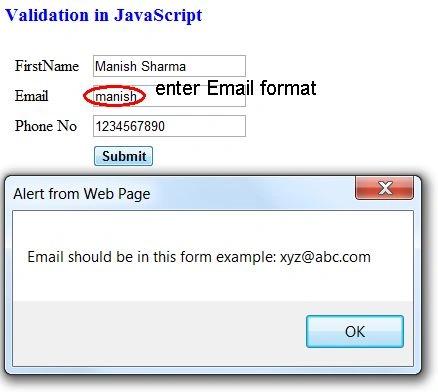
Output 4
We have entered an incorrect value in only the Email TextBox:
Output 5
We have entered an incorrect value in only the phone number TextBox:
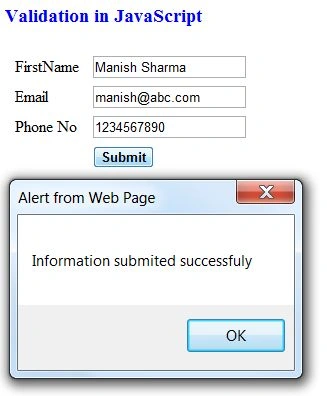
Output 6
We have entered a correct value in all textboxes:
For more information, download the attached sample application.
Mohd TaufeequePosted Jan 2, 2019, 9:33 AM
JavaScript Validation<script type="text/javascript"> function userValidation() { var Name = document.getElementById("txtUname").value; var Password = document.getElementById("txtPassword").value; var ConPassword = document.getElementById("txtConPassword").value; var gen; var mobile = document.getElementById("txtMobile").value; var email = document.getElementById("txtEmail").value; var qual = ""; var dd = document.getElementById("txtDOB").value; var add = document.getElementById("txtAddress").value; var drop = document.getElementById("dropDocName").value; var fileval = document.getElementById("fileDocument").value; //var fileupload=document.getElementById("fileDocument").value if (Name == "") { document.getElementById('<%=lblUname.ClientID%>').innerHTML = "Please Enter the UserName"; return false; } else { document.getElementById('<%=lblUname.ClientID%>').innerHTML = ""; } //Password if (Password == "") { document.getElementById('<%=lblPassword.ClientID%>').innerHTML = "Please Enter the Password"; return false; } else { document.getElementById('<%=lblPassword.ClientID%>').innerHTML = ""; } //ConPassword if (ConPassword=="") { document.getElementById('<%=lblConPassword.ClientID%>').innerHTML = "Please Enter Conpassword"; return false; } else { document.getElementById('<%=lblConPassword.ClientID%>').innerHTML = ""; } if (Password != ConPassword) { document.getElementById('<%=lblConPassword.ClientID%>').innerHTML = "Password and Confirm Password must be same"; return false; } else { document.getElementById('<%=lblConPassword.ClientID%>').innerHTML = ""; } //Gender if (document.getElementById('radioMale').checked) { gen = document.getElementById("radioMale").value; document.getElementById('<%=lblGender.ClientID%>').innerHTML = ""; } else if (document.getElementById('radioFemale').checked) { gen = document.getElementById("radioFemale").value; document.getElementById('<%=lblGender.ClientID%>').innerHTML = ""; } else { document.getElementById('<%=lblGender.ClientID%>').innerHTML = "Please select Gender"; return false; } //Mobile var len = mobile.length; var val = mobile.value; if (mobile == "") { document.getElementById('<%=lblMobile.ClientID%>').innerHTML = "Mobile Number Must not be Empty..."; return false; } else { document.getElementById('<%=lblMobile.ClientID%>').innerHTML = ""; } if (isNaN(mobile)) { document.getElementById('<%=lblMobile.ClientID%>').innerHTML = "Mobile Number Must be digits only..."; return false; } else { document.getElementById('<%=lblMobile.ClientID%>').innerHTML = ""; } if (len < 10 || len > 10) { document.getElementById('<%=lblMobile.ClientID%>').innerHTML = "Mobile Number Must be 10-digits only..."; return false; } else { document.getElementById('<%=lblMobile.ClientID%>').innerHTML = ""; } //Email var atposition = email.indexOf("@"); var dotposition = email.indexOf("."); //var startposition = email.indexOf(0); if (email == "") { document.getElementById('<%=lblEmail.ClientID%>').innerHTML = "Email id must not be empty"; return false; } else { document.getElementById('<%=lblEmail.ClientID%>').innerHTML = ""; } if (atposition < 1 || dotposition < atposition + 2 || dotposition + 2 >= email.length) { document.getElementById('<%=lblEmail.ClientID%>').innerHTML = "Please Enter Valid email id"; return false; } else { document.getElementById('<%=lblEmail.ClientID%>').innerHTML = ""; } //Qualification Validation if ((document.getElementById('chkBTech').checked) || (document.getElementById('chkBE').checked) || (document.getElementById('chkMCA').checked)) { document.getElementById('<%=lblQualification.ClientID%>').innerHTML = ""; } else { document.getElementById('<%=lblQualification.ClientID%>').innerHTML = "Please Select atleast one Qualification"; return false; } //DateOfBirth Validation if (dd == "") { document.getElementById('<%=lblDOB.ClientID%>').innerHTML = "Please Enter Your Date of Birth"; return false; } else { document.getElementById('<%=lblDOB.ClientID%>').innerHTML = ""; } //Address Validation if (add == "") { document.getElementById('<%=lblAddress.ClientID%>').innerHTML = "Please Enter Your Address"; return false; } else { document.getElementById('<%=lblAddress.ClientID%>').innerHTML = ""; } //Document type Validation if (drop == "") { document.getElementById('<%=lblDropdocnam.ClientID%>').innerHTML = "Please Select Doc Type"; return false; } else { document.getElementById('<%=lblDropdocnam.ClientID%>').innerHTML = ""; } //File Upload Validation if (fileval == "") { document.getElementById('<%=lblFileDoc.ClientID%>').innerHTML = "Please Select your Document"; return false; } else { document.getElementById('<%=lblFileDoc.ClientID%>').innerHTML = ""; } } </script> BtnInsert protected void FillData() { con.Open(); string query = "select uname,gender,phone,email,qualification,datofbirth,addr from registration"; SqlCommand cmd=new SqlCommand(query,con); SqlDataAdapter da = new SqlDataAdapter(cmd); DataSet ds = new DataSet(); da.Fill(ds, "emp"); GridView1.DataSource = ds; GridView1.DataBind(); } protected void docBind() { dropDocName.Items.Add("-Select Document-"); dropDocName.Items.Add("10th"); dropDocName.Items.Add("12th"); dropDocName.Items.Add("Graduation"); dropDocName.Items.Add("PostGraduation"); } protected void Page_Load(object sender, EventArgs e) { if(!IsPostBack) { docBind(); FillData(); } } protected void btnRegister_Click(object sender, EventArgs e) { con.Open(); string uname = txtUname.Text; string pass=txtPassword.Text; string gender=""; if(radioMale.Checked==true) { gender=radioMale.Text; } else { gender=radioFemale.Text; } string mobile=txtMobile.Text; string email=txtEmail.Text; string qualification=""; if(chkBTech.Checked==true) { qualification=qualification+chkBTech.Text; } if(chkBE.Checked==true) { qualification=qualification+chkBE.Text; } if(chkMCA.Checked==true) { qualification=qualification+chkMCA.Text; } string dob = txtDOB.Text; string address=txtAddress.Text; string filedrop=dropDocName.SelectedItem.Text; string fileName =fileDocument.FileName; string filePath = "~/Images/" + fileName; fileDocument.SaveAs(Server.MapPath(filePath)); string path=filePath; string query = "insert into registration values('" + uname + "','" + pass + "','" + gender + "','" + mobile + "','" + email + "','" + qualification + "','" + dob + "','" + address + "','" + filedrop + "','" + path + "')"; SqlCommand cmd=new SqlCommand(query,con); int i = cmd.ExecuteNonQuery(); con.Close(); if(i==1) { lblMsg.Text = "Record inserted successfully"; FillData(); } } protected void btnSearch_Click(object sender, EventArgs e) { con.Open(); string query = "select * from registration where uname='" + txtUname.Text + "'"; SqlCommand cmd = new SqlCommand(query, con); SqlDataReader dr = cmd.ExecuteReader(); DataSet ds = new DataSet(); if(dr.HasRows) { while(dr.Read()) { txtUname.Text = dr[0].ToString(); txtPassword.Text =dr[1].ToString(); txtConPassword.Text = txtPassword.Text; if(dr[2].ToString()=="Male") { radioMale.Checked = true; } else { radioFemale.Checked = true; } txtMobile.Text = dr[3].ToString(); txtEmail.Text = dr[4].ToString(); if(dr[5].ToString()=="BTech") { chkBTech.Checked = true; } else if(dr[5].ToString()=="BE") { chkBE.Checked = true; } else { chkMCA.Checked = true; } txtDOB.Text = dr[6].ToString(); txtAddress.Text = dr[7].ToString(); dropDocName.SelectedItem.Text = dr[8].ToString(); string url = dr[9].ToString(); Image1.ImageUrl = dr[9].ToString(); } } } protected void btnUpdate_Click(object sender, EventArgs e) { con.Open(); string uname = txtUname.Text; string pass=txtPassword.Text; string gender=""; if(radioMale.Checked==true) { gender=radioMale.Text; } else { gender=radioFemale.Text; } string mobile=txtMobile.Text; string email=txtEmail.Text; string qualification=""; if(chkBTech.Checked==true) { qualification=qualification+chkBTech.Text; } if(chkBE.Checked==true) { qualification=qualification+chkBE.Text; } if(chkMCA.Checked==true) { qualification=qualification+chkMCA.Text; } string dob = txtDOB.Text; string address=txtAddress.Text; string filedrop=dropDocName.SelectedItem.Text; string fileName =fileDocument.FileName; string filePath = "~/Images/" + fileName; fileDocument.SaveAs(Server.MapPath(filePath)); string path=filePath; string query = "update registration set pass='" + pass + "',gender='" + gender + "',phone='" + mobile + "',email='" + email + "',qualification='" + qualification + "',datofbirth='" + dob + "',addr='" + address + "',dname='" + filedrop + "',dpath='" + path + "' where uname='"+txtUname.Text+"'"; SqlCommand cmd = new SqlCommand(query, con); int i = cmd.ExecuteNonQuery(); con.Close(); if(i==1) { lblMsg.Text = "Details Updated Successfully"; FillData(); } else { lblMsg.Text = "Failed"; } } protected void btnDelete_Click(object sender, EventArgs e) { con.Open(); string query = "delete from registration where uname='" + txtUname.Text + "'"; SqlCommand cmd = new SqlCommand(query, con); int i = cmd.ExecuteNonQuery(); con.Close(); if (i==1) { lblMsg.Text = "Record Deleted Successfully"; FillData(); } else { lblMsg.Text = "Failed"; } }
kalu singh raoPosted Jul 7, 2016, 1:43 AM
Nice...
Saber ShaikhPosted Feb 13, 2015, 4:20 AM
nice
Naveen GcPosted Nov 12, 2014, 3:55 AM
we have inbuilt validation controls in asp.net..
Lalit RaghuvanshiPosted Jun 14, 2014, 1:48 PM
Another useful solution is:Implement JavaScript validation in asp.net website http://www.webcodeexpert.com/2013/03/javascript-validation-in-aspnet-website.html
Anurag SarkarPosted Jul 17, 2013, 3:44 PM
Thans