

Introduction
Android Navigation has changed a lot over the years. We used to manage backstack in fragments manually and it was a very tedious task. Putting fragments in a stack, pushing one and popping another, was the process. Let's see an image which explains all the components.
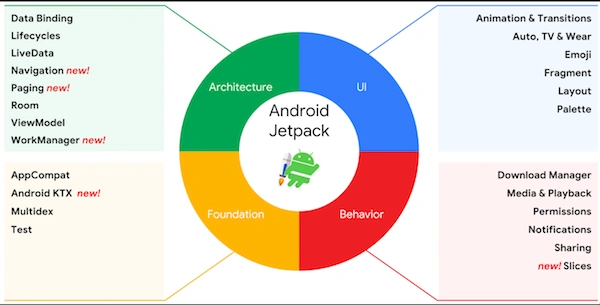
Notice the Architecture section -- the green one on the left, and it has various components like Navigation, Paging, Room etc.
Notice the Architecture section -- the green one on the left, and it has various components like Navigation, Paging, Room etc.
Set up environment to use navigation
Include navigation support in build.gradle file of app level by adding the following dependencies.
- apply plugin: 'com.android.application'
- android {
- compileSdkVersion 29
- buildToolsVersion "29.0.3"
- defaultConfig {
- applicationId "com.example.navigationsample"
- minSdkVersion 21
- targetSdkVersion 29
- versionCode 1
- versionName "1.0"
- testInstrumentationRunner "androidx.test.runner.AndroidJUnitRunner"
- }
- buildTypes {
- release {
- minifyEnabled false
- proguardFiles getDefaultProguardFile('proguard-android-optimize.txt'), 'proguard-rules.pro'
- }
- }
- }
- dependencies {
- implementation fileTree(dir: 'libs', include: ['*.jar'])
- implementation 'androidx.appcompat:appcompat:1.1.0'
- implementation 'com.google.android.material:material:1.1.0'
- implementation 'androidx.constraintlayout:constraintlayout:1.1.3'
- // Java implementation of navigation
- implementation 'androidx.navigation:navigation-fragment:2.2.1'
- implementation 'androidx.navigation:navigation-ui:2.2.1'
- implementation 'androidx.legacy:legacy-support-v4:1.0.0'
- testImplementation 'junit:junit:4.12'
- androidTestImplementation 'androidx.test.ext:junit:1.1.1'
- androidTestImplementation 'androidx.test.espresso:espresso-core:3.2.0'
- }
Navigation has mainly three parts to make proper navigation as described below.
- Navigation graph
An XML resource that contains all navigation-related information in one centralized location. This includes all of the individual content areas within your app, called destinations, as well as the possible paths that a user can take through your app.
- NavHost
An empty container that displays destinations from your navigation graph. The Navigation component contains a default NavHost implementation, NavHostFragment, that displays fragment destinations.
- NavController
An object that manages app navigation within a NavHost. The NavController orchestrates the swapping of destination content in the NavHost as users move throughout your app.
Benefits of Navigation component
- This architecture handles up navigation atomatically.
- Provides support for animations by default.
- Implementing and handling deep links.
- Including Navigation UI patterns, such as navigation drawers and bottom navigation, with minimal additional work.
- Pass data between destinations ie. fragments safely
Getting started with a sample app creation
Step 1
Let's create a sample application with basic activity template selection.
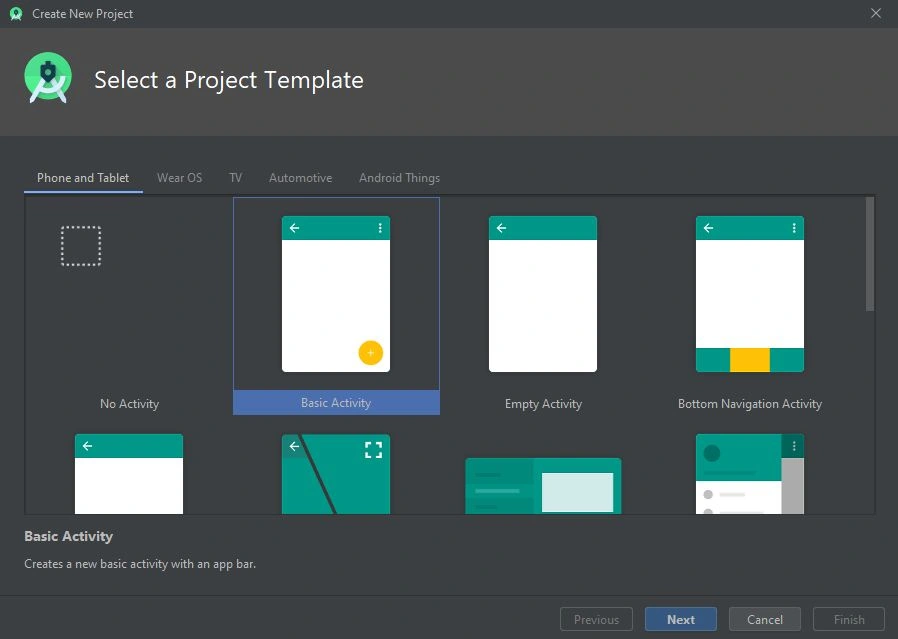
We are taking basic activity because it will create two fragments by default and a main activity.
Step 2
Name project as Navigation sample.
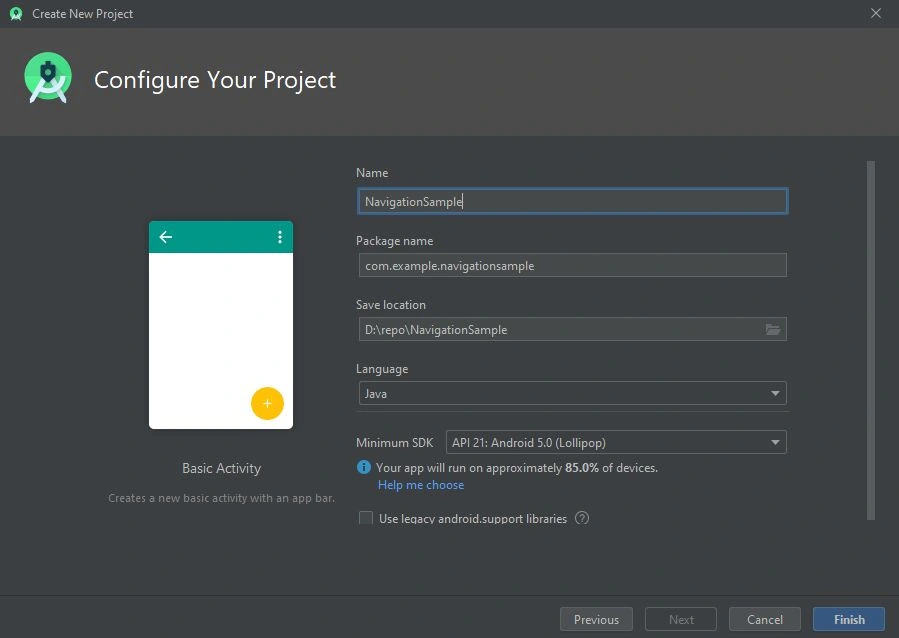
Name project as Navigation sample.
Step 3
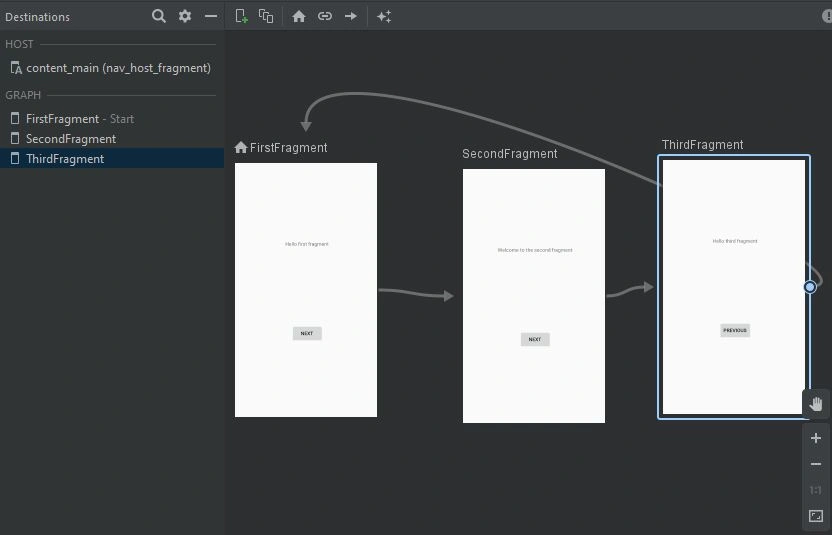
After the successfull build then it will generate a navigation graph for you. Create a third fragment name it "ThirdFragment" and place it in a navigation graph. See your nav_graph.xml file.
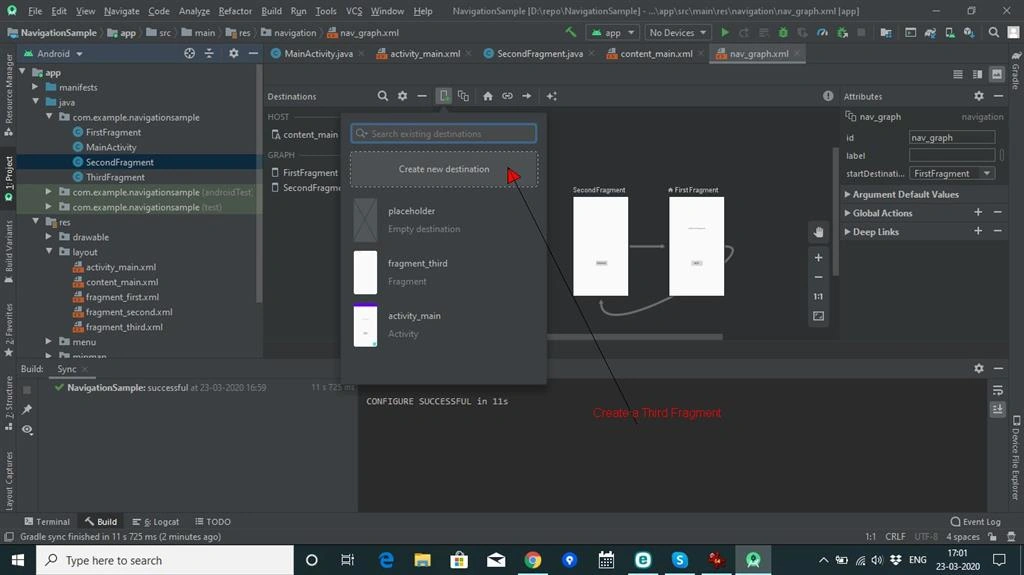
After the successfull build then it will generate a navigation graph for you. Create a third fragment name it "ThirdFragment" and place it in a navigation graph. See your nav_graph.xml file.
Navigation Graph
A navigation graph is a resource file that contains all of your destinations and actions. The graph represents all of your app's navigation paths.
Pravesh DubeyPosted May 4, 2020, 1:47 AM
Nice article