

A LINQ JOIN keyword is used to combine rows from two or more tables, based on a common field between them. Like SQL Joins, the Linq is also provided some keywords to achieve Inner Join and Outer Join. As we know from SQL outer join is divided into 2 groups that is Left Outer Join and Right Outer Join. Here, in this tip, we learn how to achieve these joins in LINQ. Let us discuss what is inner join.
- INNER JOIN: Inner Join only return matched records between two or more tables based on a common field between these tables.
- LEFT OUTER JOIN: Return all rows from the left table, and the matched rows from the right table.
- RIGHT JOIN: Return all rows from the right table, and the matched rows from the left table.
- FULL JOIN: Return all rows when there is a match in ONE of the tables.
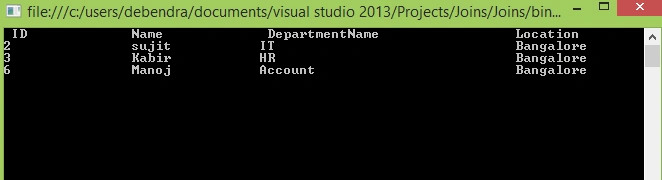
Here in this console application, I have two lists (EmployeeList and DepartmentList). Considering these 2 lists as 2 different tables, I am joining these 2 tables on the basis of a common column, i.e., ID.
INNER JOIN

- using System;
- using System.Collections.Generic;
- using System.Linq;
- using System.Text;
- using System.Threading.Tasks;
- namespace Joins
- {
- public class Employee
- {
- public int Id { get; set; }
- public int age { get; set; }
- public string name { get; set; }
- public string gender { get; set; }
- }
- public class Department
- {
- public int id { get; set; }
- public string Departments { get; set; }
- public string Location { get; set; }
- }
- class Demo
- {
- static void Main(string[] args)
- {
- List<Employee> li = new List<Employee>();
- li.Add(new Employee
- { Id = 1, age = 19, name = "Ritesh", gender = "M" });
- li.Add(new Employee
- { Id = 2, age = 20, name = "sujit", gender = "M" });
- li.Add(new Employee
- { Id = 3, age = 23, name = "Kabir", gender = "F" });
- li.Add(new Employee
- { Id = 4, age = 3, name = "mantu", gender = "F" });
- li.Add(new Employee
- { Id = 5, age = 24, name = "Kamlesh", gender = "M" });
- li.Add(new Employee
- { Id = 6, age = 28, name = "Manoj", gender = "M" });
- List<Department> Deli = new List<Department>();
- Deli.Add(new Department
- { id = 2, Departments = "IT", Location = "Bangalore" });
- Deli.Add(new Department
- { id = 8, Departments = "IT", Location = "Bangalore" });
- Deli.Add(new Department
- { id = 3, Departments = "HR", Location = "Bangalore" });
- Deli.Add(new Department
- { id = 7, Departments = "HR", Location = "Bangalore" });
- Deli.Add(new Department
- { id = 6, Departments = "Account", Location = "Bangalore" });
- var result = from emp in li
- join
- de in Deli
- on emp.Id equals de.id
- select new
- {
- EmployeeId = emp.Id,
- EmployeeName = emp.name,
- Department = de.Departments,
- Location = de.Location
- };
- Console.WriteLine(" ID\t\tName\t\t DepartmentName \t\tLocation");
- foreach (var obj in result)
- {
- Console.WriteLine(obj.EmployeeId + "\t\t" + obj.EmployeeName +
- "\t\t" + obj.Department + "\t\t\t\t" + obj.Location);
- }
- Console.ReadLine();
- }
- }
- }
LEFT OUTER JOIN
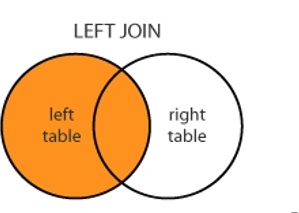
Here is the program for Left Outer join.
- using System;
- using System.Collections.Generic;
- using System.Linq;
- using System.Text;
- using System.Threading.Tasks;
- namespace Joins
- {
- public class Employee
- {
- public int Id { get; set; }
- public int age { get; set; }
- public string name { get; set; }
- public string gender { get; set; }
- }
- public class Department
- {
- public int id { get; set; }
- public string Departments { get; set; }
- public string Location { get; set; }
- }
- class Demo
- {
- static void Main(string[] args)
- {
- List<Employee> li = new List<Employee>();
- li.Add(new Employee { Id = 1, age = 19, name = "Ritesh", gender = "M" });
- li.Add(new Employee { Id = 2, age = 20, name = "sujit", gender = "M" });
- li.Add(new Employee { Id = 3, age = 23, name = "Kabir", gender = "F" });
- li.Add(new Employee { Id = 4, age = 3, name = "mantu", gender = "F" });
- li.Add(new Employee { Id = 5, age = 24, name = "Kamlesh", gender = "M" });
- li.Add(new Employee { Id = 6, age = 28, name = "Manoj", gender = "M" });
- List<Department> Deli = new List<Department>();
- Deli.Add(new Department { id = 2, Departments = "IT", Location = "Bangalore" });
- Deli.Add(new Department { id = 8, Departments = "IT", Location = "Ranchi" });
- Deli.Add(new Department { id = 3, Departments = "HR", Location = "bihar" });
- Deli.Add(new Department { id = 7, Departments = "HR", Location = "bhubaneshwar" });
- Deli.Add(new Department { id = 6, Departments = "Account", Location = "keonjhar" });
- var result = from emp in li
- join
- de in Deli
- on emp.Id equals de.id into tempstorage
- from dx in tempstorage.DefaultIfEmpty()
- select new
- {
- EmployeeId = emp.Id,
- EmployeeName = emp.name,
- Department = (dx != null) ? dx.Departments : "NULL",
- Location = (dx != null) ? dx.Location : "NULL"
- };
- Console.WriteLine("ID\t\tName\t\t DepartmentName \t\tLocation");
- foreach (var obj in result)
- {
- Console.WriteLine(obj.EmployeeId + "\t\t" +
- obj.EmployeeName + "\t\t" + obj.Department + "\t\t\t\t" + obj.Location);
- }
- Console.ReadLine();
- }
- }
- }

RIGHT OUTER JOIN

- using System;
- using System.Collections.Generic;
- using System.Linq;
- using System.Text;
- using System.Threading.Tasks;
- namespace Joins
- {
- public class Employee
- {
- public int Id { get; set; }
- public int age { get; set; }
- public string name { get; set; }
- public string gender { get; set; }
- }
- public class Department
- {
- public int id { get; set; }
- public string Departments { get; set; }
- public string Location { get; set; }
- }
- class Demo
- {
- static void Main(string[] args)
- {
- List<Employee> li = new List<Employee>();
- li.Add(new Employee
- { Id = 1, age = 19, name = "Ritesh", gender = "M" });
- li.Add(new Employee
- { Id = 2, age = 20, name = "sujit", gender = "M" });
- li.Add(new Employee
- { Id = 3, age = 23, name = "Kabir", gender = "F" });
- li.Add(new Employee
- { Id = 4, age = 3, name = "mantu", gender = "F" });
- li.Add(new Employee
- { Id = 5, age = 24, name = "Kamlesh", gender = "M" });
- li.Add(new Employee
- { Id = 6, age = 28, name = "Manoj", gender = "M" });
- List<Department> Deli = new List<Department>();
- Deli.Add(new Department
- { id = 2, Departments = "IT", Location = "Bangalore" });
- Deli.Add(new Department
- { id = 8, Departments = "IT", Location = "Bangalore" });
- Deli.Add(new Department
- { id = 3, Departments = "HR", Location = "Bangalore" });
- Deli.Add(new Department
- { id = 7, Departments = "HR", Location = "Bangalore" });
- Deli.Add(new Department
- { id = 6, Departments = "Account", Location = "Bangalore" });
- var result = from
- de in Deli
- join
- emp in li
- on de.id equals emp.Id into tempstorage
- from dx in tempstorage.DefaultIfEmpty()
- select new
- {
- EmployeeId = (dx != null) ? dx.Id :0,
- EmployeeName = (dx != null) ? dx.name : "NULL",
- Department = de.Departments,
- Location = de.Location
- };
- Console.WriteLine("ID\t\tName\t\t DepartmentName \t\tLocation");
- foreach (var obj in result)
- {
- Console.WriteLine(obj.EmployeeId + "\t\t" + obj.EmployeeName +
- "\t\t" + obj.Department + "\t\t\t\t" + obj.Location);
- }
- Console.ReadLine();
- }
- }
- }

So in this, we can see 2 different tables in different ways in LINQ.
Sonu ChaudharyPosted May 26, 2016, 10:32 AM
good one
Bhuvanesh MohankumarPosted May 6, 2016, 3:53 PM
Good one...
Vivek KumarPosted Apr 28, 2016, 3:09 PM
Good one
Uday Bhan SinghPosted Feb 2, 2016, 11:36 PM
Nice Thanks for sharing
Jaco ZwartsPosted Feb 2, 2016, 1:29 AM
Nice thank you for sharing
Debasis SahaPosted Feb 1, 2016, 11:41 PM
Nice article...
Dhanik SahniPosted Feb 1, 2016, 11:33 PM
Perfect and it is very useful. Please keep sharing
Raja TPosted Feb 1, 2016, 10:24 PM
Nice, Thanks for sharing
Ranjan DailataPosted Feb 1, 2016, 8:02 PM
Good job :) Small suggestion, the variable names like 'Deli', 'li' could be defined with a meaningful name.