

Today, in this article we will see how to perform join operation using LINQ
queries. I have created two tables in database named 'Candidate'. The first
table name is Employee. the second table name is Student. I have used LINQ to
SQL to communicate with database.
The data context name created for LINQ To SQL is: DataClasses1DataContext.
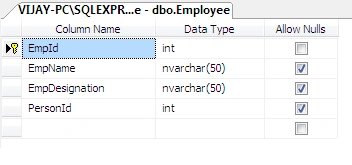
The Design Mode of Employee Table looks like this:
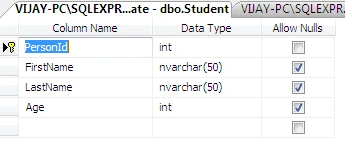
The Design Mode of Student Table looks like this:
The Complete Code for WebForm1.aspx looks like this:
<%@
Page Language="C#"
AutoEventWireup="true"
CodeBehind="WebForm1.aspx.cs"
Inherits="JOINS_LINQ.WebForm1"
%>
<!DOCTYPE
html PUBLIC
"-//W3C//DTD XHTML 1.0 Transitional//EN"
"http://www.w3.org/TR/xhtml1/DTD/xhtml1-transitional.dtd">
<html
xmlns="http://www.w3.org/1999/xhtml">
<head
id="Head1" runat="server">
<title></title>
<style
type="text/css">
.gridstyle
{
float: left;
}
</style>
</head>
<body>
<form
id="form1"
runat="server">
<div>
<center>
<asp:Label
ID="Label2"
runat="server"
Text="Left Outer Join"
Font-Bold="true"
CssClass="gridstyle"></asp:Label><br
/>
<br
/>
<asp:GridView
ID="GridView1"
runat="server"
CssClass="gridstyle"
BackColor="White"
BorderColor="#3366CC"
BorderStyle="None"
BorderWidth="1px"
CellPadding="4"
OnLoad="PageLoad">
<FooterStyle
BackColor="#99CCCC"
ForeColor="#003399"
/>
<HeaderStyle
BackColor="#003399"
Font-Bold="True"
ForeColor="#CCCCFF"
/>
<PagerStyle
BackColor="#99CCCC"
ForeColor="#003399"
HorizontalAlign="Left"
/>
<RowStyle
BackColor="White"
ForeColor="#003399"
/>
<SelectedRowStyle
BackColor="#009999"
Font-Bold="True"
ForeColor="#CCFF99"
/>
<SortedAscendingCellStyle
BackColor="#EDF6F6"
/>
<SortedAscendingHeaderStyle
BackColor="#0D4AC4"
/>
<SortedDescendingCellStyle
BackColor="#D6DFDF"
/>
<SortedDescendingHeaderStyle
BackColor="#002876"
/>
</asp:GridView>
</center>
<br
/>
<br
/>
<center>
<asp:Label
ID="Label1"
runat="server"
Text="Right Outer Join"
Font-Bold="true"
CssClass="gridstyle"></asp:Label><br
/>
<br
/>
<asp:GridView
ID="GridView2"
runat="server"
BackColor="White"
CssClass="gridstyle"
BorderColor="#3366CC"
BorderStyle="None"
BorderWidth="1px"
CellPadding="4"
OnLoad="PageLoad">
<FooterStyle
BackColor="#99CCCC"
ForeColor="#003399"
/>
<HeaderStyle
BackColor="#003399"
Font-Bold="True"
ForeColor="#CCCCFF"
/>
<PagerStyle
BackColor="#99CCCC"
ForeColor="#003399"
HorizontalAlign="Left"
/>
<RowStyle
BackColor="White"
ForeColor="#003399"
/>
<SelectedRowStyle
BackColor="#009999"
Font-Bold="True"
ForeColor="#CCFF99"
/>
<SortedAscendingCellStyle
BackColor="#EDF6F6"
/>
<SortedAscendingHeaderStyle
BackColor="#0D4AC4"
/>
<SortedDescendingCellStyle
BackColor="#D6DFDF"
/>
<SortedDescendingHeaderStyle
BackColor="#002876"
/>
</asp:GridView>
</center>
<center>
<asp:Label
ID="Label3"
runat="server"
Text="Concat Operation"
Font-Bold="true"
CssClass="gridstyle"></asp:Label><br
/>
<br
/>
<asp:GridView
ID="GridView3"
runat="server"
BackColor="White"
CssClass="gridstyle"
BorderColor="#3366CC"
BorderStyle="None"
BorderWidth="1px"
CellPadding="4"
OnLoad="PageLoad">
<FooterStyle
BackColor="#99CCCC"
ForeColor="#003399"
/>
<HeaderStyle
BackColor="#003399"
Font-Bold="True"
ForeColor="#CCCCFF"
/>
<PagerStyle
BackColor="#99CCCC"
ForeColor="#003399"
HorizontalAlign="Left"
/>
<RowStyle
BackColor="White"
ForeColor="#003399"
/>
<SelectedRowStyle
BackColor="#009999"
Font-Bold="True"
ForeColor="#CCFF99"
/>
<SortedAscendingCellStyle
BackColor="#EDF6F6"
/>
<SortedAscendingHeaderStyle
BackColor="#0D4AC4"
/>
<SortedDescendingCellStyle
BackColor="#D6DFDF"
/>
<SortedDescendingHeaderStyle
BackColor="#002876"
/>
</asp:GridView>
</center>
</div>
</form>
</body>
</html>
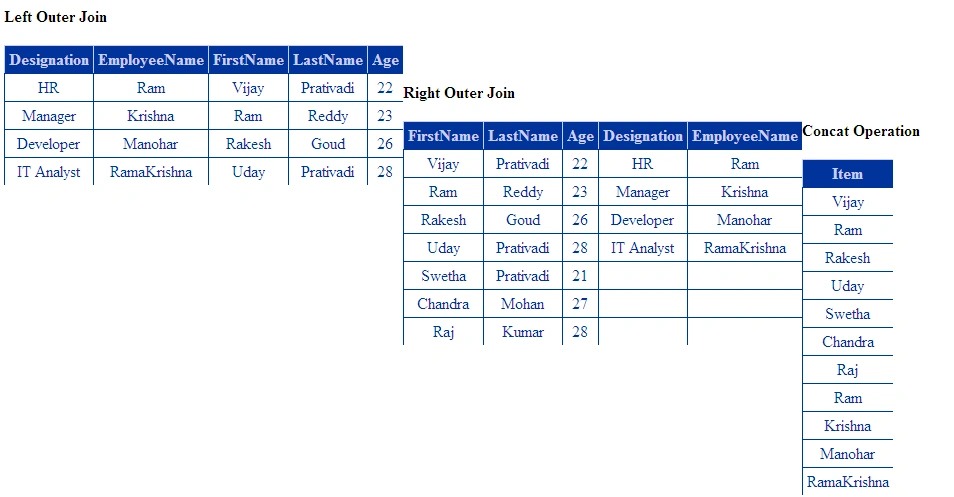
Code Toolbox Requirements:
siriPosted May 24, 2013, 4:16 AM
Could u please tell me how to update multiple table values?
elyPosted Feb 24, 2012, 2:15 AM
Hi, can i know why u use p.EmpId equals r.PersonId ? why not 'p.PersonId equals r.PersonId' ?
Rajesh KumarPosted Dec 14, 2011, 6:32 PM
Good Work.....
Manoj AcharyaPosted Dec 13, 2011, 3:17 PM
Dear Vijay, It is very use full post. Thanks and keep it up.
Michell JohnsonPosted Dec 13, 2011, 11:44 AM
Dear Vijay it's really a great work, and it's very useful task thanks a lot.