Hello Geeks.
Welcome to all of you in 5th day of our journey. In today's journey we cover the topic "How to make a table in Bootstrap" but before starting our journey I highly recommend you take a quick look at our previous day's journeys.
Now I will start today's journey.
Table: A table is a structure to organise data in a systematic way. Using Bootstrap we can easily make our table responsive.
Syntax for table
  1. <table class="table">
  2. <tr>
  3. <td></td>
  4. </tr>
  5. </table>
Syntax for responsive table
  1. <div class="responsive">
  2. <table class="table">
  3. <tr>
  4. <td></td>
  5. </tr>
  6. </table>
  7. </div>
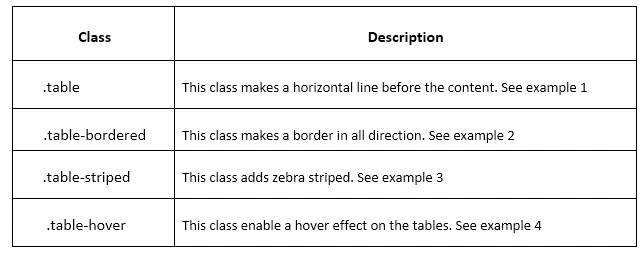
Predefined classes of table

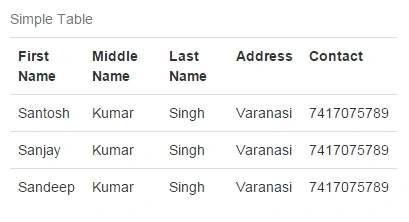
Now see the Example 1
  1. <!DOCTYPE html>
  2. <html lang="en">
  3. <head>
  4. <meta charset="UTF-8">
  5. <title>Bootstrap 3 Dropdowns </title>
  6. <link rel="stylesheet" href="https://maxcdn.bootstrapcdn.com/bootstrap/3.3.4/css/bootstrap.min.css">
  7. <link rel="stylesheet" href="https://maxcdn.bootstrapcdn.com/bootstrap/3.3.4/css/bootstrap-theme.min.css">
  8. <script src="https://ajax.googleapis.com/ajax/libs/jquery/1.11.2/jquery.min.js"></script>
  9. <script src="https://maxcdn.bootstrapcdn.com/bootstrap/3.3.4/js/bootstrap.min.js"></script>
  10. </head>
  11. <body>
  12. <form>
  13. <div class="container">
  14. <br />
  15. <table class="table">
  16. <caption>Simple Table</caption>
  17. <tr>
  18. <th>First Name</th>
  19. <th>Middle Name</th>
  20. <th>Last Name</th>
  21. <th>Address</th>
  22. <th>Contact</th>
  23. </tr>
  24. <tr>
  25. <td>Santosh</td>
  26. <td>Kumar</td>
  27. <td>Singh</td>
  28. <td>Varanasi</td>
  29. <td>7417075789</td>
  30. </tr>
  31. <tr>
  32. <td>Sanjay</td>
  33. <td>Kumar</td>
  34. <td>Singh</td>
  35. <td>Varanasi</td>
  36. <td>7417075789</td>
  37. </tr>
  38. <tr>
  39. <td>Sandeep</td>
  40. <td>Kumar</td>
  41. <td>Singh</td>
  42. <td>Varanasi</td>
  43. <td>7417075789</td>
  44. </tr>
  45. </table>
  46. </div>
  47. </form>
  48. </body>
  49. </html>
Output


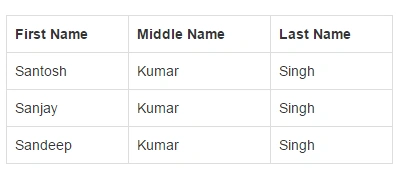
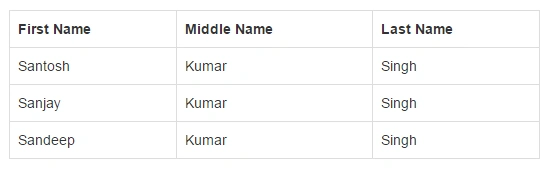
Example of bordered Table
  1. <!DOCTYPE html>
  2. <html lang="en">
  3. <head>
  4. <meta charset="UTF-8">
  5. <title>Bootstrap 3 Dropdowns </title>
  6. <link rel="stylesheet" href="https://maxcdn.bootstrapcdn.com/bootstrap/3.3.4/css/bootstrap.min.css">
  7. <link rel="stylesheet" href="https://maxcdn.bootstrapcdn.com/bootstrap/3.3.4/css/bootstrap-theme.min.css">
  8. <script src="https://ajax.googleapis.com/ajax/libs/jquery/1.11.2/jquery.min.js"></script>
  9. <script src="https://maxcdn.bootstrapcdn.com/bootstrap/3.3.4/js/bootstrap.min.js"></script>
  10. </head>
  11. <body>
  12. <form>
  13. <div class="container">
  14. <br />
  15. <table class="table table-bordered">
  16. <tr>
  17. <th>First Name</th>
  18. <th>Middle Name</th>
  19. <th>Last Name</th>
  20. </tr>
  21. <tr>
  22. <td>Santosh</td>
  23. <td>Kumar</td>
  24. <td>Singh</td>
  25. </tr>
  26. <tr>
  27. <td>Sanjay</td>
  28. <td>Kumar</td>
  29. <td>Singh</td>
  30. </tr>
  31. <tr>
  32. <td>Sandeep</td>
  33. <td>Kumar</td>
  34. <td>Singh</td>
  35. </tr>
  36. </table>
  37. </div>
  38. </form>
  39. </body>
  40. </html>
Output
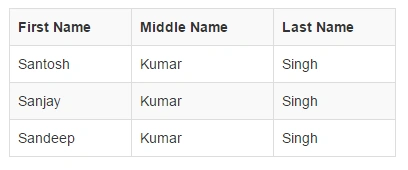
Example of Striped table Output
  1. <!DOCTYPE html>
  2. <html lang="en">
  3. <head>
  4. <meta charset="UTF-8">
  5. <title>Bootstrap 3 Dropdowns </title>
  6. <link rel="stylesheet" href="https://maxcdn.bootstrapcdn.com/bootstrap/3.3.4/css/bootstrap.min.css">
  7. <link rel="stylesheet" href="https://maxcdn.bootstrapcdn.com/bootstrap/3.3.4/css/bootstrap-theme.min.css">
  8. <script src="https://ajax.googleapis.com/ajax/libs/jquery/1.11.2/jquery.min.js"></script>
  9. <script src="https://maxcdn.bootstrapcdn.com/bootstrap/3.3.4/js/bootstrap.min.js"></script>
  10. </head>
  11. <body>
  12. <form>
  13. <div class="container">
  14. <br />
  15. <table class="table table-bordered table-striped">
  16. <tr>
  17. <th>First Name</th>
  18. <th>Middle Name</th>
  19. <th>Last Name</th>
  20. </tr>
  21. <tr>
  22. <td>Santosh</td>
  23. <td>Kumar</td>
  24. <td>Singh</td>
  25. </tr>
  26. <tr>
  27. <td>Sanjay</td>
  28. <td>Kumar</td>
  29. <td>Singh</td>
  30. </tr>
  31. <tr>
  32. <td>Sandeep</td>
  33. <td>Kumar</td>
  34. <td>Singh</td>
  35. </tr>
  36. </table>
  37. </div>
  38. </form>
  39. </body>
  40. </html>

Example of Hover table
  1. <!DOCTYPE html>
  2. <html lang="en">
  3. <head>
  4. <meta charset="UTF-8">
  5. <title>Bootstrap 3 Dropdowns </title>
  6. <link rel="stylesheet" href="https://maxcdn.bootstrapcdn.com/bootstrap/3.3.4/css/bootstrap.min.css">
  7. <link rel="stylesheet" href="https://maxcdn.bootstrapcdn.com/bootstrap/3.3.4/css/bootstrap-theme.min.css">
  8. <script src="https://ajax.googleapis.com/ajax/libs/jquery/1.11.2/jquery.min.js"></script>
  9. <script src="https://maxcdn.bootstrapcdn.com/bootstrap/3.3.4/js/bootstrap.min.js"></script>
  10. </head>
  11. <body>
  12. <form>
  13. <div class="container">
  14. <br />
  15. <table class="table table-bordered table-hover">
  16. <tr>
  17. <th>First Name</th>
  18. <th>Middle Name</th>
  19. <th>Last Name</th>
  20. </tr>
  21. <tr>
  22. <td>Santosh</td>
  23. <td>Kumar</td>
  24. <td>Singh</td>
  25. </tr>
  26. <tr>
  27. <td>Sanjay</td>
  28. <td>Kumar</td>
  29. <td>Singh</td>
  30. </tr>
  31. <tr>
  32. <td>Sandeep</td>
  33. <td>Kumar</td>
  34. <td>Singh</td>
  35. </tr>
  36. </table>
  37. </div>
  38. </form>
  39. </body>
  40. </html>
Output

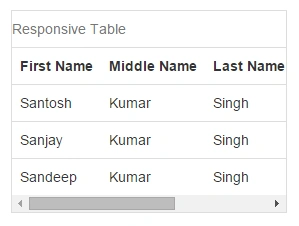
Responsive Table: To make a responsive table use a class="responsive" inside a div.
Example
  1. <!DOCTYPE html>
  2. <html lang="en">
  3. <head>
  4. <meta charset="UTF-8">
  5. <title>Bootstrap 3 Dropdowns </title>
  6. <link rel="stylesheet" href="https://maxcdn.bootstrapcdn.com/bootstrap/3.3.4/css/bootstrap.min.css">
  7. <link rel="stylesheet" href="https://maxcdn.bootstrapcdn.com/bootstrap/3.3.4/css/bootstrap-theme.min.css">
  8. <script src="https://ajax.googleapis.com/ajax/libs/jquery/1.11.2/jquery.min.js"></script>
  9. <script src="https://maxcdn.bootstrapcdn.com/bootstrap/3.3.4/js/bootstrap.min.js"></script>
  10. </head>
  11. <body>
  12. <form>
  13. <div class="container">
  14. <br />
  15. <div class="table-responsive">
  16. <table class="table">
  17. <caption>Responsive Table</caption>
  18. <tr>
  19. <th>First Name</th>
  20. <th>Middle Name</th>
  21. <th>Last Name</th>
  22. <th>Address</th>
  23. <th>Contact</th>
  24. </tr>
  25. <tr>
  26. <td>Santosh</td>
  27. <td>Kumar</td>
  28. <td>Singh</td>
  29. <td>Varanasi</td>
  30. <td>7417075789</td>
  31. </tr>
  32. <tr>
  33. <td>Sanjay</td>
  34. <td>Kumar</td>
  35. <td>Singh</td>
  36. <td>Varanasi</td>
  37. <td>7417075789</td>
  38. </tr>
  39. <tr>
  40. <td>Sandeep</td>
  41. <td>Kumar</td>
  42. <td>Singh</td>
  43. <td>Varanasi</td>
  44. <td>7417075789</td>
  45. </tr>
  46. </table>
  47. </div>
  48. </div>
  49. </form>
  50. </body>
  51. </html>
Output

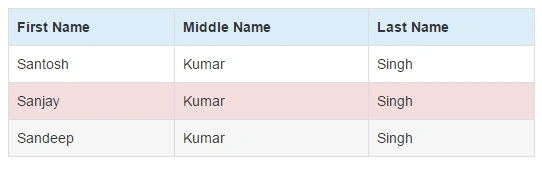
Contextual Classes: There are some contextual classes like the following.
Active
  1. <table>
  2. <tr class="active">
  3. <td></td>
  4. </table>
Info
  1. <table>
  2. <tr class="info">
  3. <td></td>
  4. </table>
Success
  1. <table>
  2. <tr class="success">
  3. <td></td>
  4. </table>
Danger
  1. <table>
  2. <tr class="danger">
  3. <td></td>
  4. </table>
Warning
  1. <table>
  2. <tr class="warning">
  3. <td></td>
  4. </table>
Example of Contextual
  1. <!DOCTYPE html>
  2. <html lang="en">
  3. <head>
  4. <meta charset="UTF-8">
  5. <title>Bootstrap 3 Dropdowns </title>
  6. <link rel="stylesheet" href="https://maxcdn.bootstrapcdn.com/bootstrap/3.3.4/css/bootstrap.min.css">
  7. <link rel="stylesheet" href="https://maxcdn.bootstrapcdn.com/bootstrap/3.3.4/css/bootstrap-theme.min.css">
  8. <script src="https://ajax.googleapis.com/ajax/libs/jquery/1.11.2/jquery.min.js"></script>
  9. <script src="https://maxcdn.bootstrapcdn.com/bootstrap/3.3.4/js/bootstrap.min.js"></script>
  10. </head>
  11. <body>
  12. <form>
  13. <div class="container">
  14. <br />
  15. <table class="table table-bordered">
  16. <tr class="info">
  17. <th>First Name</th>
  18. <th>Middle Name</th>
  19. <th>Last Name</th>
  20. </tr>
  21. <tr>
  22. <td>Santosh</td>
  23. <td>Kumar</td>
  24. <td>Singh</td>
  25. </tr>
  26. <tr class="danger">
  27. <td>Sanjay</td>
  28. <td>Kumar</td>
  29. <td>Singh</td>
  30. </tr>
  31. <tr class="active">
  32. <td>Sandeep</td>
  33. <td>Kumar</td>
  34. <td>Singh</td>
  35. </tr>
  36. </table>
  37. </div>
  38. </form>
  39. </body>
  40. </html>
Output

So here I stop our today's journey. The next day we will meet with a new concept of Bootstrap.
Happy Coding.