

This is an an Open Source jQuery Project. I made this project in jQuery. Here I will explain how to make our project in jQuery. The name of my project is R-NoteBook.
The following is my jQuery and aspx code:
- <%@ Page Language="C#" AutoEventWireup="true" CodeFile="Default.aspx.cs" Inherits="_Default" %>
- <!DOCTYPE html PUBLIC "-//W3C//DTD XHTML 1.0 Transitional//EN" "http://www.w3.org/TR/xhtml1/DTD/xhtml1-transitional.dtd">
- <html xmlns="http://www.w3.org/1999/xhtml">
- <head runat="server">
- <title>R-NoteBook - A jQuery Open Source Project </title>
- <script src="jquery-1.10.2.min.js" type="text/javascript"></script>
- <style type="text/css">
- .tblNoteResult
- {
- border: solid 7px Red;
- }
- .tblNoteResult td
- {
- padding: 5px;
- border: 1px solid #2D4CB1;
- font-family:Verdana;
- font-size:8pt;
- background-color:#E6EFF2;
- }
- .tblNoteResult th
- {
- padding: 5px;
- border: 1px solid green;
- background-color:Green;
- color:#FCE514;
- font-family:Verdana;
- font-size:12pt;
- }
- </style>
- <script type="text/javascript">
- function bindData() {
- $.ajax({
- type: "POST",
- url: "Default.aspx/getData",
- data: "{}",
- contentType: "application/json; charset=utf-8",
- datatype: "jsondata",
- async: "true",
- success: function(response) {
- if ($('#tblRNoteBookResult').length != 0)
- { $("#tblRNoteBookResult").remove(); }
- var table = "<table class='tblNoteResult' id=tblRNoteBookResult cellpadding='10' cellspacing='4' width='90%' align='center'><thead> <tr><th align='left'>Note Title</th><th align='left'>Note Description</th><th align='left'>Posted On</th><th align='left'>Posted By</th></thead> <tbody>";
- for (var i = 0; i <= response.d.length - 1; i++)
- {
- var row = "<tr>";
- row += '<td width=20%>' + response.d[i].NoteTitle + '</td>';
- row += '<td width=50%>' + response.d[i].NoteDesc + '</td>';
- row += '<td width=15%>' + response.d[i].PostedDate + '</td>';
- row += '<td width=15%>' + response.d[i].PostedBy + '</td>';
- row += '</tr>';
- table += row;
- }
- table += '</tbody></table>';
- $('#divRNoteBookData').html(table);
- $("#divRNoteBookData").slideDown("slow");
- },
- error: function(response) {
- alert(response.status + ' chandan ' + response.statusText);
- }
- });
- }
- $(document).ready(function() {
- bindData();
- $('#btnSubmit').click(function() {
- var NoteTitle = $("#txtTitle").val();
- var NoteDescription = $("#txtDescription").val();
- var PostedBy = $("#txtName").val();
- $.ajax({
- type: "POST",
- url: "Default.aspx/saveData",
- data: "{Title:'" + NoteTitle + "',Description:'" + NoteDescription + "',PostedBy:'" + PostedBy + "'}",
- contentType: "application/json; charset=utf-8",
- datatype: "jsondata",
- async: "true",
- success: function(response) {
- var myObject = eval('(' + response.d + ')');
- if (myObject > 0) {
- alert("Note Saved Successfully.");
- // Binding All Note
- bindData();
- // Clear All Text Box Values
- $("#txtTitle").val("");
- $("#txtDescription").val("");
- $("#txtName").val("");
- }
- else {
- }
- },
- error: function(response) {
- alert(response.status + ' ' + response.statusText);
- }
- });
- });
- });
- </script>
- </head>
- <body>
- <form id="form1" runat="server">
- <table cellpadding="2" cellspacing="2" width="60%" align="center" style="border: Solid 5px Green;
- font-weight: bold; font-size: 12pt; background-color: Skyblue; color: Blue;">
- <tr>
- <td align="center" colspan="2" style="background-color: Yellow; font-family: Verdana;
- color: Red;">
- Write Your Daily Note
- </td>
- </tr>
- <tr>
- <td>
- Your Name #:
- </td>
- <td>
- <asp:TextBox runat="server" ID="txtName" Width="350px" />
- </td>
- </tr>
- <tr>
- <td>
- Note Title #:
- </td>
- <td>
- <asp:TextBox runat="server" ID="txtTitle" Width="350px" />
- </td>
- </tr>
- <tr>
- <td>
- Note Description #:
- </td>
- <td>
- <asp:TextBox runat="server" ID="txtDescription" Width="350px" Height="100px" TextMode="MultiLine" />
- </td>
- </tr>
- <tr>
- <td>
- </td>
- <td>
- <asp:Button ID="btnSubmit" runat="server" Text="Save Note" Width="120px" />
- </td>
- </tr>
- <tr>
- <td colspan="2">
- </td>
- </tr>
- </table>
- <div id="divRNoteBookData">
- </div>
- </form>
- </body>
- </html>
- using System;
- using System.Configuration;
- using System.Data;
- using System.Linq;
- using System.Web;
- using System.Web.Security;
- using System.Web.UI;
- using System.Web.UI.HtmlControls;
- using System.Web.UI.WebControls;
- using System.Web.UI.WebControls.WebParts;
- using System.Xml.Linq;
- using System.Web.Services;
- using System.Data.SqlClient;
- using System.Collections.Generic;
- public partial class _Default : System.Web.UI.Page
- {
- protected void Page_Load(object sender, EventArgs e)
- {
- }
- [WebMethod]
- public static int saveData(string Title, string Description, string PostedBy)
- {
- try
- {
- SqlConnection con = new SqlConnection(@"DATA SOURCE=MyPC\SqlServer2k8;INTEGRATED SECURITY=TRUE;DATABASE=R-NoteBook");
- SqlDataAdapter da = new SqlDataAdapter("INSERT INTO MyNote(Title,Description, PostedBy) VALUES('" + Title + "', '" + Description + "', '" + PostedBy + "')", con);
- DataSet ds = new DataSet();
- da.Fill(ds);
- return 1;
- }
- catch
- {
- return -1;
- }
- }
- [WebMethod]
- public static RNoteBook[] getData()
- {
- RNoteBookCollection RNBC = new RNoteBookCollection();
- try
- {
- SqlConnection con = new SqlConnection(@"DATA SOURCE=MyPC\SqlServer2k8;INTEGRATED SECURITY=TRUE;DATABASE=R-NoteBook");
- if (con.State == ConnectionState.Closed)
- {
- con.Open();
- }
- SqlDataReader dr;
- SqlCommand cmd;
- string FetchData = "Select * From MyNote ORDER BY Posted_Date DESC";
- cmd = new SqlCommand(FetchData, con);
- dr = cmd.ExecuteReader();
- if (dr.Read())
- {
- while (dr.Read())
- {
- RNoteBook NB = new RNoteBook();
- NB.NoteTitle = dr["Title"].ToString();
- NB.NoteDesc = dr["Description"].ToString();
- NB.PostedBy = dr["PostedBy"].ToString();
- NB.PostedDate = dr["Posted_Date"].ToString();
- RNBC.Add(NB);
- }
- }
- return RNBC.ToArray();
- }
- catch
- {
- return RNBC.ToArray();
- }
- }
- }
- public class RNoteBook
- {
- public string NoteTitle { get; set; }
- public string NoteDesc { get; set; }
- public string PostedBy { get; set; }
- public string PostedDate { get; set; }
- }
- public class RNoteBookCollection : List<RNoteBook>
- {
- public void Add(RNoteBook RNB)
- {
- base.Add(RNB);
- }
- }
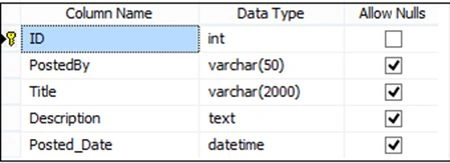
Image 1.
I have copied the script of my database into the App_Data folder in the application.

Image 2.
Now run the application. You can enter your note and click on the Save Note button.

Image 3.
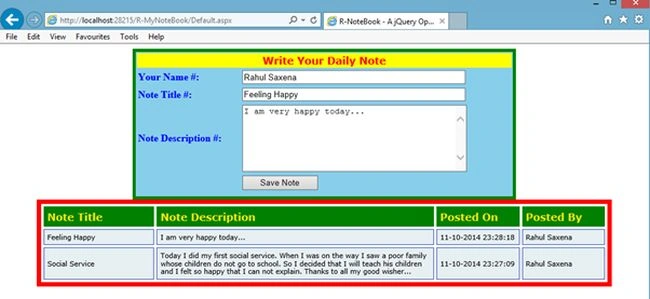
Image 4.
Here in this project you can see that to save data and to fetch data I used a JSON request. I made 2 web methods on Defaulr.aspx.cs.
Rahul Kumar SaxenaPosted Apr 25, 2015, 11:44 PM
Thanks Gowtham Rajamanickam...
Gowtham RajamanickamPosted Apr 25, 2015, 6:14 AM
good