Introduction
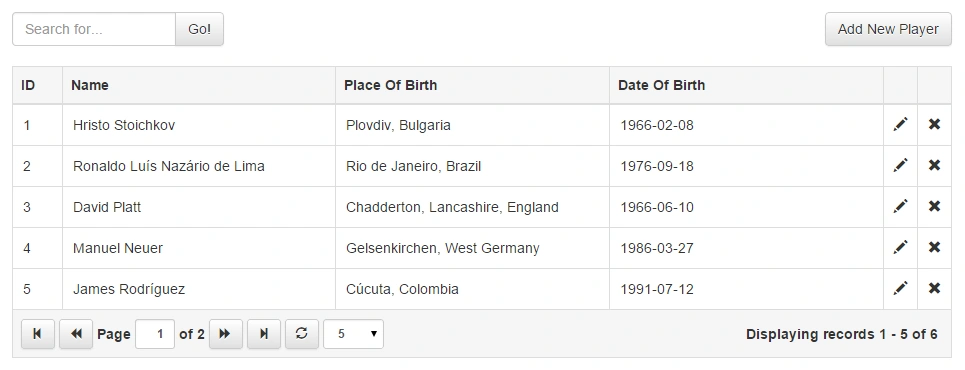
This article shows how to easily implement paging, sorting, filtering and CRUD operations with the jQuery Grid Plugin in ASP.NET MVC with bootstrap.
Background
In the sample project that you can download from this article I'm using
jQuery Grid 0.4.3 by gijgo.com,
jQuery 2.1.3,
Bootstrap 3.3.4 and
AspNet.Mvc 5.2.3. A few words about jQuery Grid by gijgo.com. Since the other libraries, that are in use are pretty popular compared to the grid plugin, I'm going to provide you some info about this plugin.
- Stylish and Featured Tabular data presentation control.
- JavaScript control for representing and manipulating tabular data on the web.
- Ajax Enabled.
- Can be integrated with any of the server-side technologies like ASP, JavaServelets, JSP, PHP and so on.
- Very simple to integrate with ASP.NET.
- Supports pagination, JavaScript and server-side data sources.
- Supports jQuery UI and Bootstrap.
- Free open-source tool distributed under the MIT License.
You can find the documentation about the version of the plugin that is in use in this article at
http://gijgo.com/version_0_4/Documentation. Integrating jQuery Grid with ASP.NET MVC step-by-step.
- Create a new ASP.NET MVC project in Visual Studio.
- I assume that jQuery and bootstrap has been added to your ASP.NET MVC project by default. If they are not added you can find and add them to your project via Nuget.
- Add the jQuery Grid by gijgo.com via Nuget. You can find more info at https://www.nuget.org/packages/jQuery.Grid/
- Ensure that you have a reference to the jquery.js, bootstrap.css, grid.css and grid.js files in the pages where you are planning to use the jQuery grid.
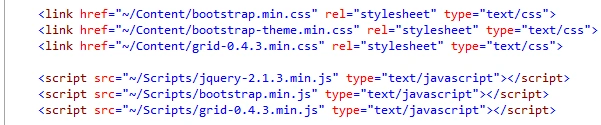
In order to use the grid plugin you will need a HTML table tag for a base element of the grid. I recommend to use the "data-source" attribute of the table as identification for the location of source URL on the server side.
- <table id="grid" data-source="@Url.Action("GetPlayers")"></table>
Then, we need to initialize the table as a jQuery grid with the fields that we are planning to display in the Grid.
- grid = $("#grid").grid({
- dataKey: "ID",
- uiLibrary: "bootstrap",
- columns: [
- { field: "ID", width: 50, sortable: true },
- { field: "Name", sortable: true },
- { field: "PlaceOfBirth", title: "Place Of Birth", sortable: true },
- { field: "DateOfBirth", title: "Date Of Birth", sortable: true },
- { field: "Edit", title: "", width: 34, type: "icon", icon: "glyphicon-pencil", tooltip: "Edit", events: { "click": Edit } },
- { field: "Delete", title: "", width: 34, type: "icon", icon: "glyphicon-
remove", tooltip: "Delete", events: { "click": Remove } }
- ],
- pager: { enable: true, limit: 5, sizes: [2, 5, 10, 20] }
- });
If you want to be able to sort by a specific column you need to set the sortable option of the colum to true. When you do that, the grid plugin will send information to the server about the field name that needs to be sorted. In order to configure paging you need to use the pager option from where you can control the paging.
In the sample project I use the following code to implement simple CRUD operations over the data inside the grid.
- function Add() {
- $("#playerId").val("");
- $("#name").val("");
- $("#placeOfBirth").val("");
- $("#dateOfBirth").val("");
- $("#playerModal").modal("show");
- }
- function Edit(e) {
- $("#playerId").val(e.data.id);
- $("#name").val(e.data.record.Name);
- $("#placeOfBirth").val(e.data.record.PlaceOfBirth);
- $("#dateOfBirth").val(e.data.record.DateOfBirth);
- $("#playerModal").modal("show");
- }
- function Save() {
- var player = {
- ID: $("#playerId").val(),
- Name: $("#name").val(),
- PlaceOfBirth: $("#placeOfBirth").val(),
- DateOfBirth: $("#dateOfBirth").val()
- };
- $.ajax({ url: "Home/Save", type: "POST", data: { player: player } })
- .done(function () {
- grid.reload();
- $("#playerModal").modal("hide");
- })
- .fail(function () {
- alert("Unable to save.");
- $("#playerModal").modal("hide");
- });
- }
- function Remove(e) {
- $.ajax({ url: "Home/Remove", type: "POST", data: { id: e.data.id } })
- .done(function () {
- grid.reload();
- })
- .fail(function () {
- alert("Unable to remove.");
- });
- }
- function Search() {
- grid.reload({ searchString: $("#search").val() });
- }
Server Side
In the Controller we need only the 4 methods Index, GetPlayers, Save and Remove.
- [NoCache]
- public class HomeController : Controller
- {
- public ActionResult Index()
- {
- return View();
- }
-
- [HttpGet]
- public JsonResult GetPlayers(int? page, int? limit, string sortBy, string direction, string searchString = null)
- {
- int total;
- var records = new GridModel().GetPlayers(page, limit, sortBy, direction, searchString, out total);
- return Json(new { records, total }, JsonRequestBehavior.AllowGet);
- }
-
- [HttpPost]
- public JsonResult Save(Player player)
- {
- new GridModel().Save(player);
- return Json(true);
- }
-
- [HttpPost]
- public JsonResult Remove(int id)
- {
- new GridModel().Remove(id);
- return Json(true);
- }
- }
Please note that I'm using the custom "[NoCache]" attribute for the controller that will resolve some issues with the caching. I recommend the usage of that attribute or a similar mechanism for the prevention of bugs related to caching.
- [AttributeUsage(AttributeTargets.Class | AttributeTargets.Method)]
- public sealed class NoCacheAttribute : ActionFilterAttribute
- {
- public override void OnResultExecuting(ResultExecutingContext filterContext)
- {
- filterContext.HttpContext.Response.Cache.SetExpires(DateTime.UtcNow.AddDays(-1));
- filterContext.HttpContext.Response.Cache.SetValidUntilExpires(false);
- filterContext.HttpContext.Response.Cache.SetRevalidation(HttpCacheRevalidation.AllCaches);
- filterContext.HttpContext.Response.Cache.SetCacheability(HttpCacheability.NoCache);
- filterContext.HttpContext.Response.Cache.SetNoStore();
- base.OnResultExecuting(filterContext);
- }
- }
In the data model of this example I use XML as a data store to simplify the logic in the model. You can customize the date model as you want and replace my implementation with code using relational databases like Microsoft SQL Server, My SQL or other services that are specific for your project.
I hope that this article will be useful for your project. Happy codding!


Tasneem NomaniPosted Feb 15, 2024, 12:10 AM
How can I add a checkbox column to this grid?
Dorababu MekaPosted Dec 15, 2021, 4:07 PM
I have downloaded from Nuget and trying but getting an error as jquery-3.6.0.min.js:2 Uncaught TypeError: $(...).grid is not a function any idea?
Tiago RodriguesPosted Nov 21, 2016, 7:50 AM
Atanas Atanasov, how could I make a column receive the value of 1 or 0 with a condition?example: If (coding) Column receives 0 else receives 1 Is it possible on this grid? Thank you and great article.
Nguyễn VũPosted Sep 30, 2016, 11:40 PM
Thank for nice article. I want to use action link to render edit link in each row. But I don't want to do in template like this: tmpl: 'domain/people/edit/{ID}' }. How can I get the id and pass it like argument to render link.
Amey DeoPosted Sep 19, 2016, 4:50 AM
Very useful code. I would like to know how can we add search boxes below every column name in the same code just to provide better functionality?
RicardoPosted Aug 19, 2016, 7:31 PM
Error a send id the table html and not id sql: $.ajax({ url: "Home/Remove", type: "POST", data: { id: e.data.id } })
dsfsf dsfsdfdsPosted Aug 17, 2016, 6:49 PM
Please how implement with code first and not XML?
Hariharan KrishnamoorthiPosted Jul 25, 2016, 11:12 AM
Really useful article. Neat explanation given. Thanks
sumit guptaPosted May 28, 2016, 3:03 AM
I am using two grid Say grid1 and grid 2 on same page . When After loading first grid I load second grid The paging from first grid gets dissapers and the second grid paging Sizes of [2, 5, 10, 20] are repeated twice in second grid and If I change the size of second one then ist grid size also get change. Please help
Atanas AtanasovPosted May 26, 2016, 3:18 AM
The paging and sorting with remote datasource is driven by the server code. Probably your issue is on the server side. You can see in the example above how I use the limit parameter to limit the records.
kalyani navubothuPosted Apr 19, 2016, 10:10 AM
Hi can you help me out? When I give my pager limit size to 5 it still displays 50 records on the page. is that something I am doing wrong. I exactly copied your above code..
Jim FengPosted Jan 27, 2016, 1:57 PM
Hi, I download your project and run it on IE 11 and Chrome 45. The data grid is lineup perfectly, but all Ajax post back for deleting, adding and updating record is not working. I debugged both server and client but no luck to get a clue. It does not trigger the Remove and Save actions on HomeController.
Atif JalalPosted Nov 28, 2015, 10:58 PM
You made my day. This is what I was looking for, thanks!
Prashant JaylePosted Oct 21, 2015, 3:15 AM
Hi sir its very good article..... i want to generate link of ID column and redirect to another page after click on link
Ricardo GaliardiPosted Aug 25, 2015, 2:00 PM
Hello! How do I load the grid with data coming from EntityFramework in asp.net mvc 5? I tried the example, the data is loaded to the controller and the grid on page carries the quantity rather than the data.
Debendra DashPosted Jul 13, 2015, 9:23 AM
good article sir.........
Karthik Muthu KaruppanPosted Apr 23, 2015, 11:25 AM
good
Karthik Muthu KaruppanPosted Apr 23, 2015, 11:25 AM
good
Rahul Kumar SaxenaPosted Apr 20, 2015, 1:59 PM
Good Work...
Shridhar SharmaPosted Apr 20, 2015, 12:18 PM
nice article..
Manoj BhoirPosted Apr 20, 2015, 11:43 AM
Good one...
Rajeev RanjanPosted Apr 20, 2015, 7:25 AM
super cool article
Sibeesh VenuPosted Apr 20, 2015, 6:38 AM
good one.
Manoj KulkarniPosted Apr 19, 2015, 11:04 PM
Thank you for sharing..
Santhakumar MunuswamyPosted Apr 19, 2015, 3:53 PM
Thanks for nice article