

Figure 1 shows the DataTable in design mode from which I am reading records.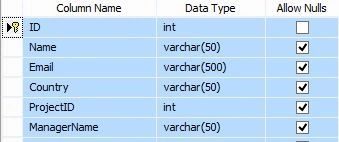
Figure 1.
The following is the script of My Employee table:
- CREATE TABLE [dbo].[Employee](
- [ID] [int] IDENTITY(1,1) NOT NULL,
- [Name] [varchar](50) NULL,
- [Email] [varchar](500) NULL,
- [Country] [varchar](50) NULL,
- [ProjectID] [int] NULL,
- [ManagerName] [varchar](50) NULL,
- CONSTRAINT [PK_Employee] PRIMARY KEY CLUSTERED
- (
- [ID] ASC
- )WITH (PAD_INDEX = OFF, STATISTICS_NORECOMPUTE = OFF, IGNORE_DUP_KEY = OFF, ALLOW_ROW_LOCKS = ON, ALLOW_PAGE_LOCKS = ON) ON [PRIMARY]
- ) ON [PRIMARY]
- GO
- CREATE PROCEDURE [dbo].[GetEmployee_SQLPaging]
- @PageIndex INT = 1
- ,@PageSize INT = 10
- ,@RecordCount INT OUTPUT
- AS
- BEGIN
- SET NOCOUNT ON;
- SELECT ROW_NUMBER() OVER
- (
- ORDER BY [ID] ASC
- )AS RowNumber
- ,[ID],[Name],[Email],[Country] INTO #Results FROM [Employee]
- SELECT @RecordCount = COUNT(*) FROM #Results
- SELECT * FROM #Results
- WHERE RowNumber BETWEEN(@PageIndex -1) * @PageSize + 1 AND(((@PageIndex -1) * @PageSize + 1) + @PageSize) - 1
- DROP TABLE #Results
- END

Figure 2.
Now the following is my aspx:
- <%@ Page Language="C#" AutoEventWireup="true" CodeBehind="Default.aspx.cs" Inherits="JSON_GridView_SQLPaging.Default" %>
- <!DOCTYPE html>
- <html xmlns="http://www.w3.org/1999/xhtml">
- <head runat="server">
- <style type="text/css">
- body {
- font-family: Arial;
- font-size: 10pt;
- }
- .Pager span {
- text-align: center;
- color: navy;
- display: inline-block;
- width: 20px;
- background-color: red;
- margin-right: 3px;
- line-height: 150%;
- border: 2px solid navy;
- }
- .Pager a {
- text-align: center;
- display: inline-block;
- width: 20px;
- background-color: green;
- color: #fff;
- border: 1px solid #3AC0F2;
- margin-right: 3px;
- line-height: 150%;
- text-decoration: none;
- }
- </style>
- <title></title>
- <script src="Scripts/jquery.min.js"></script>
- <script src="jQueryPager.min.js" type="text/javascript"></script>
- <script type="text/javascript">
- $(function () {
- BindEmployee(1);
- });
- $(".Pager .page").live("click", function () {
- BindEmployee(parseInt($(this).attr('page')));
- });
- function BindEmployee(pageIndex) {
- $.ajax({
- type: "POST",
- url: "Default.aspx/BindEmployee",
- data: '{pageIndex: ' + pageIndex + '}',
- contentType: "application/json; charset=utf-8",
- dataType: "json",
- success: OnSuccess,
- failure: function (response) {
- alert(response.d);
- },
- error: function (response) {
- alert(response.d);
- }
- });
- }
- function OnSuccess(response) {
- var xmlDoc = $.parseXML(response.d);
- var xml = $(xmlDoc);
- var emp = xml.find("Employee");
- var row = $("[id*=gvEmployee] tr:last-child").clone(true);
- $("[id*=gvEmployee] tr").not($("[id*=gvEmployee] tr:first-child")).remove();
- $.each(emp, function () {
- var employee = $(this);
- $("td", row).eq(0).html($(this).find("ID").text());
- $("td", row).eq(1).html($(this).find("Name").text());
- $("td", row).eq(2).html($(this).find("Email").text());
- $("td", row).eq(3).html($(this).find("Country").text());
- $("[id*=gvEmployee]").append(row);
- row = $("[id*=gvEmployee] tr:last-child").clone(true);
- });
- var pager = xml.find("Pager");
- $(".Pager").jQueryPagerFunc({
- ActiveCssClass: "current",
- PagerCssClass: "pager",
- PageIndex: parseInt(pager.find("PageIndex").text()),
- PageSize: parseInt(pager.find("PageSize").text()),
- RecordCount: parseInt(pager.find("RecordCount").text())
- });
- };
- </script>
- </head>
- <body>
- <form id="form1" runat="server">
- <div>
- <table style="width: 100%; text-align: center; border: solid 5px red; background-color: blue; vertical-align: top;">
- <tr>
- <td>
- <div>
- <fieldset style="width: 99%;">
- <legend style="font-size: 20pt; color: white; font-family: Verdana">jQuery JSON - Showing Records in Grid View With SQL Paging</legend>
- <table style="width: 100%;">
- <tr>
- <td style="vertical-align: top; background-color: #9DD1F1; text-align: center;">
- <asp:GridView ID="gvEmployee" runat="server" AutoGenerateColumns="false"
- HeaderStyle-ForeColor="White" Width="100%" BackColor="Yellow">
- <Columns>
- <asp:BoundField ItemStyle-Width="30px" DataField="ID" HeaderText="ID" ItemStyle-HorizontalAlign="Left" HeaderStyle-HorizontalAlign="Left" ItemStyle-ForeColor="Red" />
- <asp:BoundField ItemStyle-Width="80px" DataField="Name" HeaderText="Name" ItemStyle-HorizontalAlign="Left" HeaderStyle-HorizontalAlign="Left" ItemStyle-ForeColor="Red" />
- <asp:BoundField ItemStyle-Width="100px" DataField="Email" HeaderText="Email" ItemStyle-HorizontalAlign="Left" HeaderStyle-HorizontalAlign="Left" ItemStyle-ForeColor="Red" />
- <asp:BoundField ItemStyle-Width="80px" DataField="Country" HeaderText="City" ItemStyle-HorizontalAlign="Left" HeaderStyle-HorizontalAlign="Left" ItemStyle-ForeColor="Red" />
- </Columns>
- <HeaderStyle BackColor="Red" HorizontalAlign="Left" />
- </asp:GridView>
- <br />
- <div class="Pager" style="background-color: green; padding-top: 10px; padding-bottom: 10px;"></div>
- </td>
- </tr>
- </table>
- </fieldset>
- </div>
- </td>
- </tr>
- </table>
- </div>
- </form>
- </body>
- </html>
- using System;
- using System.Collections.Generic;
- using System.Linq;
- using System.Web;
- using System.Web.UI;
- using System.Web.UI.WebControls;
- using System.Data;
- using System.Web.Services;
- using System.Configuration;
- using System.Data.SqlClient;
- namespace JSON_GridView_SQLPaging
- {
- public partial class Default : System.Web.UI.Page
- {
- private static int PageSize = 10;
- protected void Page_Load(object sender, EventArgs e)
- {
- if (!IsPostBack)
- {
- BindDummyRowToGridView();
- }
- }
- private void BindDummyRowToGridView()
- {
- DataTable dummy = new DataTable();
- dummy.Columns.Add("ID");
- dummy.Columns.Add("Name");
- dummy.Columns.Add("Email");
- dummy.Columns.Add("Country");
- dummy.Rows.Add();
- gvEmployee.DataSource = dummy;
- gvEmployee.DataBind();
- }
- [WebMethod]
- public static string BindEmployee(int pageIndex)
- {
- string query = "[GetEmployee_SQLPaging]";
- SqlCommand cmd = new SqlCommand(query);
- cmd.CommandType = CommandType.StoredProcedure;
- cmd.Parameters.AddWithValue("@PageIndex", pageIndex);
- cmd.Parameters.AddWithValue("@PageSize", PageSize);
- cmd.Parameters.Add("@RecordCount", SqlDbType.Int, 4).Direction = ParameterDirection.Output;
- return ReadData(cmd, pageIndex).GetXml();
- }
- private static DataSet ReadData(SqlCommand cmd, int pageIndex)
- {
- string connectionString = @"Data Source=INDIA\MSSQLServer2k8; Initial Catalog= TestDB; Integrated Security=true;";
- using (SqlConnection con = new SqlConnection(connectionString))
- {
- using (SqlDataAdapter sda = new SqlDataAdapter())
- {
- cmd.Connection = con;
- sda.SelectCommand = cmd;
- using (DataSet ds = new DataSet())
- {
- sda.Fill(ds, "Employee");
- DataTable dt = new DataTable("Pager");
- dt.Columns.Add("PageIndex");
- dt.Columns.Add("PageSize");
- dt.Columns.Add("RecordCount");
- dt.Rows.Add();
- dt.Rows[0]["PageIndex"] = pageIndex;
- dt.Rows[0]["PageSize"] = PageSize;
- dt.Rows[0]["RecordCount"] = cmd.Parameters["@RecordCount"].Value;
- ds.Tables.Add(dt);
- return ds;
- }
- }
- }
- }
- }
- }
- function jQueryPagerFunc(a, b)
- {
- var c = '<a style = "cursor:pointer" class="page" page = "{1}">{0}</a>';
- var d = "<span>{0}</span>";
- var e, f, g;
- var g = 5;
- var h = Math.ceil(b.RecordCount / b.PageSize);
- if (b.PageIndex > h)
- { b.PageIndex = h }
- var i = "";
- if (h > 1)
- {
- f = h > g ? g : h;
- e = b.PageIndex > 1 && b.PageIndex + g - 1 < g ? b.PageIndex : 1;
- if (b.PageIndex > g % 2)
- {
- if (b.PageIndex == 2) f = 5;
- else f = b.PageIndex + 2
- }
- else
- {
- f = g - b.PageIndex + 1
- }
- if (f - (g - 1) > e)
- {
- e = f - (g - 1)
- }
- if (f > h)
- {
- f = h;
- e = f - g + 1 > 0 ? f - g + 1 : 1
- }
- var j = (b.PageIndex - 1) * b.PageSize + 1;
- var k = j + b.PageSize - 1;
- if (k > b.RecordCount)
- {
- k = b.RecordCount
- }
- i = "<b>Records " + (j == 0 ? 1 : j) + " - " + k + " of " + b.RecordCount + "</b> ";
- if (b.PageIndex > 1)
- {
- i += c.replace("{0}", "<<").replace("{1}", "1");
- i += c.replace("{0}", "<").replace("{1}", b.PageIndex - 1)
- }
- for (var l = e; l <= f; l++)
- {
- if (l == b.PageIndex)
- {
- i += d.replace("{0}", l)
- }
- else
- {
- i += c.replace("{0}", l).replace("{1}", l)
- }
- }
- if (b.PageIndex < h)
- {
- i += c.replace("{0}", ">").replace("{1}", b.PageIndex + 1);
- i += c.replace("{0}", ">>").replace("{1}", h)
- }
- }
- a.html(i);
- try
- {
- a[0].disabled = false
- }
- catch (m)
- { }
- }
- (function (a)
- {
- a.fn.jQueryPagerFunc = function (b) {
- var c = {};
- var b = a.extend(c, b);
- return this.each(function () { jQueryPagerFunc(a(this), b) })
- }
- })
- (jQuery);
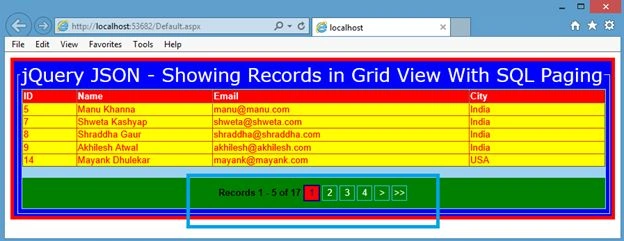
Figure 3.
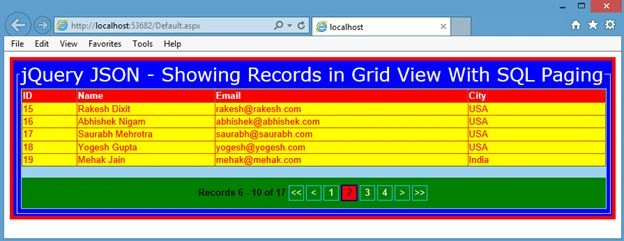
Figure 4.
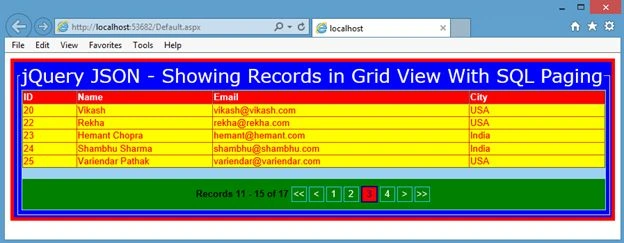
Figure 5.
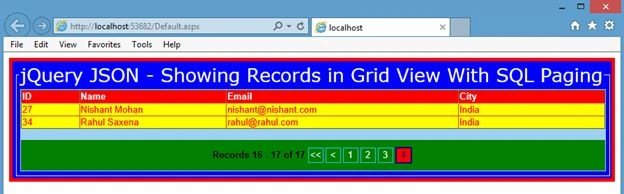
Figure 6.
Rahul Kumar SaxenaPosted Jul 22, 2015, 3:39 AM
Thanks Sharad...
SharadPosted Jul 22, 2015, 12:43 AM
Excellent... big fan
Rahul Kumar SaxenaPosted Jul 18, 2015, 1:14 AM
Thanks.Rakesh Kalluri
Rahul Kumar SaxenaPosted Jul 18, 2015, 1:13 AM
Thanks Santhakumar Munuswamy
Rakesh KalluriPosted Jul 18, 2015, 12:36 AM
Good One
Santhakumar MunuswamyPosted Jul 17, 2015, 4:40 PM
Good article. Thanks for sharing
Rahul Kumar SaxenaPosted Jul 17, 2015, 2:27 PM
Thanks Rakesh Chavda
RakeshPosted Jul 17, 2015, 11:35 AM
Nice Article Sir
Rahul Kumar SaxenaPosted Jul 17, 2015, 10:56 AM
Thanks Nilesh Jadav..
Rahul Kumar SaxenaPosted Jul 17, 2015, 10:56 AM
Thanks Gopi Chand
Rahul Kumar SaxenaPosted Jul 17, 2015, 10:56 AM
Thanks Sharad...
Nilesh JadavPosted Jul 17, 2015, 6:17 AM
Nice one sir
Gopi ChandPosted Jul 17, 2015, 5:49 AM
Ultimate :)
SharadPosted Jul 17, 2015, 5:40 AM
great article with examples..