

The following is my SQL Server data table in Design mode.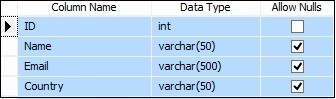
Image 1 SQL Server Data Table in Design mode
Script of My Data Table
- CREATE TABLE [dbo].[Employee](
- [ID] [int] IDENTITY(1,1) NOT NULL,
- [Name] [varchar](50) NULL,
- [Email] [varchar](500) NULL,
- [Country] [varchar](50) NULL
- ) ON [PRIMARY]
- GO
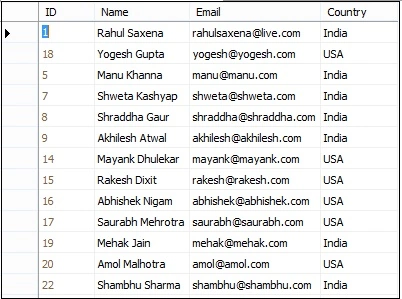
Image 2 My Data table
aspx code
- <%@ Page Language="C#" AutoEventWireup="true" CodeBehind="Default.aspx.cs" Inherits="jQueryCheckBoxWithGridView.Default" %>
- <!DOCTYPE html>
- <html
- xmlns="http://www.w3.org/1999/xhtml">
- <head runat="server">
- <title>Show GridView Column Value on Check Bos Selection Using jQuery</title>
- <script src="Scripts/jquery-2.1.4.min.js"></script>
- <script type="text/javascript">
- $(function () {
- var chk = $('input:checkbox').click(function (e) {
- var selectedValue = '';
- $("input[name$=chkEMP]:checked").each(function () {
- selectedValue += $(this).next("input[name$=hdnId]").val() + "; ";
- });
- $('#selEMPDiv').text("Your Selected Employee : " + selectedValue)
- });
- });
- </script>
- </head>
- <body>
- <form id="form1" runat="server">
- <div>
- <table id="tblEMP" style="border: solid 2px red; width: 100%; text-align: center;">
- <tr>
- <td style="height: 30px; background-color: orange; color: #0026ff;
- font-size: 20pt; font-weight: bold; font-family: Verdana;">
- Show GridView Column Value on Check Bos Selection Using jQuery</td>
- </tr>
- <tr>
- <td>
- <asp:GridView ID="GridViewEMP" runat="server" AutoGenerateColumns="False" Width="90%"
- HorizontalAlign="Center" HeaderStyle-BackColor="Green" CellPadding="4" ForeColor="#333333" GridLines="None">
- <AlternatingRowStyle BackColor="White" ForeColor="#284775" />
- <Columns>
- <asp:TemplateField>
- <ItemTemplate>
- <asp:CheckBox ID="chkEMP" runat="server" />
- <asp:HiddenField ID="hdnId" runat="server" Value='
- <%#Eval("Name") %>' />
- </ItemTemplate>
- </asp:TemplateField>
- <asp:BoundField DataField="ID" HeaderText="ID" ItemStyle-Horizontal HeaderStyle-Horizontal />
- <asp:BoundField DataField="Name" HeaderText="Name" ItemStyle-Horizontal HeaderStyle-Horizontal />
- <asp:BoundField DataField="Email" HeaderText="Email" ItemStyle-Horizontal HeaderStyle-Horizontal />
- <asp:BoundField DataField="Country" HeaderText="Country" ItemStyle-Horizontal HeaderStyle-Horizontal />
- </Columns>
- <EditRowStyle BackColor="#999999" />
- <FooterStyle BackColor="#5D7B9D" Font-Bold="True" ForeColor="White" />
- <HeaderStyle BackColor="#5D7B9D" Font-Bold="True" ForeColor="White"></HeaderStyle>
- <PagerStyle BackColor="#284775" ForeColor="White" HorizontalAlign="Center" />
- <RowStyle BackColor="#F7F6F3" ForeColor="#333333" />
- <SelectedRowStyle BackColor="#E2DED6" Font-Bold="True" ForeColor="#333333" />
- <SortedAscendingCellStyle BackColor="#E9E7E2" />
- <SortedAscendingHeaderStyle BackColor="#506C8C" />
- <SortedDescendingCellStyle BackColor="#FFFDF8" />
- <SortedDescendingHeaderStyle BackColor="#6F8DAE" />
- </asp:GridView>
- </td>
- </tr>
- <tr>
- <td style="height: 30px; background-color: #e5d6d6; color: green; font-size: 11pt; font-weight: bold; font-family: Verdana;">
- <p id="selEMPDiv"></p>
- </td>
- </tr>
- </table>
- </div>
- </form>
- </body>
- </html>
- using System;
- using System.Collections.Generic;
- using System.Configuration;
- using System.Data;
- using System.Data.SqlClient;
- using System.Linq;
- using System.Web;
- using System.Web.UI;
- using System.Web.UI.WebControls;
- namespace jQueryCheckBoxWithGridView {
- public partial class Default: System.Web.UI.Page {
- protected void Page_Load(object sender, EventArgs e) {
- if (!Page.IsPostBack) GetEmployee();
- }
- private void GetEmployee() {
- string constr = ConfigurationManager.ConnectionStrings["RConnection"].ConnectionString;
- using(SqlConnection con = new SqlConnection(constr)) {
- using(SqlCommand cmd = new SqlCommand("SELECT * FROM Employee ORDER BY ID")) {
- using(SqlDataAdapter da = new SqlDataAdapter()) {
- DataTable dt = new DataTable();
- cmd.CommandType = CommandType.Text;
- cmd.Connection = con;
- da.SelectCommand = cmd;
- da.Fill(dt);
- GridViewEMP.DataSource = dt;
- GridViewEMP.DataBind();
- }
- }
- }
- }
- }
- }
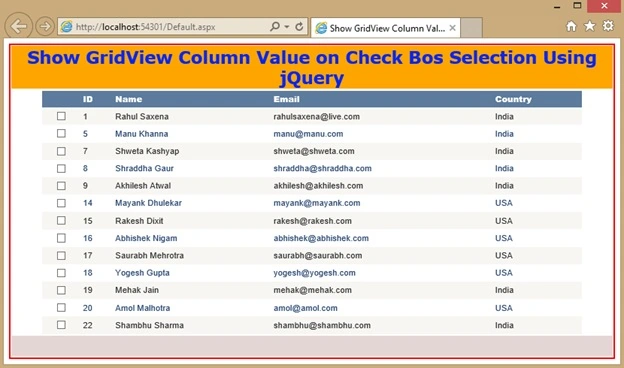
Image 3 Show GridView Column
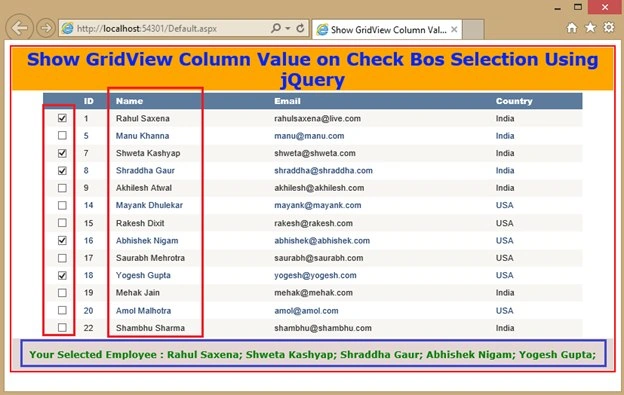
Image 4 Show GridView Column Selection Using jQuery
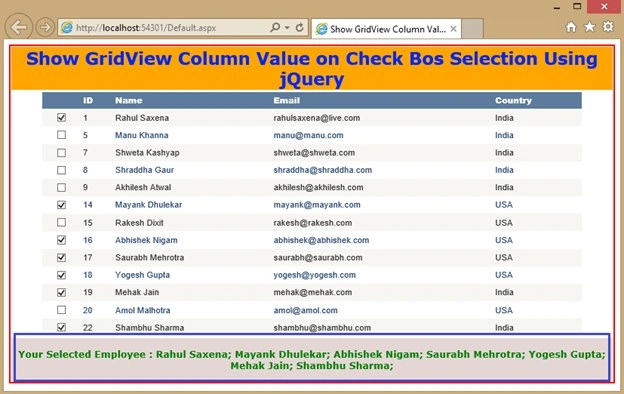
Image 5 Show GridView Column Value on CheckBox
Abhishek KumarPosted Sep 28, 2015, 6:28 AM
Sir i want to drag and drop a grid view column into another grid view.using jquey.. its very urgent sir.. please...
Rahul Kumar SaxenaPosted May 26, 2015, 2:14 AM
Thanks Nanhe Siddique...
Nanhe SiddiquePosted May 26, 2015, 1:57 AM
nice brother
Rahul Kumar SaxenaPosted May 26, 2015, 1:19 AM
Thanks. Pankaj Kumar Choudhary
Rahul Kumar SaxenaPosted May 26, 2015, 1:18 AM
Thanks Sibeesh Venu
Pankaj Kumar ChoudharyPosted May 26, 2015, 1:07 AM
Nice Article sir.............
Sibeesh VenuPosted May 26, 2015, 1:02 AM
Good one.
Rahul Kumar SaxenaPosted May 26, 2015, 12:41 AM
thanks Santhakumar Munuswamy
Santhakumar MunuswamyPosted May 26, 2015, 12:33 AM
Thanks for nice article