

In this article we will be seeing about the Labels for taxonomy term in SharePoint.
In this article we will be seeing the following:
- Create a new Label for a term.
- Get all the Labels for a particular term.
Steps Involved:
- Open visual studio 2010.
- Create a new console application.
- Add the following references.
- Microsoft.SharePoint.dll
- Microsoft.SharePoint.Taxonomy.dll
- Add the following namespaces.
- Using Microsoft.SharePoint;
- Using Microsoft.Sharepoint.Taxonomy;
Get all the labels for a term:
using System;
using System.Collections.Generic;
using System.Linq;
using System.Text;
using Microsoft.SharePoint;
using Microsoft.SharePoint.Taxonomy;
namespace EMM
{
class Program
{
static void Main(string[] args)
{
using (SPSite site = new SPSite("http://servcerName:10/"))
{
TaxonomySession taxonomySession = new TaxonomySession(site);
TermStore termStore = taxonomySession.TermStores["MMS"];
Group group = termStore.Groups["SharePoint Group"];
TermSet termSet = group.TermSets["Word Automation Term Set"];
Term term = termSet.Terms["Conversion Settings term"];
LabelCollection labelCol = term.Labels;
foreach (Label label in labelCol)
{
Console.WriteLine(label.Value.ToString());
}
Console.ReadLine();
}
}
}
}
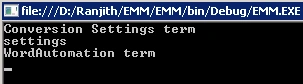
Create new Label for a term:
using System;
using System.Collections.Generic;
using System.Linq;
using System.Text;
using Microsoft.SharePoint;
using Microsoft.SharePoint.Taxonomy;
namespace EMM
{
class Program
{
static void Main(string[] args)
{
using (SPSite site = new SPSite("http://serverName:10/"))
{
TaxonomySession taxonomySession = new TaxonomySession(site);
TermStore termStore = taxonomySession.TermStores["MMS"];
Group group = termStore.Groups["SharePoint Group"];
TermSet termSet = group.TermSets["Word Automation Term Set"];
Term term = termSet.Terms["Conversion Settings term"];
term.CreateLabel("testLabel", 1033, false);
termStore.CommitAll();
}
}
}
}
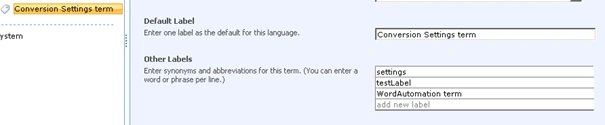
Iftikhar IqbalPosted Jan 13, 2014, 10:22 AM
I have one question if anyone can answer it, it will be great and helpful. I am using Sharepoint 2013 with 2 languages but site originally in English. i had added a document Library with a name "Main Documents". When i Switch the language from English to Arabic everything which is default by Microsoft will translate to arabic Except for "Main Documents".. how can change this to custom Arabic Label. If guide me if its possible. Thanks. Iqbal.