

In this article we are going to see how to obtain language-specific font recommendations in a Windows 8 Metro Style Application. Here, we will present an example; in this example we will explain how to obtain language-specific font recommendations using the LanguageFontGroup class in the Windows.Globalization.Fonts namespace.
The LanguageFontGroup APIs (Windows.Globalization.Fonts namespace) can indicate an appropriate font to use for a given language. So, we will use the following steps to make this application as below.
Step 1 : First of all you will create a new Metro Style Application. Let us see the description with images of how you will create it.
- Open Visual Studio 2011
- File -> New -> Project
- Choose Template -> Visual C# -> Windows Metro Style -> Blank Application
- Rename this application:
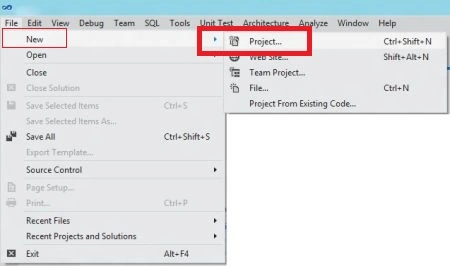
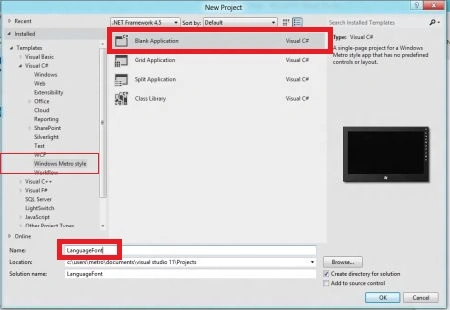
Step 2 : In the Solution Explorer there are two files that we will primarily work with; MainPage.xaml and MainPage.xaml.cs files. In the images folder add any image to the application but in this application we don't have to add an image.
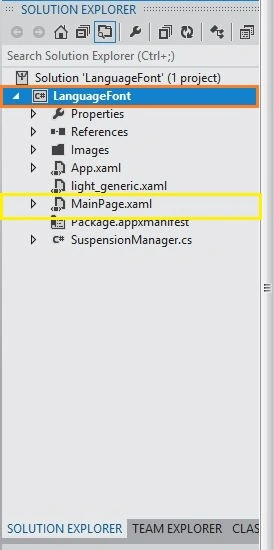
Step 3 : The MainPage.xaml file is as in the following code.
Code : Let us see the code which is given below.
<UserControl x:Class="LanguageFont.MainPage"
xmlns="http://schemas.microsoft.com/winfx/2006/xaml/presentation"
xmlns:x="http://schemas.microsoft.com/winfx/2006/xaml"
xmlns:d="http://schemas.microsoft.com/expression/blend/2008"
xmlns:mc="http://schemas.openxmlformats.org/markup-compatibility/2006"
xmlns:sys="using:Windows.Foundation"
mc:Ignorable="d"
d:DesignHeight="768" d:DesignWidth="1366">
<Grid x:Name="LayoutRoot" Background="White">
<!--App Orientation States-->
<VisualStateManager.VisualStateGroups>
<VisualStateGroup x:Name="OrientationStates">
<VisualState x:Name="FullScreenLandscape"/>
<VisualState x:Name="Filled">
<Storyboard>
<ObjectAnimationUsingKeyFrames Storyboard.TargetProperty="(FrameworkElement.Margin)" Storyboard.TargetName="ContentRoot">
<DiscreteObjectKeyFrame KeyTime="0">
<DiscreteObjectKeyFrame.Value>
<Thickness>40,20,40,20</Thickness>
</DiscreteObjectKeyFrame.Value>
</DiscreteObjectKeyFrame>
</ObjectAnimationUsingKeyFrames>
<ObjectAnimationUsingKeyFrames Storyboard.TargetProperty="(StackPanel.Orientation)" Storyboard.TargetName="InputPanel">
<DiscreteObjectKeyFrame KeyTime="0">
<DiscreteObjectKeyFrame.Value>
<Orientation>Horizontal</Orientation>
</DiscreteObjectKeyFrame.Value>
</DiscreteObjectKeyFrame>
</ObjectAnimationUsingKeyFrames>
<ObjectAnimationUsingKeyFrames Storyboard.TargetProperty="(FrameworkElement.MaxWidth)" Storyboard.TargetName="Description">
<DiscreteObjectKeyFrame KeyTime="0" Value="700">
</DiscreteObjectKeyFrame>
</ObjectAnimationUsingKeyFrames>
</Storyboard>
</VisualState>
<VisualState x:Name="FullScreenPortrait">
<Storyboard>
<ObjectAnimationUsingKeyFrames Storyboard.TargetProperty="(FrameworkElement.Margin)" Storyboard.TargetName="ContentRoot">
<DiscreteObjectKeyFrame KeyTime="0">
<DiscreteObjectKeyFrame.Value>
<Thickness>40,20,40,20</Thickness>
</DiscreteObjectKeyFrame.Value>
</DiscreteObjectKeyFrame>
</ObjectAnimationUsingKeyFrames>
<ObjectAnimationUsingKeyFrames Storyboard.TargetProperty="(FrameworkElement.MaxWidth)" Storyboard.TargetName="Description">
<DiscreteObjectKeyFrame KeyTime="0" Value="700">
</DiscreteObjectKeyFrame>
</ObjectAnimationUsingKeyFrames>
</Storyboard>
</VisualState>
<VisualState x:Name="Snapped">
<Storyboard>
<ObjectAnimationUsingKeyFrames Storyboard.TargetProperty="(FrameworkElement.Margin)" Storyboard.TargetName="ContentRoot">
<DiscreteObjectKeyFrame KeyTime="0">
<DiscreteObjectKeyFrame.Value>
<Thickness>20,20,20,20</Thickness>
</DiscreteObjectKeyFrame.Value>
</DiscreteObjectKeyFrame>
</ObjectAnimationUsingKeyFrames>
<ObjectAnimationUsingKeyFrames Storyboard.TargetProperty="(StackPanel.Orientation)" Storyboard.TargetName="InputPanel">
<DiscreteObjectKeyFrame KeyTime="0">
<DiscreteObjectKeyFrame.Value>
<Orientation>Vertical</Orientation>
</DiscreteObjectKeyFrame.Value>
</DiscreteObjectKeyFrame>


SubashPosted Sep 19, 2016, 8:43 AM
Nice share