

ASP.NET Core 7 Web API. Lazy loading is a technique where related data is only loaded from the database when it is explicitly requested. In Entity Framework Core, lazy loading can be achieved by marking navigation properties as virtual.
Create a new ASP.NET Core Web API Project
dotnet new webapi -n LazyLoadingInAspNetCoreWebApI
cd LazyLoadingInAspNetCoreWebApI
Install SQLite NuGet Package
Install the SQLite NuGet package to enable SQLite support in your project.
dotnet add package Microsoft.EntityFrameworkCore.Sqlite
Let's assume you have two entities, Author and Book, where an author can have multiple books. Here's a simple example:
Create your model classes
In the Author and Book classes, the navigation property Books is marked as virtual. This is a key step in enabling lazy loading for these navigation properties.
namespace LazyLoadingInAspNetCoreWebApI.Models
{
    public class Author
    {
        public int AuthorId { get; set; }
        public string Name { get; set; }

        public virtual ICollection<Book> Books { get; set; }
    }
}
The use of the virtual keyword allows Entity Framework Core to generate proxies for these classes, which can then intercept calls to navigation properties and load the related data on demand.
Create Books Model
namespace LazyLoadingInAspNetCoreWebApI.Models
{
    public class Book
    {
        public int BookId { get; set; }
        public string Title { get; set; }
        public int AuthorId { get; set; }

        public virtual Author Author { get; set; }
    }
}
Create the Application Database Context
using LazyLoadingInAspNetCoreWebApI.Models;
using Microsoft.EntityFrameworkCore;

namespace LazyLoadingInAspNetCoreWebApI.AppDbContext
{
    public class ApplicationDbContext : DbContext
    {
        public ApplicationDbContext(DbContextOptions<ApplicationDbContext> options) : base(options) { }

        public DbSet<Author> Authors { get; set; }
        public DbSet<Book> Books { get; set; }
    }
}
Add the Dependencies in the Program.cs Class
Make sure you have the necessary NuGet packages installed, including Microsoft.EntityFrameworkCore.Sqlite and Microsoft.EntityFrameworkCore.Proxies. Also, ensure that your DefaultConnection in the configuration is properly set up with the correct SQLite connection details.
using LazyLoadingInAspNetCoreWebApI.AppDbContext;
using Microsoft.EntityFrameworkCore;
using Microsoft.OpenApi.Models;
using System;

var builder = WebApplication.CreateBuilder(args);

// Add services to the container.
var configuration = builder.Configuration;

// Add services to the container.
builder.Services.AddDbContext<ApplicationDbContext>(options =>
    options.UseLazyLoadingProxies().UseSqlite(configuration.GetConnectionString("DefaultConnection")));
builder.Services.AddControllers();
// Learn more about configuring Swagger/OpenAPI at https://aka.ms/aspnetcore/swashbuckle
builder.Services.AddEndpointsApiExplorer();
builder.Services.AddSwaggerGen(c =>
{
    c.SwaggerDoc("v1", new OpenApiInfo { Title = "Lazy Loading In Asp.net Core Web API", Version = "v1" });

});
var app = builder.Build();

// Configure the HTTP request pipeline.
if(app.Environment.IsDevelopment())
{
    app.UseSwagger();
    app.UseSwaggerUI();
}

app.UseHttpsRedirection();

app.UseAuthorization();

app.MapControllers();

app.Run();
Add the Database Connection
// appsettings.json
{
  "ConnectionStrings": {
    "DefaultConnection": "Data Source=LazyLoading.db"
  },
  "Logging": {
    "LogLevel": {
      "Default": "Information",
      "Microsoft": "Warning",
      "Microsoft.Hosting.Lifetime": "Information"
    }
  },
  "AllowedHosts": "*"
}
Run the Migration
dotnet ef migrations add InitialCreate
dotnet ef database update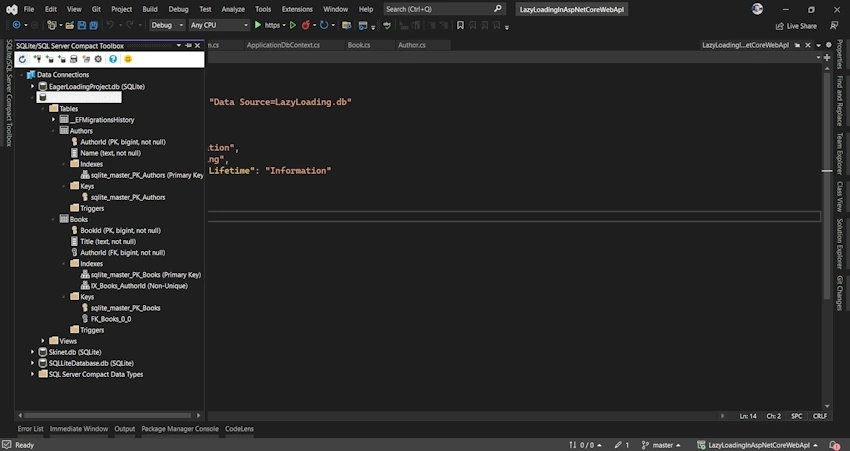
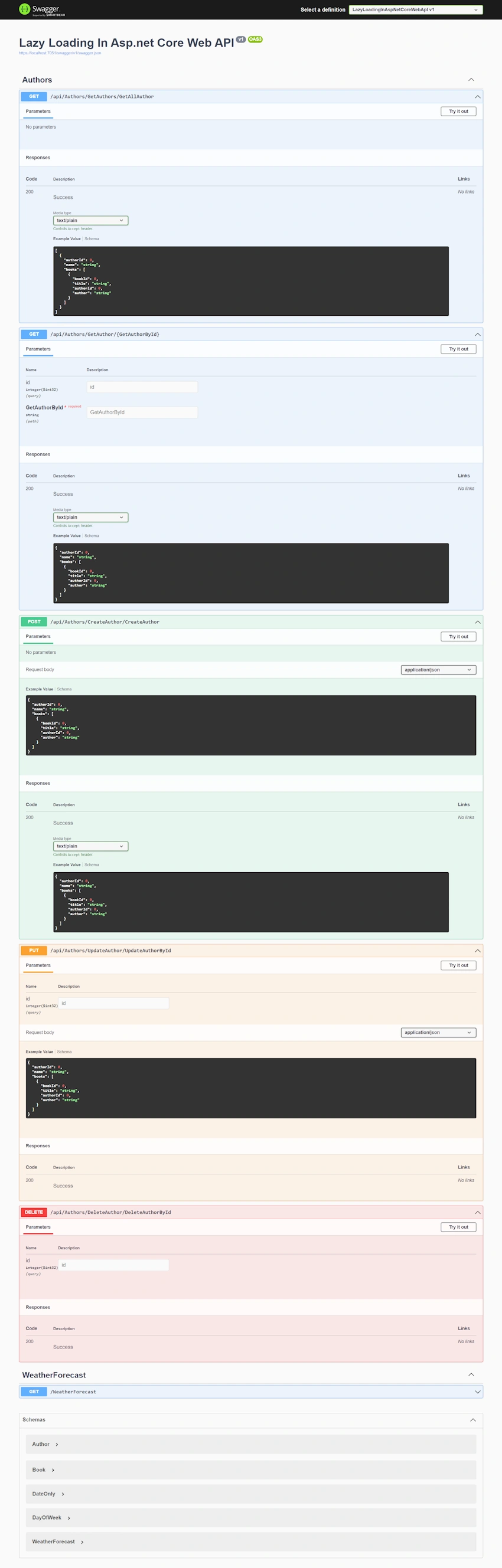
Join the conversation! Your thoughts help the community grow.