Introduction
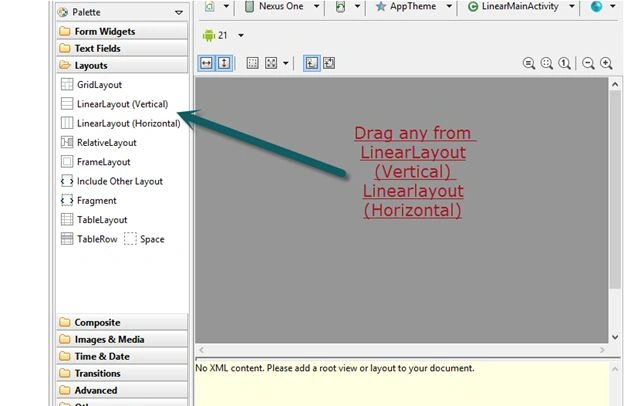
- Linear Layout
- Relative Layout
- Table Layout
- Frame Layout
1. Linear Layout
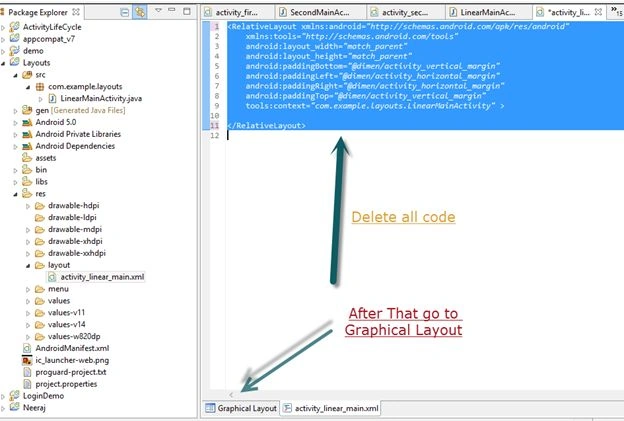

- <LinearLayout xmlns:android="http://schemas.android.com/apk/res/android"
- android:layout_width="fill_parent"
- android:layout_height="fill_parent"
- android:orientation="vertical" >
- </LinearLayout>
- for Lu=inearLayout(Horizontal)
- <LinearLayout xmlns:android="http://schemas.android.com/apk/res/android"
- android:layout_width="fill_parent"
- android:layout_height="fill_parent" >
- </LinearLayout>
So LinearLayout (Horizontal) is the default LinearLayout, but you can change the layout by editing the code:
- android:orientation="vertical"
- “Vertical” replace by Horizontal or delete this line then vertical convert into a horizontal layout
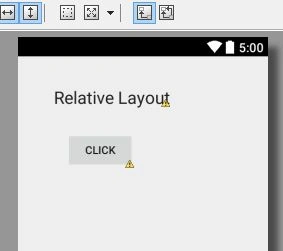
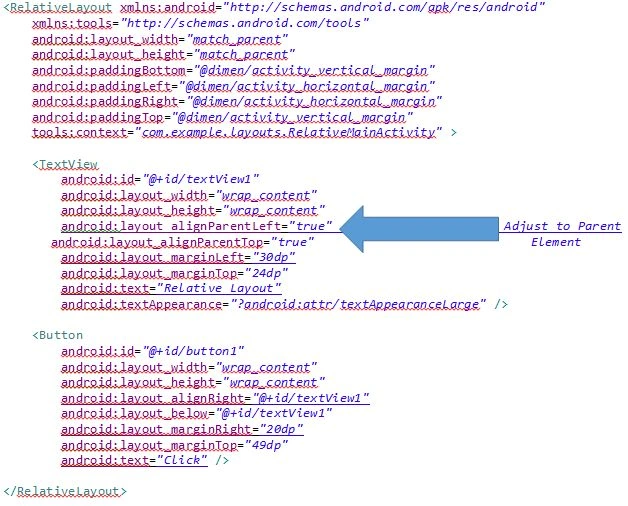
2. Relative Layout
- <RelativeLayout xmlns:android="http://schemas.android.com/apk/res/android"
- xmlns:tools="http://schemas.android.com/tools"
- android:layout_width="match_parent"
- android:layout_height="match_parent"
- android:paddingBottom="@dimen/activity_vertical_margin"
- android:paddingLeft="@dimen/activity_horizontal_margin"
- android:paddingRight="@dimen/activity_horizontal_margin"
- android:paddingTop="@dimen/activity_vertical_margin"
- tools:context="com.example.layouts.RelativeMainActivity" >
- </RelativeLayout>
3. Table Layout
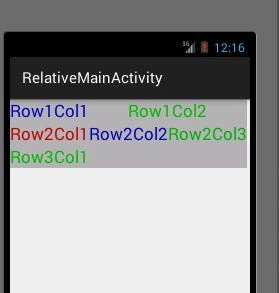
- <TableLayout xmlns:android="http://schemas.android.com/apk/res/android"
- android:layout_width="wrap_content"
- android:layout_height="wrap_content"
- >
- <TableRow
- android:id="@+id/tableRow1"
- android:layout_width="fill_parent"
- android:layout_height="wrap_content"
- android:gravity="center_horizontal" >
- <TextView
- android:id="@+id/textView1"
- android:layout_width="wrap_content"
- android:layout_height="wrap_content"
- android:text="Row1Col1"
- android:textAppearance="?android:attr/textAppearanceLarge"
- android:background="#b0b0b0"
- android:textColor="#0000bb"
- android:layout_weight="1" />
- <TextView
- android:id="@+id/textView8"
- android:layout_width="wrap_content"
- android:layout_height="wrap_content"
- android:text="Row1Col2"
- android:textAppearance="?android:attr/textAppearanceLarge"
- android:background="#b0b0b0"
- android:textColor="#00bb00"
- android:layout_weight="1"/>
- </TableRow>
- <TableRow
- android:id="@+id/tableRow2"
- android:layout_width="fill_parent"
- android:layout_height="wrap_content"
- android:gravity="center_horizontal"
- >
- <TextView
- android:id="@+id/textView2"
- android:layout_width="wrap_content"
- android:layout_height="wrap_content"
- android:text="Row2Col1"
- android:textAppearance="?android:attr/textAppearanceLarge"
- android:background="#b0b0b0"
- android:textColor="#bb0000"
- android:layout_weight="1"/>
- <TextView
- android:id="@+id/textView3"
- android:layout_width="match_parent"
- android:layout_height="wrap_content"
- android:background="#b0b0b0"
- android:text="Row2Col2"
- android:textAppearance="?android:attr/textAppearanceLarge"
- android:textColor="#0000b0"
- android:layout_weight="1" />
- <TextView
- android:id="@+id/textView4"
- android:layout_width="wrap_content"
- android:layout_height="wrap_content"
- android:text="Row2Col3"
- android:textAppearance="?android:attr/textAppearanceLarge"
- android:background="#b0b0b0"
- android:textColor="#00b00b"
- android:layout_weight="1"
- />
- </TableRow>
- <TableRow
- android:id="@+id/tableRow3"
- android:layout_width="fill_parent"
- android:layout_height="wrap_content"
- android:gravity="center_horizontal" >
- <TextView
- android:id="@+id/textView7"
- android:layout_width="wrap_content"
- android:layout_height="wrap_content"
- android:text="Row3Col1"
- android:textAppearance="?android:attr/textAppearanceLarge"
- android:background="#b0b0b0"
- android:textColor="#00bb00"
- android:layout_weight="1"/>
- </TableRow>
- </TableLayout>
4. Frame Layout

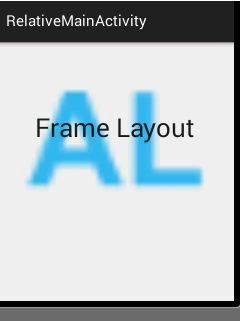
- <FrameLayout xmlns:android="http://schemas.android.com/apk/res/android"
- android:layout_width="fill_parent"
- android:layout_height="fill_parent" >
- <ImageView
- android:id="@+id/imageView1"
- android:layout_width="match_parent"
- android:layout_height="262dp"
- android:src="@drawable/ic_launcher" />
- <TextView
- android:id="@+id/textView1"
- android:layout_width="match_parent"
- android:layout_height="226dp"
- android:gravity="center_vertical|center_horizontal"
- android:text="Frame Layout"
- android:textAppearance="?android:attr/textAppearanceLarge"
- android:textSize="35sp" />
- </FrameLayout>

Santhakumar MunuswamyPosted Jun 15, 2015, 2:28 PM
Thanks for sharing
Manoj KulkarniPosted Jun 15, 2015, 6:52 AM
Nice article
Sibeesh VenuPosted Jun 15, 2015, 5:13 AM
Good one.
Neeraj KumarPosted Jun 15, 2015, 4:48 AM
One is Table Row layout but basically it is use with TableLayout .you can use single TableRow Layout Directly
Gopi ChandPosted Jun 15, 2015, 2:44 AM
Good one Neeraj
Neeraj KumarPosted Jun 15, 2015, 1:02 AM
Thank You Sandeep
Sandeep Singh ShekhawatPosted Jun 15, 2015, 12:49 AM
It's nice and helpful. Looking more from your side. Thanks for sharing this one.