
In this article, we are going to talk about Pipes in Angular.
Pipes (|) in Angular are used to transform the data before displaying it in a browser. Angular provides a lot of built-in pipes to translate the data before displaying it into the browser and as we know, Angular lets us extend its feature, we can even create custom pipes in Angular. So in this article, we are going to learn the built-in pipes which are provided by Angular and in the next article, I will explain how to create custom pipes.
So, in this article, we will learn what inbuilt pipes are provided by Angular and how to use them. We will display simple variables using the interpolation({{}}) on screen and will apply filters to transform the data.
To build a screen, we need only one component (AppComponent) and respective HTML template file.
We will see the following inbuilt pipes,
- Pipes which we can apply to Strings
- Pipes which we can apply to Numbers
- Pipes which we can apply to Date
Pipes which we can apply to String
- Uppercase - We can use this pipe to convert the data-bound expression to uppercase.
- Lowercase - We can use this pipe to convert the data-bound expression to lowercase.
- Slice – We can use this pipe to extract the substring from the data-bound expression. This pipe takes two parameters - starting index of a string and the last index of the string.
Ex. {{name | slice: ‘startIndex’: ’lastIndex’}} we can pass parameters to the pipe using the colon(:)
Copy paste the below code in the .ts file.
- import {
- Component
- } from '@angular/core'
- @Component({
- selector: 'my-app',
- templateUrl: './app/app.component.html',
- })
- export class AppComponent {
- public name: string = "C# Corner";
- }
In the above code, I have just declared one variable name and I am displaying that variable in HTML using the interpolation ({{value}}). Now, open the HTML file and copy paste the below code.
- <div class="container">
- <h4> <b>Original String - </b>{{ name }}</h4>
- <h4> <b>uppercase pipe - </b>{{ name | uppercase }}</h4>
- <h4> <b>lowercase pipe - </b>{{ name | lowercase }}</h4>
- <h4> <b>slice pipe - </b>{{ name | slice: 3: 9}}</h4>
- </div>
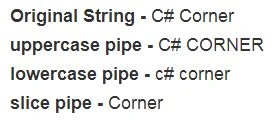
As shown in the above code, I am just displaying the variable using the interpolation and I have applied pipes using the pipe (|) symbol.
See the below output screen.
Pipes which we can apply to Numbers
We can use these pipes to format the numbers
- Number – We can use this pipe to convert the number to a different format.
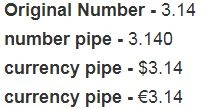
- Currency – We can use this pipe to show currency symbol. This pipe takes two parameters - currency i.e USD, EURO, and GTP; and the Boolean value which decides whether we want to display the currency symbol or not. See the below code and output screenshot for more information.

Bhavesh JadavPosted Mar 29, 2018, 7:07 AM
Good ..............................
Satish Kumar VadlavalliPosted Mar 27, 2018, 11:05 PM
Nice one, Thanks :)