

“Life is a journey, not a destination.” This is something I have been following for years which keeps me always open for new challenges and new exploration over technologies. So, recently, I got an opportunity to explore PowerApps, one of the most innovative contributions by Microsoft to the Office 365 family.
Brief Introduction to PowerApps
PowerApps is one of the most innovative contributions by Microsoft making things more accessible and more user-friendly for the end users. The word itself is self-explanatory which includes “App” which can be a Browser-based App or a Mobile-based App.
The concept is that Microsoft offers you hundreds of connectors which come self-integrated with multiple applications (Microsoft and Non-Microsoft Products) which are used for transmission of data, and once the data has become available, we can create a presentation of the same.
The app offers an end-user the basic CRUD operations ( CREATE, UPDATE, READ, DELETE) which can be extended by an admin to fulfill the more business-specific requirements.
The Apps are categorized as below.
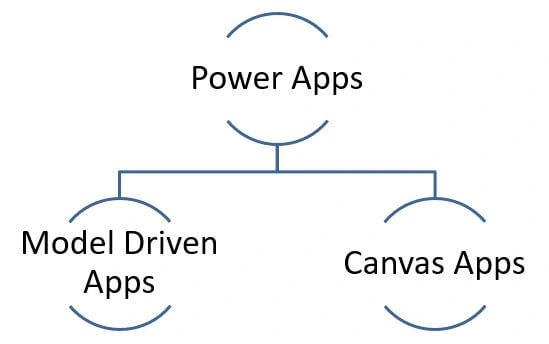
Model Drive Apps
Let’s keep it simple this time, so if you have been working in any of the coding languages, at times we call a term – MODEL which simply denotes that there is something which is driven by DATA which has a backbone as some DATABASE, on similar lines Microsoft has named these apps as MODEL Driven Apps which simply means they are backed by a strong database structure and thus assist us to develop and implement complex logic. Model-Driven Apps are more like developing and implementing the end to end Modules to fulfill the requirements of Businesses. For example, the latest modules like Dynamics Talent is a Model-Driven App.
Canvas Apps
Making things easy and simple again, Microsoft offers these Apps, as simply something over CANVAS. The CANVAS app can be created by anyone in the organization and it can be shared with anyone, the app can be created to implement simple straightforward business implementations which include basic CRUD operations. The app can be modified and more complex logic can be amended at any instance of time without any issues.
Basically, CANVAS APPs are more mobile-friendly as they have basic implementations whereas MODEL Driven Apps are more browser-friendly since they have complex logic.
Join the conversation! Your thoughts help the community grow.