
Introduction
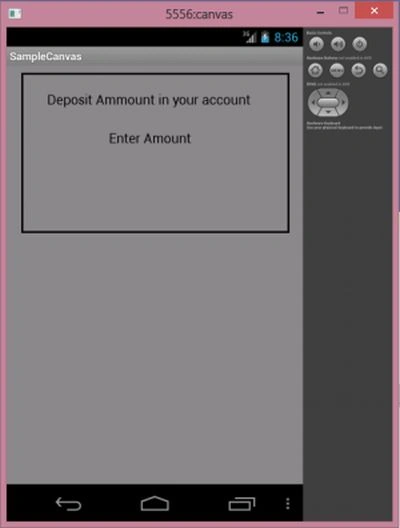
In this, you will first create a paint object. Then call the setColor() method of paint to set the color of the rectangle by ing a color variable. The setStyle() method sets the style of the rectangle, here I ed Stroke as an argument that sets the rectangle having a stroke on its side.
The setStrokeWidth() method sets the stroke width of the Rectangle. Finally,b I called darwRect() to draw the rectangle.
I have also drawn the text using the drawText() method of the canvas and also called setTextsize() to change the size of the text.
Step 1
Create a project like this:
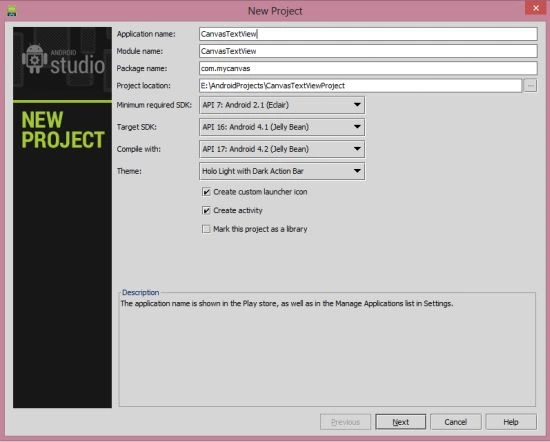 Step 2
XML file
Step 2
XML file
- <?xml version="1.0" encoding="utf-8"?>
- <LinearLayout xmlns:android="http://schemas.android.com/apk/res/android"
- android:layout_width="fill_parent"
- android:layout_height="fill_parent"
- android:orientation="vertical" >
- <TextView
- android:layout_width="fill_parent"
- android:layout_height="wrap_content"
- android:text="Text" />
- </LinearLayout>
Step 3
Create a Java file as in the following:
- package com.SampleCanvas;
- import android.app.Activity;
- import android.graphics.Color;
- import android.os.Bundle;
- public class Second extends Activity {
- SampleCanvasActivity drawView;
- @Override
- public void onCreate(Bundle savedInstanceState) {
- super.onCreate(savedInstanceState);
- drawView = new SampleCanvasActivity(this);
- drawView.setBackgroundColor(Color.GRAY);
- setContentView(drawView);
- }
- }
Join the conversation! Your thoughts help the community grow.