

Introduction
LINQ stands for Language Integrated Query. It is a powerful feature in C# that allows developers to query and manipulate data using a simple and readable syntax.
With LINQ, you can easily:
Filter data
Sort data
Search data
Group data
Transform data
LINQ helps reduce the need for lengthy loops and complex conditional statements, making your code cleaner and easier to maintain.
It can be used with:
Arrays
Lists
Collections
Databases
XML files
Before start linq we have to learn about lambda expression (=>) :
What is lambda expression :
A Lambda Expression in C# is a short way to write an anonymous function (a function without a name).
A shortcut to write a tiny functions.
Example :
(a, b) => a + b This lambda expression returns the sum of a and b.
Types of lambda expression
1. Expression lambda
An expression lambda contains a single expression.
x => x * 2This returns the value of x multiplied by 2.
2. Statement lambda
A statement lambda contains one or more statements enclosed within curly braces.
 x =>
{
    Console.WriteLine(x);
    return x * 2;
}
This prints the value of x and then returns x * 2.
What is LINQ
LINQ (Language Integrated Query) is a feature in C# that allows you to query data directly from collections like arrays, lists, databases, and XML documents.
It provides SQL-like querying capabilities inside C# code.
One of the biggest advantages of LINQ is that it offers a consistent way to work with different types of data sources.
Example :
Step 1: Create a class (model):
  namespace Linq.Model
{
    public class Product
    {
        public int Id { get; set; }
        public string Name { get; set; }
        public string Category { get; set; }
        public decimal Price { get; set; }
        public int StockQuantity { get; set; }
    }
}
Step 2: Create a controller :
using Linq.Model;
using System.Web.Mvc;

namespace Linq.Controllers
{
    public class LinqController : Controller
    {
        public static void Main()
        {
            var products = new List<Product>
            {
                new Product { Id = 1, Name = "Dell Latitude 5440", Category = "Laptop", Price = 85000,
StockQuantity = 15 },
                new Product { Id = 2, Name = "Logitech MX Master 3S", Category = "Accessories", Price = 9500, StockQuantity = 40 },
                new Product { Id = 3, Name = "Samsung Odyssey G5", Category = "Monitor", Price = 28000,
StockQuantity = 20 },
                new Product { Id = 4, Name = "Apple MacBook Pro M3", Category = "Laptop", Price = 185000,
StockQuantity = 10 },
                new Product { Id = 5, Name = "Keychron K8 Pro", Category = "Accessories", Price = 8500,
StockQuantity = 35 }
            };

            List<string> productNames = products
                                        .Select(product => product.Name)
                                        .ToList();

            Console.WriteLine("Available Products:" );
            Console.WriteLine(" ");

            foreach (var name in productNames)
            {
                Console.WriteLine(name);
            }
        }
    }
}
Output :
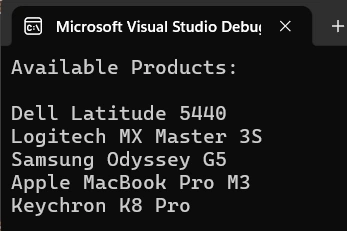
Types of LINQ
1. LINQ to Objects
This is the most common type of LINQ and the easiest for beginners to learn.
Used with collections like Arrays, Lists, and Collections.
Data is stored in the application's memory.
Helps filter, sort, and search data easily.
List<int> numbers = new List<int> { 10, 20, 30, 40, 50 };
var result = numbers.Where(n => n > 25);

foreach (var item in result)
{
    Console.WriteLine(item);
}
2. LINQ to SQL
Used to get data directly from a SQL Server database.
LINQ converts your query into SQL commands automatically.
Reduces the need to write SQL queries manually.
var employees = from emp in db.Employees
                where emp.Salary > 40000
                select emp;

foreach (var employee in employees)
{
    Console.WriteLine(employee.Name);
}
3. LINQ to Entities
Used with Entity Framework.
Helps communicate with databases using C# code instead of SQL.
Works with different database systems such as SQL Server, PostgreSQL, and MySQL.
var customers = context.Customers
                       .Where(c => c.IsActive);
Returns all customers whose IsActive property is true.
4. LINQ to XML
Used to read and manipulate XML files.
Makes it easy to search and extract data from XML documents.
Suppose we have an XML file named Students.xml
The following code retrieves all students whose age is greater than 21:
XDocument doc = XDocument.Load("Students.xml");

        var students = from s in doc.Descendants("Student")
                       where (int)s.Element("Age") > 21
                       select s;

        foreach (var student in students)
        {
            Console.WriteLine(student.Element("Name").Value);
        }
returns the names of students whose age is greater than 21.
5. LINQ to DataSet
Used with DataSet and DataTable objects.
Helpful when working with older ADO.NET applications.
DataTable students = new DataTable();

        students.Columns.Add("Id", typeof(int));
        students.Columns.Add("Name", typeof(string));
        students.Columns.Add("Age", typeof(int));

        students.Rows.Add(1, "John", 22);
        students.Rows.Add(2, "Bob", 18);
        students.Rows.Add(3, "Harry", 24);

        var result = from student in students.AsEnumerable()
                     where student.Field<int>("Age") > 20
                     select student;

        foreach (var student in result)
        {
            Console.WriteLine(student["Name"]);
        }
returns John and Harry because their age is greater than 20.
Benefits of Using LINQ
1. Improved Code Readability :
LINQ queries are easy to read and understand, making the code more maintainable.
2. Reduced Code Complexity :
Common operations such as filtering, sorting, and grouping can be performed with fewer lines of code
3. Increased Developer Productivity :
Developers can write code faster by using built-in LINQ methods instead of creating custom logic.
4. Type Safety :
LINQ queries are checked at compile time, helping identify errors early.
5. Consistent Query Syntax :
LINQ provides a unified way to query different data sources, including collections, databases, XML documents, and API responses.
6. Better Maintainability :
Cleaner and shorter code is easier to maintain and update.
7. Seamless Integration with Entity Framework:
LINQ works seamlessly with Entity Framework, allowing developers to query databases using C# syntax instead of writing raw SQL queries.
8. Powerful Data Transformation:
Methods such as Select() make it simple to transform data into the required format.
9. Built-in Support for Aggregation:
LINQ provides methods like Count(), Sum(), Average(), Min(), and Max() to perform calculations efficiently.
10. Enhanced Performance with Deferred Execution:
Many LINQ queries execute only when needed, which can improve application performance.
Common LINQ Method
| Method | Purpose |
|---|---|
| Where() | Filter data |
| Select() | Project/transform data |
| OrderBy() | Sort ascending |
| OrderByDescending() | Sort descending |
| FirstOrDefault() | Get first item |
| SingleOrDefault() | Get a single item |
| Count() | Count records |
| Any() | Check if data exists |
| Sum() | Calculate total |
| GroupBy() | Group records |
Conclusion
In this article, we learned about LINQ and its different types. LINQ is one of the most powerful features of C# because
it allows developers to query, filter, sort, group, and transform data using a simple and readable syntax.
Hope this helps you!
Join the conversation! Your thoughts help the community grow.