

Introduction
Hope you all are doing well, first of all, thank you so much for reading my previous blog:
Today we will learn about the development of UI (user interface) for android applications using components provided by Android itself.
For the development of UI Android provides “Widgets” for developing the desired interface.
All the widgets created by XML files and we can use them in the Android User Interface.
Here I am explaining how many types of widgets provided by android and how to use them in android layout or XML file.
Widgets
- Palin text view
- Large text
- Medium text
- Small text
- Button
- Small button
- Radio button
- Checkbox
- Switch
- Toggle button
- Image button
- Image view
- Progress bar(Large)
- Progress bar(Normal)
- Progress bar(Small)
- Progress bar(Horizontal)
- Seek bar
- Rating bar
- Spinner
- Web view
Here are some other layouts and widgets provided by Android for use in the application
- Layouts and widgets.
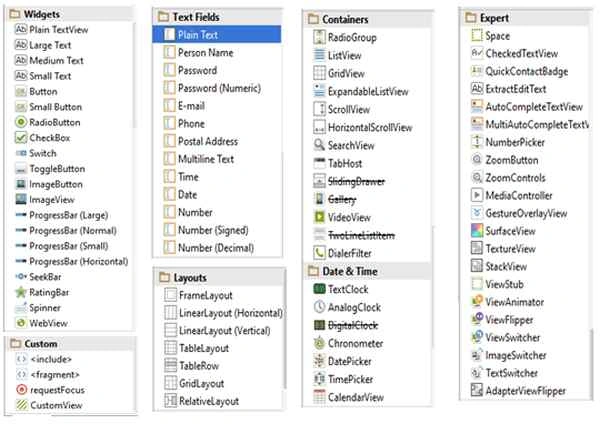
- So using these widgets we can make our UI more user friendly and can make amazing applications.
- Today we will learn how to use these widgets in XML file and how to work with them.
XML files are basically used for designing UI in Android and XML files have some predefined tags.
With the help of these tags, we have to first create a layout for placing our widgets on it and types of layouts are given in the images.
Here I am using a linear layout,
Linear layout: it is a layout which places one after another, it places objects or widgets either in a row or in the column and places them horizontal or in a vertical manner.
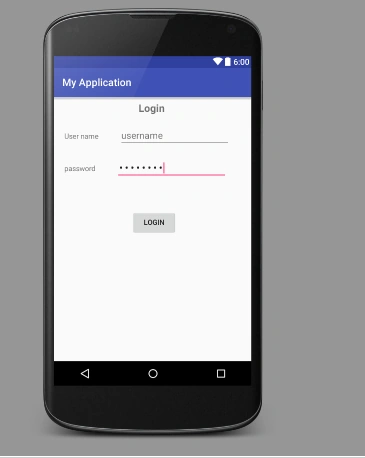
Here I am creating a login page with the help of linear layout,
I will use two text fields and one-two buttons for creating the attractive UI. We can also use Background images.
Start here,
- In your Layout folder create an XML file named activity_main.xml.
- We have already MainActivity.java file in our JAVA folder.
- Start placing this code in activity_main.xml.
- Every layout should have a unique id so that we can access them.
- All the strings should be defined in “\MyApplication\app\src\main\res\values” path having an XML file named Strings.xml.
Code is here
- <RelativeLayout
- xmlns:android="http://schemas.android.com/apk/res/android"
- xmlns:tools="http://schemas.android.com/tools"
- android:id="@+id/container"
- android:layout_width="match_parent"
- android:layout_height="match_parent"
- android:background="@color/red"
- android:gravity="center_horizontal"
- tools:context="com.madhuram.loginapplication.MainActivity"
- tools:ignore="MergeRootFrame" >
- <TextView
- android:id="@+id/login_text"
- android:layout_width="wrap_content"
- android:layout_height="wrap_content"
- android:layout_marginLeft="60dp"
- android:text="@string/login"
- android:textSize="20sp"
- android:textStyle="bold" />
- <LinearLayout
- android:id="@+id/layoutlogin"
- android:layout_width="wrap_content"
- android:layout_height="wrap_content"
- android:layout_below="@id/login_text"
- android:orientation="horizontal" >
- <TextView
- android:layout_width="74dp"
- android:layout_height="wrap_content"
- android:text="@string/username" />
- <EditText
- android:id="@+id/login"
- android:layout_width="148dp"
- android:layout_height="wrap_content"
- android:inputType="text" />
- </LinearLayout>
- <LinearLayout
- android:id="@+id/layoutpassword"
- android:layout_width="wrap_content"
- android:layout_height="wrap_content"
- android:layout_below="@+id/layoutlogin"
- android:orientation="horizontal" >
- <TextView
- android:layout_width="74dp"
- android:layout_height="wrap_content"
- android:text="@string/password" />
- <EditText
- android:id="@+id/password"
- android:layout_width="148dp"
- android:layout_height="wrap_content"
- android:inputType="textPassword" />
- </LinearLayout>
- <LinearLayout
- android:id="@+id/layoutbutton"
- android:layout_width="wrap_content"
- android:layout_height="wrap_content"
- android:layout_below="@+id/layoutpassword"
- android:orientation="horizontal" >
- <Button
- android:id="@+id/login_button"
- android:layout_width="wrap_content"
- android:layout_height="wrap_content"
- android:layout_marginTop="46dp"
- android:text="@string/login" />
- </LinearLayout>
- </RelativeLayout>
Madhuram SrivastavaPosted Nov 8, 2015, 8:45 AM
thnx Ratnesh Singh sir
Ratnesh SinghPosted Nov 8, 2015, 6:26 AM
Nice...
Madhuram SrivastavaPosted Nov 5, 2015, 11:41 PM
thnx Upendra Pratap Shahi sir , you can see the explanation in my 4th Article for tools :)
Upendra Pratap ShahiPosted Nov 5, 2015, 11:57 AM
what is basic requirement for this..what tool, system etc
Upendra Pratap ShahiPosted Nov 5, 2015, 11:57 AM
nice share..
Madhuram SrivastavaPosted Oct 25, 2015, 11:08 AM
thank you Santhakumar Munuswamy sir for reading :)
Santhakumar MunuswamyPosted Oct 25, 2015, 11:06 AM
Good one
Madhuram SrivastavaPosted Oct 25, 2015, 10:52 AM
thnak you mr. Sanjay Singh :)
Sanjay SinghPosted Oct 25, 2015, 6:39 AM
nice one ... keep it up
Madhuram SrivastavaPosted Oct 24, 2015, 12:54 PM
thank you so much for all the precious comments , hope you all are enjoying the way of my presentation .i am using here very simple way so that people can learn in an easy way .
Nilesh JadavPosted Oct 24, 2015, 12:40 PM
Well Good share !! I hope more to come on Android Platform !! Thanks for sharing
Mukesh KumarPosted Oct 24, 2015, 12:03 PM
Great Job.. thanks for sharing
RakeshPosted Oct 24, 2015, 11:38 AM
Good One
Harshad PansuriyaPosted Oct 24, 2015, 8:10 AM
nice one