

Introduction
Let us first understand what a view is. Views are a subset of a table or multiple tables. A view does not form part of the physical schema. It's a virtual table computed or collated dynamically from data in the database when the view is requested. It contains rows and columns, just like a real table.
A view limits the exposure of data to the user by restricting access to specified rows and columns.
Views provide data in a simplified form by hiding its complexity. The database contains only the definition of a view and not all the data so they take very less space for storage.
The following are the key points to be noted about views:
A view limits the exposure of data to the user by restricting access to specified rows and columns.
Views provide data in a simplified form by hiding its complexity. The database contains only the definition of a view and not all the data so they take very less space for storage.
The following are the key points to be noted about views:
- Multiple views can be created on the one table.
- Views can be defined as read-only or updatable.
- Views can be indexed for better performance.
- Insert, update, delete can be done on an updatable view.
The following is the code snippets to create, update and delete views.
Create View
- CREATE VIEW view_name AS
- SELECT column_name(s)
- FROM table_name
- WHERE condition
- WITH CHECK OPTION; --This line of code is optional
- CREATE OR REPLACE VIEW view_name AS
- SELECT column_name(s)
- FROM table_name
- WHERE condition
- DROP VIEW view_name
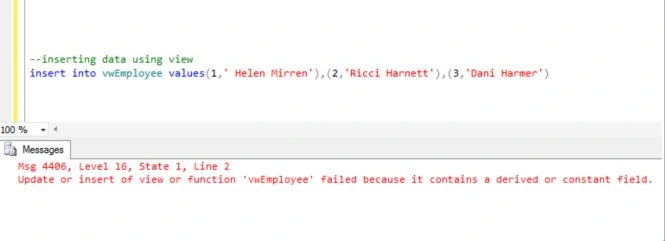
A view can be updated only if the following things are not used in the view:
- DISTINCT
- Summary functions
- Set functions
- Set operators
- ORDER BY clause
- Multiple tables
- Subqueries in WHERE clause
- GROUP BY or HAVING
- Calculated columns
The same rules are applicable for inserts. Also all NOT NULL columns from the base table must be included in the view in order for the INSERT operation to work.
The Insert/Update/Delete syntax for the view is similar to normal Insert/Update/Delete syntax of a table.
WITH CHECK OPTION
This option is as for the CREATE VIEW statement option. This ensures that all INSERT/UPDATE operations satisfy the conditions in the view. If they do not satisfy the condition(s), the UPDATE or INSERT returns an error.
Readonly Views
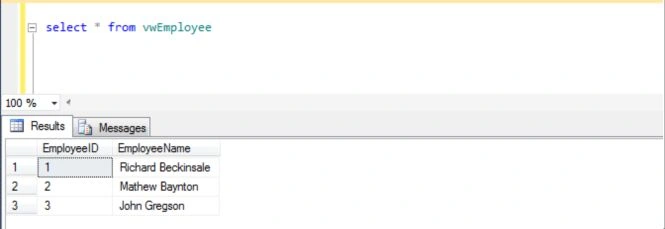
We can make views readonly using the following technique:
Muhammad IbrarPosted Jul 13, 2019, 1:34 AM
Nice. Its great article
Faiz MirzaPosted Jun 9, 2015, 9:40 AM
Just the kind of article I was looking for. Thanks Nitin
Karthik Muthu KaruppanPosted Apr 23, 2015, 11:23 AM
good
Yashwant VishwakarmaPosted Apr 21, 2015, 3:42 AM
Nice article!!
Shubham KumarPosted Apr 21, 2015, 1:25 AM
helpful
Manoj BhoirPosted Apr 21, 2015, 12:58 AM
Well explained Nitin.
Manoj KulkarniPosted Apr 20, 2015, 11:12 PM
Very informative thankx
Rahul Kumar SaxenaPosted Apr 20, 2015, 10:06 PM
Good Work Nitin Tyagi...