

LINQ in C# is used to work with data access from sources such as objects, data sets, SQL Server, and XML. LINQ stands for Language Integrated Query. LINQ is a data querying API with SQL like query syntaxes. LINQ provides functions to query cached data from all kinds of data sources. The data source could be a collection of objects, database or XML files. We can easily retrieve data from any object that implements the IEnumerable<T> interface.
The official goal of the LINQ family of technologies is to add "general purpose query facilities to the .NET Framework that apply to all sources of information, not just relational or XML data".
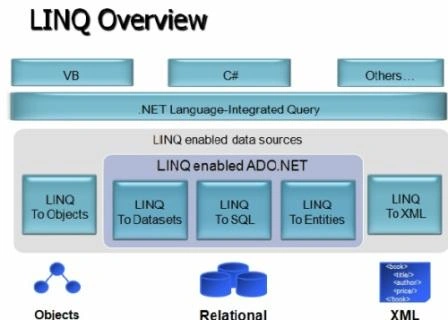
Advantages of LINQ
- LINQ offers an object-based, language-integrated way to query over data no matter where that data came from. So through LINQ we can query database, XML as well as collections.
- Compile time syntax checking
- It allows you to query collections like arrays, enumerable classes etc in the native language of your application, like VB or C# in much the same way as you would query a database using SQL
LINQ to Object
LINQ to Object provides functionality to query in-memory objects and collections. Any class that implements the IEnumerable<T> interface (in the System.Collections.Generic namespace) can be queried with SQO.
LINQ to ADO.NET
LINQ to ADO.NET deals with data from external sources, basically anything ADO.NET can connect to. Any class that implements IEnumerable<T> or IQueryable<T> (in the System.Query namespace) can be queried with SQO.
- LINQ to SQL (DLinq) {Queries performed against the relation database only Microsoft SQL Server Supported}
- LINQ to DataSet {Supports queries by using ADO.NET data sets and data tables}
- LINQ to Entities
LINQ to XML (XLinq)
LINQ to XML is used to query XML data sources.
Here is a detailed tutorial on LINQ with C# for beginners.
LINQ Code Examples
Here is a simple example that creates a array of integers. A LINQ query is used to return a var that stores the collection of returned data. Learn more: The var keyword in C#.
int[] nums = new int[] {0,1,2};
var res = from a in nums where a < 3 orderby a select a;
foreach(int i in res)
 Console.WriteLine(i);
Let's look at a working example. Create a Web page or UI with a GridView control that we will use to display some data. The following code example defines a class, patient with some properties such as name, gender, age, and area.
public class patient
{
    public patient()
    {
    }
    // Fields
    private string _name;
    private int _age;
    private string _gender;
    private string _area;
    // Properties
    public string PatientName
    {
        get { return _name; }
        set { _name = value; }
    }
    public string Area
    {
        get { return _area; }
        set { _area = value; }
    }
    public String Gender
    {
        get { return _gender; }
        set { _gender = value; }
    }
    public int Age
    {
        get { return _age; }
        set { _age = value; }
    }
}
Join the conversation! Your thoughts help the community grow.