

In this article I will show you how to access basic data sources like Data Table, SQL server database using LINQ to SQL Classes and XML data using LINQ to XML.
Technology:
CSharp 3.5/4.0
Implementation:
I will introduce the LINQ first for the Beginners who are working first time with the LINQ.
LINQ is Language integrated Query that is used to query on Data Source Objects like Arrays Collection Datasets etc .For example we can select some data based on some criteria from DataTable, We can select some Elements from array.
Now I think you are familiar with the basic purpose of the LINQ. So let's learn basic syntax of LINQ query.
LINQ query's syntax is somewhat similar to the Structured Query language. So if you are familiar with the SQL syntax it will be very easy to understand for you.
Query starts with 'from' keyword and ends with 'select'.
from <ELEMENTNAME> in<DATA_SOURCE_NAME> where <YOUR_CONDITION_ON_DATA> select <ELEMENT_NAME>
Where element name is name of object which you are retrieving from data Source condition can be anything according to Element Type you are receiving from Data Source.
In sample code below I will show you sample code in which we will see how to access elements from array, Collection and DataTable.
Basic Steps I have done in Sample Application are as below
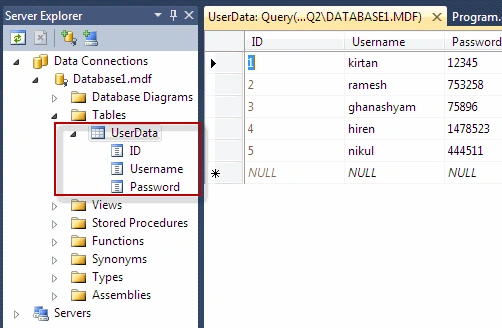
- Created Some Sample Data Sources (Created DataTable, SQL Database and One XML File)
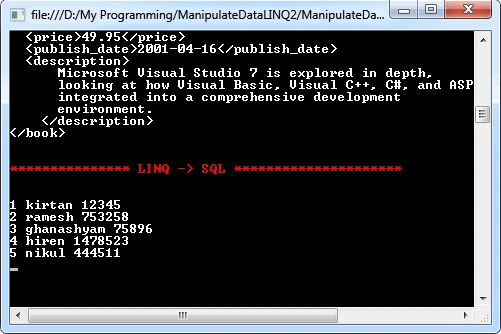
- Accessed each with LINQ
static void Main(string[] args)
{
/*************************************************
* Creating DataSources for
Manipulating by LINQ
*************************************************/
//Build DataTable
DataTable dt = new
DataTable();
dt.Columns.Add("Fruite");
dt.Columns.Add("Color");
//Add Few Rows to DataTable
DataRow dr = dt.NewRow();
dr[0] = "Orange";
dr[1] = "Orange";
dt.Rows.Add(dr);
DataRow dr1 = dt.NewRow();
dr1[0] = "Apple";
dr1[1] = "Red";
dt.Rows.Add(dr1);
DataRow dr2 = dt.NewRow();
dr2[0] = "Banana";
dr2[1] = "Yellow";
dt.Rows.Add(dr2);
DataRow dr3 = dt.NewRow();
dr3[0] = "Cherry";
dr3[1] = "Red";
dt.Rows.Add(dr3);
/*
***********************************
Accessing DataTable using LINQ
**********************************
*/
//Select Elements Where color is red
IEnumerable<DataRow> TableData = from e in dt.AsEnumerable() where e[1].ToString() == "Red" select e;
//print the Result
Console.ForegroundColor = ConsoleColor.Red;
Console.WriteLine("\n\n************Filtered
Data From DataTable using
LINQ*******\n\n");
Console.ForegroundColor = ConsoleColor.White;
foreach (DataRow
row in TableData)
{
Console.WriteLine(String.Format("{0}
{1}",row[0],row[1]));
}
/* ***************************************
* Access XML Document using LINQ
* ***************************************/
Console.ForegroundColor = ConsoleColor.Red;
Console.WriteLine("\n\n***********Access
XML Document using LINQ ******************\n\n");
Console.ForegroundColor = ConsoleColor.White;
//Find the books in XML file which belongs to Genre Computer
var CompuData = from e in XElement.Load("XMLFile1.xml").Elements("book") where e.Element("genre").Value.ToString() == "Computer" select e;
// Print the Result of LINQ Query
foreach (var obj in CompuData)
{
Console.WriteLine(obj);
}
/**************************************
* Access SQL Database using LINQ
* *************************************/
Console.ForegroundColor = ConsoleColor.Red;
Console.WriteLine("\n\n***************
LINQ -> SQL *********************\n\n");
Console.ForegroundColor = ConsoleColor.White;
//Print Data in Table to Screen
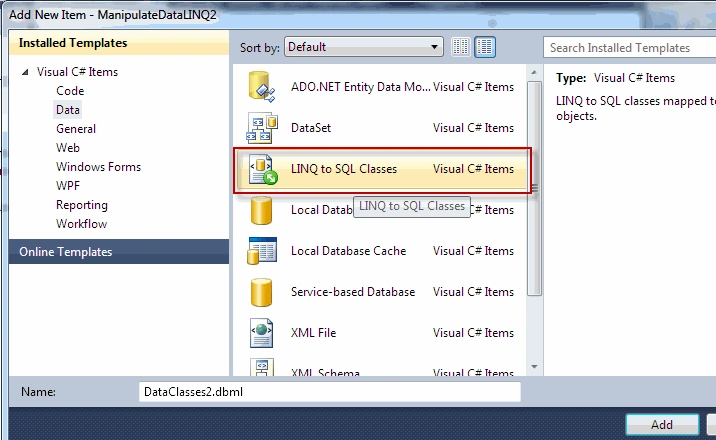
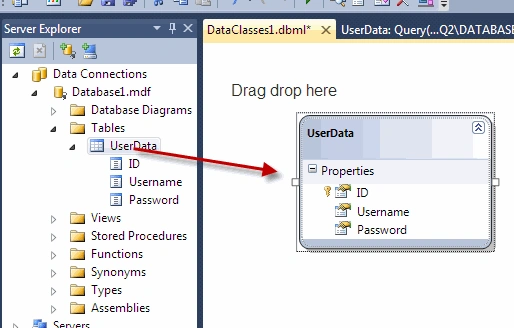
Database1DataContext db = new Database1DataContext();
var UserData = from u in db.UserDatas select u;
foreach (var x in UserData)
{
Console.WriteLine(x.ID+" "+x.Username+" "+x.Password);
}
Console.ReadKey();
}
Explanation of the Code:
Gowtham RajamanickamPosted Apr 11, 2016, 2:59 AM
good one...
attamah godwillPosted May 31, 2011, 12:49 PM
that is excellent. how can i follow you as in twitter or facebook or email
Terry AllenPosted Mar 12, 2011, 1:04 AM
Thank you for posting this article. It was very helpful to me. I look forward to reading more of your postings in the future!
Manivel KPosted Jan 20, 2011, 5:03 AM
How can i access the functionalities of linq in VS2005
hitesh hiteshPosted Dec 24, 2010, 12:47 AM
GUD WORK SIR...
Anil SrivastavaPosted Apr 23, 2010, 3:48 AM
This is really a good article on Linq. Heep posting such articles in future Regards Anil Srivastava Pune India.
Amit ChoudharyPosted Apr 22, 2010, 11:17 PM
hey kirtan you have posted very nice article on Linq. i was looking around to start with linq and you post was the first place i get started with it.. Thanks and keep up such postings