

In this article, we will see how to load an XML into a WPF DataGrid control. If you have not worked with the DataGrid control, I recommend reading DataGrid in WPF.
In ADO.NET, the DataSet class implements methods and properties to work with XML documents.
The ReadXml method reads an XML file and loads it into a DataSet. ReadXml is an overloaded method; you can use it to read a data stream, TextReader, XmlReader, or an XML file and store it into a DataSet object, that can later be used to display the data in a tabular format.
The following code snippet loads the Books.xml file into a DataSet.
- DataSet dataSet = new DataSet();
- dataSet.ReadXml(@"C:\Books\Books.xml");
- dataGrid1.ItemsSource = dataSet.Tables[0].DefaultView;
Sample
Use the following procedure to create the sample:
- Create a WPF application using Visual Studio 2012
- Add a DataGrid Control to the Window
- Add a Button control then double-click on it and add the following code to the button click event handler.
- DataSet dataSet = new DataSet();
- dataSet.ReadXml(@"C:\Books\Books.xml");
- dataGrid1.ItemsSource = dataSet.Tables[0].DefaultView;
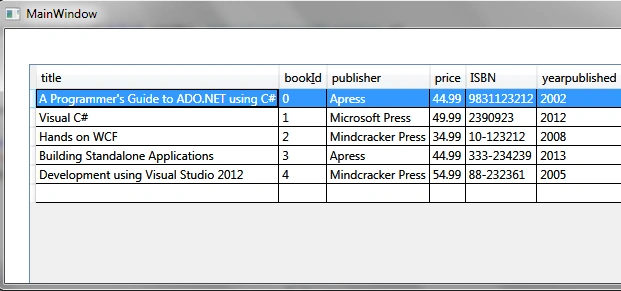
The output will be a DataGrid displaying the contents of an XML file.
sathish reddy sPosted Apr 17, 2015, 8:40 AM
In XML file there is no bookId filed, but how come it displayed in datagrid?and there is author (first name and last name) are there in the xml but those are not displayed in datagrid why?