
Load testing in Azure Cloud is a fully managed service that supports end-to-end load and performance testing, allowing testing teams to generate highly scalable virtual user loads.
It can simulate traffic for any web application, regardless of where it is hosted across the globe.
Development teams, testing teams, and Quality Assurance (QA) engineers can leverage Azure Load Testing to optimize the performance, scalability, and capacity of their web applications.
Performance testers can also use this tool to test both public and private application endpoints, including those hosted in on-premises environments
Load Testing in Azure Cloud - Usage Scenarios
- Load Test in Azure cloud allows you to perform the load test from various performance testing tools like JMeter tool of Apache and Locust.
- Load Test in Azure supports different types of frameworks and a variety of applications, and various communication type of protocols.
- Below are the various types of supported applications or endpoint types by this tool.

- Azure load test, we can integrate with the JMeter tool. Plugins can also be used in your test script.
- Load Testing scenarios can be created in the Azure cloud with the help of a URL-based endpoint, and the JMeter tool test script(.jmx file) can be used.
- These two are the ways to perform the load testing in Azure cloud they are “Single URL-based HTTP endpoint “ and “by exporting the .jmx file of Apache JMeter tool, which supports all the protocols”.
Load Testing in Azure Cloud – Load Test Creation Types
- There are 4 different types of performance and Load Test creation in Azure Load Test.
- This tool will collect the different test resources and test metrics for load testing scenarios.
- Collects the various metrics from the Client side, which will give a detailed report
- Server-side test metrics provide information about Azure application components.
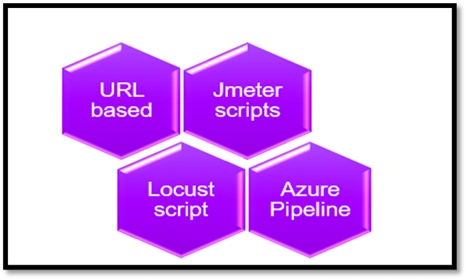
Load Test Creation Types
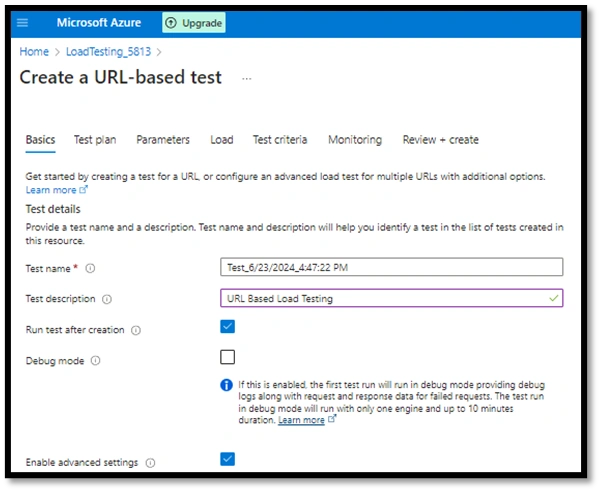
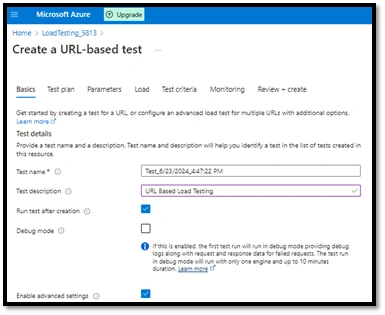
Load Testing in Azure Cloud – URL-based test creation
- Load test in Azure cloud allows us to test any web application load test by creating a URL-based test generation for load testing.
- URL-based HTTP endpoint test, you can create a load test without any idea or prior knowledge of any load testing tools or scripting language.
- In URL-based HTTP endpoint test creation, we have to mention each page request URL.mutiple pages URL also can be specified.
- URL-based test can also be done with different types of load testing, like spike, random.
In order to generate a URL-based performance test, you need to follow the steps mentioned below.
- First, we have to create a resource in Azure Load Testing in the Azure cloud tool.
- Add the web application and web service endpoints. Specify the basic load test configuration parameters.
- We can add more endpoints and monitoring, which can also be added during the test creation.
Load Testing in Azure Cloud – Jmeter Load test script import
- Begin by creating a load test script for a specific test scenario using the Apache JMeter tool and executing it locally.
- Next, upload the JMeter script to Azure Load Testing. Uploading additional data and configuration files is optional. If your test plan includes a user.properties file, make sure to specify it using the File relevance dropdown.
- Note that the size of the JMeter test script and the user.properties file exceeds the allowed limit.
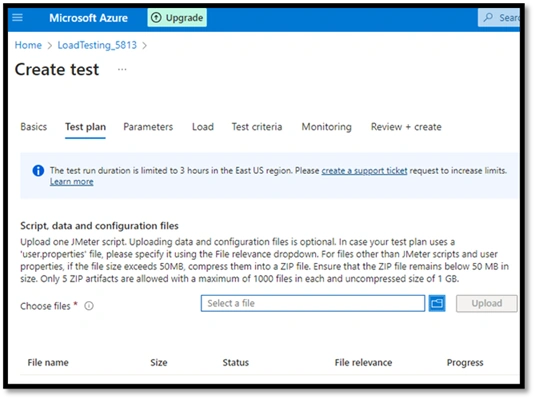
JMeter Load test script import
Join the conversation! Your thoughts help the community grow.