

Introduction
Localization or Internationalization means displaying the content in several languages that can help the user to access the content across the globe. Reports are currently one of the important tools and are used in various fields depending on the requirements of the user. Localization plays a very important role and now it has become a normal requirement of any project. Using localization we can make a single RDL / RDLC file available across multiple locales.
Microsoft has not provided any way to add a resource (resx) file in a report to localize it. But Microsoft provides a way to use an assembly with a report. This will become a workaround to achieve localization in SSRS reports.
To implement this solution we first need to create the assembly that will do the actual localization. This assembly contains a resource file and a class file that has a function that accepts a key name and culture and depending on the culture, the function will localize the value. The class file may have the following definition.
- using System;
- using System.Globalization;
- namespace ReportLocalization
- {
- public static class LocalizedValue
- {
- public static string GetString(string name, string cultureInfoName)
- {
- string returnString = string.Empty;
- try
- {
- // Culture formation
- CultureInfo ci = new CultureInfo(cultureInfoName);
- // Value retrieved from the resource file
- returnString = ReportResource.ResourceManager.GetString(name, ci);
- }
- catch (Exception ex) { }
- if (string.IsNullOrEmpty(returnString))
- {
- returnString = name;
- }
- return returnString;
- }
- }
- }
Create a server report project using SQL Server Business Intelligent Development Studio. Within the report, create a data-source and reports.
Use the following procedure to add this assembly and do report localization.
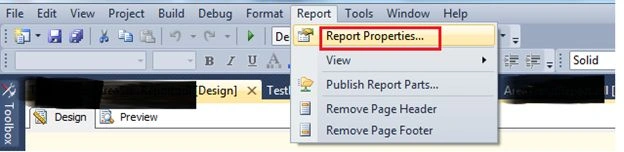
1. Click on Report >> Report Properties from the menu.
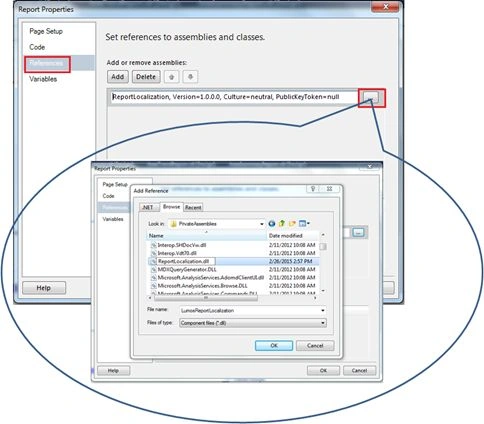
2. Add the custom assembly (DLL) to the report as a reference.
Click on the reference tab and click on the add button. Browse to the assembly and click on the “Ok” button.
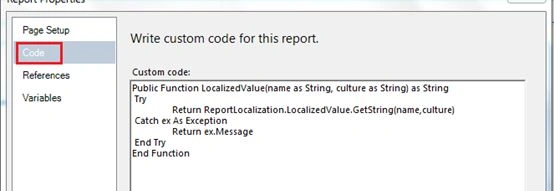
3. Add the following function Code tab.
- Public Function LocalizedValue(name as String, culture as String) as String
- Try
- Return ReportLocalization.LocalizedValue.GetString(name,culture)
- Catch ex As Exception
- Return ex.Message
- End Try
- End Function
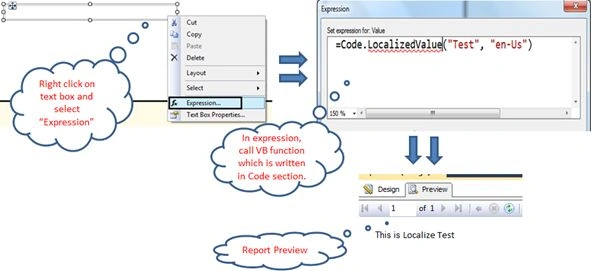
4. To localize a caption, right-click the TextBox and select "Expression". Use the custom code (that is written in the Code tab of the report properties) to get the localized value for any string.
=Code.LocalizedValue("Test", “en-Us”)
When previewing the report, we get an error like "Could not load file or assembly 'assembly name and version information' or one of its dependencies. The system cannot find the file specified."
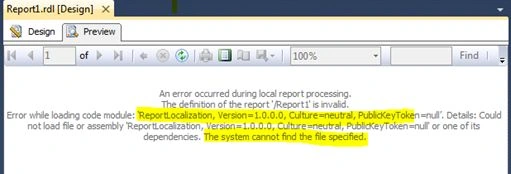
To resolve this issue, we need to copy our custom assembly in the following folder.
- <%Win directory %>:\Program Files (x86)\Microsoft Visual Studio <<Version of visual studio >>\Common7\IDE\PrivateAssemblies
C:\Program Files (x86)\Microsoft Visual Studio 10.0\Common7\IDE\PrivateAssemblies
Upload report on report server
When we use a server report, all the reports need to deploy to the report server. When our report contains a custom assembly, we might get an error like "Error while loading code module....".
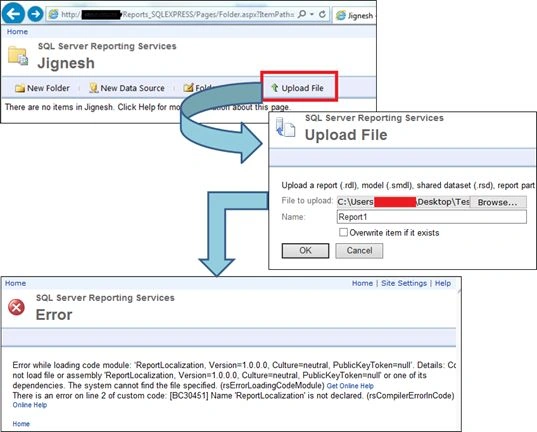
Solution: to resolve this issue, we need to copy our custom assembly to the following path:
- <%Win directory Program Files\Microsoft SQL Server\MSRS11.<<version>> \Reporting Services\ReportServer\bin
C:\ Program Files\Microsoft SQL Server\MSRS11.SQLEXPRESS\Reporting Services\ReportServer\bin
Most Common problem you may encounter
The most common problem using this approach is that when adding the new resource (resx) file it will not be reflected in the report. The reason for this is the custom assembly (DLL) is not updated in the following paths.
- Program Files\10.0\Common7\IDE\PrivateAssemblies
- Program Files\Microsoft SQL Server\ MSRS11.SQLEXPRESS\Reporting Services\ReportServer\bin
The SSRS Report is now localized.
I hope this will help you.
Adil KamalPosted May 23, 2023, 2:11 PM
There is an error on line 2 of custom code: [BC30451] 'ReportLocalization' is not declared. It may be inaccessible due to its protection level.
Adil KamalPosted May 23, 2023, 2:11 PM
Hi Jignesh, I am getting this error below when trying to save the assembly configuration SSRS:
deepti khatujaPosted May 6, 2020, 5:07 AM
Hi i dont have visual Studio.. but i do work on SSRs reports, is it possible to do so?
Saikat BhattacharyaPosted Feb 5, 2020, 2:38 AM
Hi Jignesh. I have Visual Studio 2019. I created a report and used the reportlocalization custom assembly. I copied the assembly in the mentioned folder, but still I am getting the same error while previewing. Can you please help me resolve this?
Dinesh KumarPosted May 8, 2019, 3:55 AM
@Jignesh Trivedi , Your Article was useful to me , And I have an one doubt.
Sukanya JoshiPosted Apr 7, 2019, 1:29 AM
I'm not able to resolve the error in 4 point....even after I add dll in c drive it's showing the same error...plz help me to resolve it
Gianluca NebiacolomboPosted Oct 24, 2018, 2:02 AM
Very simple and useful exposition more than MSDN. Thank You
Sheriff SheriffPosted Apr 20, 2017, 7:46 AM
I am getting the same error, which you mentioned and place the assembly at same location which you discribe, kinldy help me to resolve this issue
swat nPosted Dec 13, 2016, 5:44 AM
What exactly is resource file can any one give me an example for resource file.i have multiple languages multiple text how can i create such large resouce file
Banketeshvar NarayanPosted Mar 25, 2016, 3:31 AM
@Jignesh, could you please tell me that do I need any .resx file too ? I mean from where it is going to pick localized values. Suppose I have a column Header as "Header Sheet" I want to localize it for French and german so from where it will provide French and german values?
vipin chandranPosted Jun 29, 2015, 7:49 AM
good
Sibeesh VenuPosted Feb 28, 2015, 5:30 AM
Good one....
Rahul Kumar SaxenaPosted Feb 27, 2015, 11:20 PM
Good Show...