

Introduction
Supercharge your .NET MAUI projects with Lottie animations! Imagine it as the magic wand for your app's visuals. Thanks to Adobe After Effects, Lottie speaks a special language called JSON, making animations a breeze. Meet SkiaSharp, a Microsoft buddy that helps Lottie shine in .NET MAUI, making your app look cool without the complexity. Learn the ropes in our beginner-friendly guide! Add a dash of Lottie, sprinkle in some JSON magic, and watch your app come to life!
Top advantages of Lottie Animations
- Vector-based Adaptability: Lottie animations, being vector-based, ensure seamless scalability without compromising resolution.
- Reduced File Size: Compared to formats like GIF or MP4, Lottie files boast significantly smaller sizes while maintaining top-notch quality.
Quick Links
- Project Setup
- Install Plugin
- Implementation
- Demo
- Download Code
Project Setup in .NET
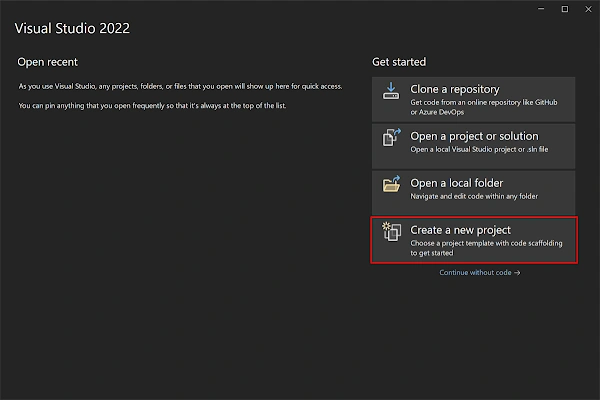
- Launch Visual Studio 2022, and in the start window click Create a new project to create a new project.
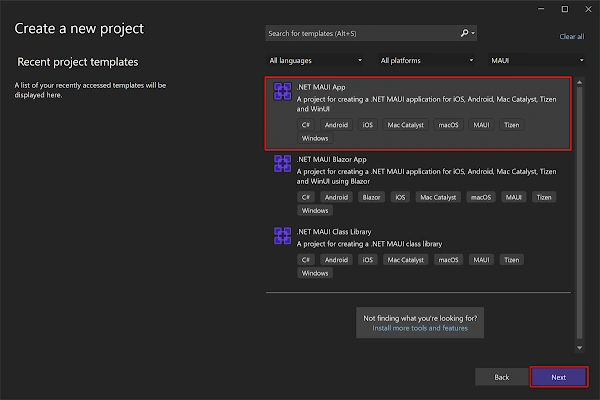
- In the Create a new project window, select MAUI in the All project types drop-down, select the .NET MAUI App template, and click the Next button:
- In the configure your new project window, name your project, choose a suitable location for it, and click the Next button:

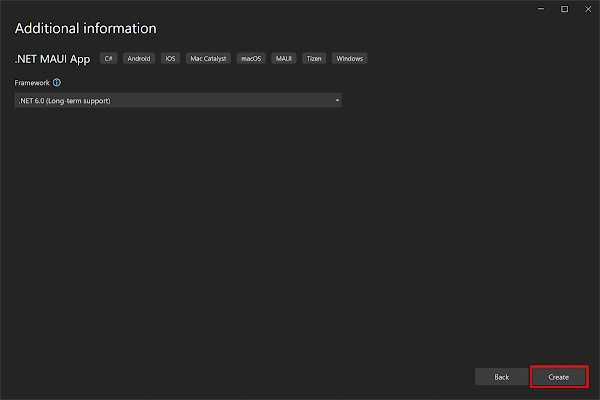
- In the Additional information window, click the Create button:
- Once the project is created, we can able to see the Android, iOS, Windows and other running options in the toolbar. Press the emulator or run button to build and run the app

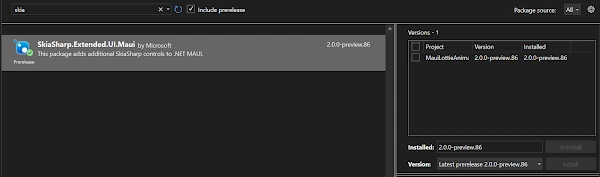
Install Plugin
Join the conversation! Your thoughts help the community grow.