

Introduction
In SQL Server a magic table is nothing more than an internal table that is created by the SQL Server to recover recently inserted, deleted and updated data in the SQL Server database. That is, when we insert or delete a record from a table in SQL Server then the recently inserted or deleted data from the table is also inserted into INSERTED into the magic table or DELETED from the magic table. Using it we can recover data that is recently used to modify data into a table, either use in a delete, insert or update to table. Basically there are two types of magic tables in SQL Server, namely inserted and deleted. An update can be done using these two. Generally we cannot see these two tables, we can only see it using Triggers in SQL Server.
SQL Server contains 2 types of Magic tables
INSERTED Magic Table
The Inserted table holds the recently inserted or updated values, in other words new data values. Hence the newly added and updated records are inserted into the Inserted table.
DELETED Magic Table
The Deleted table holds the recently deleted or updated values, in other words old data values. Hence the old updated and deleted records are inserted into the Deleted table.
Basically, magic tables are used by triggers for the following purposes:
- To test data DML errors and take Proper Action.
- To find the proper condition for the Transition Control Language (TCL).
- To find the difference between the table before and after the data modification and take proper actions.
- Insert
- Delete
- Update
First we create a table.
- Create table Employee
- (
- Emp_Id INT IDENTITY(1,1) NOT NULL,
- Emp_Name varchar(50),
- Age INT NOT NULL,
- Salary decimal(10,2)
- )
- Insert Into Employee values('Rahul' ,25,35000)
- Insert Into Employee values('Suresh' ,23,25000)
- Insert Into Employee values('Nikita' ,42,27000)
- Insert Into Employee values('Sachin' ,23,35000)
- Insert Into Employee values('Suresh' ,25,35000)
- Insert Into Employee values('Sunil' ,27,28000)
- Insert Into Employee values('Pardeep' ,42,29000)
- Insert Into Employee values('Sonu' ,35,41000)
- Insert Into Employee values('Monu' ,38,3200)
- Insert Into Employee values('Sanjeev' ,35,34000)
- Insert Into Employee values('Neeraj' ,27,23000)
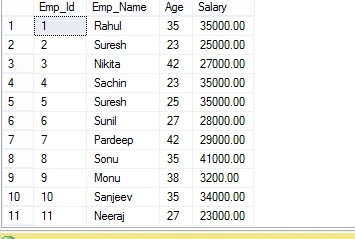
Select * from Employee
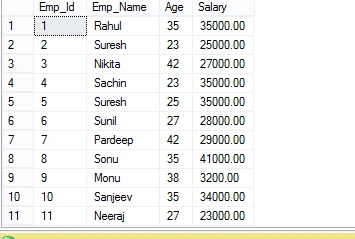
Magic table for Insertion
Whenever we insert data into a table then SQL Server generates a table automatically that contains the inserted data known as the INSERTED Magic Table.
In an insertion only an INSERTED Magic Table is used.
First we will create a Trigger for Insertion as in the following:
- CREATE TRIGGER Insert_Trigger
- ON Employee
- FOR INSERT
- AS
- begin
- SELECT * FROM INSERTED -- show data in INSERTED Magic table
- end
Now we enter some values into the table as in the following:
Insert Into Employee values('Nikita',32,45000)
The output will be:
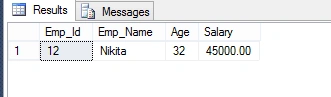
// This table is INSERTED Table
Select * from Employee

Magic table for Deletion
Whenever we delete any data from a table then SQL Server generates a table automatically that contains the Deleted data that is known as the DELETED Magic Table.
In a deletion only the DELETED Magic Table is used.
We create a Trigger for Deletion.
- CREATE TRIGGER Delete_Trigger
- ON Employee
- FOR DELETE
- AS
- begin
- SELECT * FROM deleted -- show data in Deleted Magic table
- end
We delete a row from a table
DELETE from Employee where emp_Id=12
The OUTPUT will be:
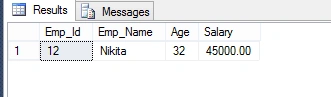
Select * from Employee
Magic table for Updates
Whenever we update data in a table then SQL Server generates two tables automatically that contain the inserted and deleted data that are known as the INSERTED Magic Table that contains the inserted data and the DELETED Magic Table that contains the deleted data.
In an update command two magic tables are used, the first is called INSERTED and the second is called DELETED.
Now we create a Trigger for updates.
- CREATE TRIGGER UPDATE_Trigger
- ON Employee
- FOR UPDATE
- AS
- begin
- SELECT * FROM deleted -- show data in Deleted Magic table
- SELECT * FROM inserted -- show data in INserted Magic table
- end
Now we update a row in a table.
- Update Employee SET Emp_Name='Sonu Choudhary' , age=42 , Salary=45000 where Emp_Id=8
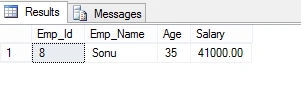
//DELETED Magic Table
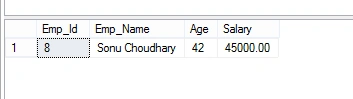

Pankaj Kumar ChoudharyPosted Jul 17, 2015, 6:14 AM
Thanks Sir.........
SharadPosted Jul 17, 2015, 5:50 AM
good one..
Pankaj Kumar ChoudharyPosted Mar 18, 2015, 8:23 AM
Thanks To all of You...Your's appreciation will inspire me for future Articles.....
Rajeev RanjanPosted Mar 18, 2015, 7:04 AM
This is the nice article of urs, but still i am confused, what is the actual uses of Magic table. will you try to explain more
Ganesh SarafPosted Mar 18, 2015, 5:56 AM
Thanks
Gowtham RajamanickamPosted Mar 18, 2015, 3:40 AM
good show...
NitinPosted Mar 18, 2015, 2:25 AM
nice one
Rahul Kumar SaxenaPosted Mar 18, 2015, 1:49 AM
Magical Show...
Manish Kumar ChoudharyPosted Mar 18, 2015, 1:01 AM
Nice one.
Ratnesh SinghPosted Mar 18, 2015, 12:53 AM
Good one
Tom MohanPosted Mar 17, 2015, 10:57 PM
nice magic
RakeshPosted Mar 17, 2015, 8:30 PM
Nice explanation..Keep it up Pankaj