
Introduction
In this article, I will show you how to create an S3 Bucket in Amazon Web Services and then access and manage its objects from your C# code.
Using the code
Before you use this code, you will need to have an AWS account and know how to create an S3 bucket in AWS. I have provided a step-by-step guide that explains how to create a S3 bucket, add users by using IAM in AWS, and set up a group policy to regulate access to the S3 resources.
You can see my S3 tutorial here.
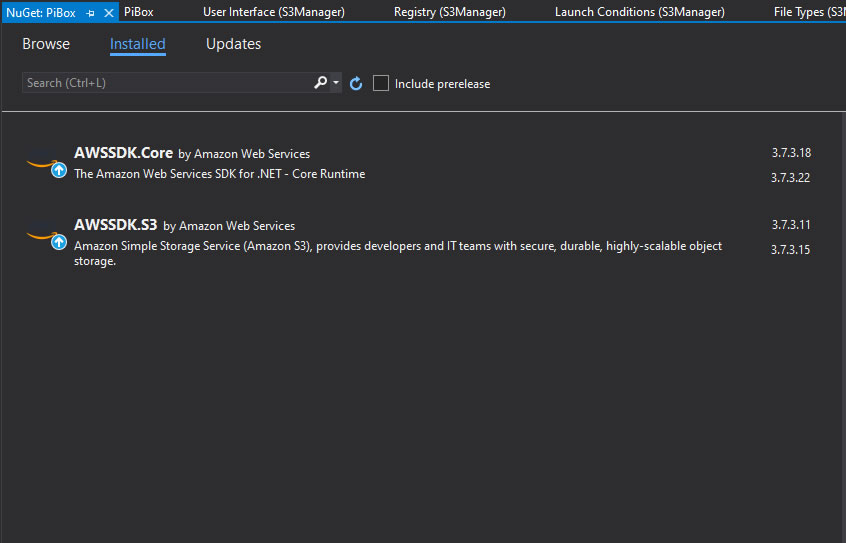
Start a new project in Visual Studio, then continue by adding AWS SDK to our project from the Nuget repository,
To maintain our objects and perform the download, upload, and delete, I have created separated classes,

S3BucketDelete
To delete objects (files and folders).
public class S3BucketDelete {
    public string bucketName {
        get;
        set;
    }
    public string fileName {
        get;
        set;
    }
    public string filePath {
        get;
        set;
    }
    public void DeleteFile() {
        try {
            var client = new AmazonS3Client(Amazon.RegionEndpoint.USWest2);
            DeleteObjectRequest delRequest = new DeleteObjectRequest {
                BucketName = bucketName,
                    Key = Path.Combine(filePath, fileName) // Delete file at the path
            };
            DeleteObjectResponse response = client.DeleteObject(delRequest);
        } catch (Exception x) {
            MessageBox.Show(x.Message);
        }
    }
    public void DeleteFolder() {
        var client = new AmazonS3Client(Amazon.RegionEndpoint.USWest2);
        DeleteObjectRequest delRequest = new DeleteObjectRequest {
            BucketName = bucketName,
                Key = Path.Combine(filePath, fileName) + "/" // Delete folder
        };
        DeleteObjectResponse response = client.DeleteObject(delRequest);
    }
}
S3BucketDownload
To download objects into local destinations from the AWS S3.
public class S3BucketDownload {
    public string bucketName {
        get;
        set;
    }
    public string keyName {
        get;
        set;
    }
    public string filePath {
        get;
        set;
    }
    public string fileDestination {
        get;
        set;
    }
    public async Task DownoadFileAsync() {
        try {
            var client = new AmazonS3Client(Amazon.RegionEndpoint.USWest2);
            var fileTransferUtility = new TransferUtility(client);
            var request = new TransferUtilityDownloadRequest {
                BucketName = bucketName,
                    FilePath = Path.Combine(filePath, keyName),
                    Key = fileDestination + keyName,
            };
            await fileTransferUtility.DownloadAsync(request);
        } catch (AmazonS3Exception s3Exception) {
            MessageBox.Show(s3Exception.Message, "Error 102", MessageBoxButtons.OK, MessageBoxIcon.Error);
        } catch (Exception ex) {
            MessageBox.Show(ex.Message, "Error 103", MessageBoxButtons.OK, MessageBoxIcon.Error);
        }
    }
}
S3BucketUpload
To upload files from the location sources into our S3,
public class S3BucketUploader {
    public string bucketName {
        get;
        set;
    }
    public string keyName {
        get;
        set;
    }
    public string filePath {
        get;
        set;
    }
    public string fileDestination {
        get;
        set;
    }
    public void UploadFile() {
        try {
            var client = new AmazonS3Client(Amazon.RegionEndpoint.USWest2);
            PutObjectRequest putRequest = new PutObjectRequest {
                BucketName = bucketName,
                    Key = keyName,
                    FilePath = filePath,
                    ContentType = "text/plain"
            };
            PutObjectResponse response = client.PutObject(putRequest);
        } catch (Exception x) {
            MessageBox.Show(x.Message, "Error 101", MessageBoxButtons.OK, MessageBoxIcon.Error);
        }
    }
    public void UploadFileToFolder() {
        try {
            var client = new AmazonS3Client(Amazon.RegionEndpoint.USWest2);
            PutObjectRequest putRequest = new PutObjectRequest {
                BucketName = bucketName,
                    Key = Path.Combine(fileDestination, keyName),
                    FilePath = filePath,
                    ContentType = "text/plain"
            };
            PutObjectResponse response = client.PutObject(putRequest);
        } catch (Exception x) {
            MessageBox.Show(x.Message, "Error 100", MessageBoxButtons.OK, MessageBoxIcon.Error);
        }
    }
    public async Task UploadFileAsync() {
        try {
            var client = new AmazonS3Client(Amazon.RegionEndpoint.USWest2);
            var fileTransferUtility = new TransferUtility(client);
            var request = new TransferUtilityUploadRequest {
                BucketName = bucketName,
                    FilePath = filePath,
                    Key = Path.Combine(fileDestination, keyName),
                    PartSize = 6291456, // 6 MB.
                    ServerSideEncryptionMethod = ServerSideEncryptionMethod.AES256
            };
            await fileTransferUtility.UploadAsync(request);
        } catch (AmazonS3Exception s3Exception) {
            MessageBox.Show(s3Exception.Message, "Error 102", MessageBoxButtons.OK, MessageBoxIcon.Error);
        } catch (Exception ex) {
            MessageBox.Show(ex.Message, "Error 103", MessageBoxButtons.OK, MessageBoxIcon.Error);
        }
    }
}

Join the conversation! Your thoughts help the community grow.