

As always I will first show the NuGet package that will help us to get a map. I will add "Xamarin.Forms.Maps" into my solution.
Xamarin.Forms.Maps uses the native map APIs on each platform. This provides a fast, familiar maps experience for users, but means that some configuration is necessary to adhere to each platform-specific API requirement. Once configured, the Map control works just like any other Xamarin.Forms element in common code.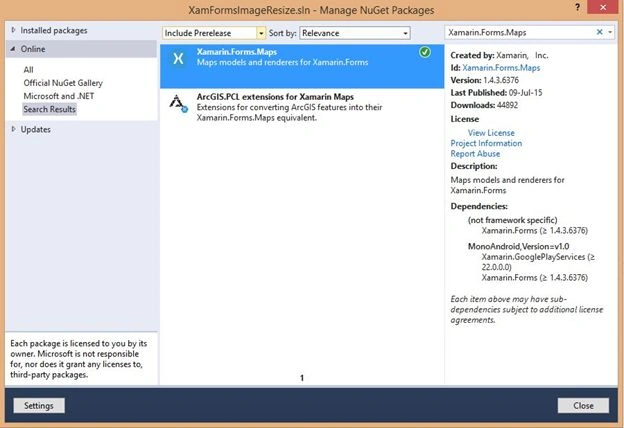
Now we want to set some permissions, so that we will use "AndroidManifest.xml" and set some of these user permissions. I want a key for accessing Google Maps. You can click here to learn more about it.
Now we can open "WMAppManifest.xml" for setting permissions for Windows Phone.
Now we want to initialize the Xamarin.Forms.Maps in each platform-specific startup class (for example, AppDelegate.cs for iOS, MainActivity.cs for Android and MainPage.xaml.cs in Windows Phone) by calling "Xamarin.FormsMaps.Init()" before calling "LoadApplication()".
Now we can provide the following code to get a map on our page:
- var map = new Map { HorizontalOptions = LayoutOptions.FillAndExpand };
- var mapPosition = new Position(10.020921, 76.337919);
- map.MoveToRegion ( MapSpan.FromCenterAndRadius(mapPosition, Distance.FromMiles(3)));
- var mapPin = new Pin {
- Type = PinType.Place,
- Position = mapPosition,
- Label = "Mazsoft Technologies",
- Address = "Kakkanad - Kerala"
- };
- map.Pins.Add(mapPin);
Jainy KurianPosted Dec 3, 2015, 2:39 PM
Is it possible to add custom image for map pin in xaml?
Jainy KurianPosted Dec 3, 2015, 2:38 PM
Good one!!.
Nilesh JadavPosted Jul 15, 2015, 12:09 AM
Nice article sir
Santhakumar MunuswamyPosted Jul 14, 2015, 3:44 PM
Thanks for nice article:)
Sibeesh VenuPosted Jul 14, 2015, 12:58 PM
Nice Share. Thank you :)
Vaikesh K PPosted Jul 14, 2015, 6:51 AM
Thanks Nilesh Jadav :)
Nilesh JadavPosted Jul 14, 2015, 6:46 AM
Nice one sir