
Introduction
In this article, you will learn about master details, using jqWidgets Framework with AngularJS. I hope, you will like this.
Note - You can download zip file from jqWidgets.
Create your Application
Open Visual Studio and select File, click New Project.
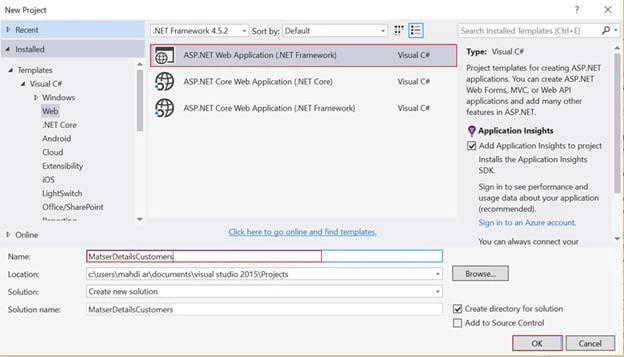
The "New Project" Window will pop up. Select ASP.NET Web Application (.NET Framework), name your project and click OK.
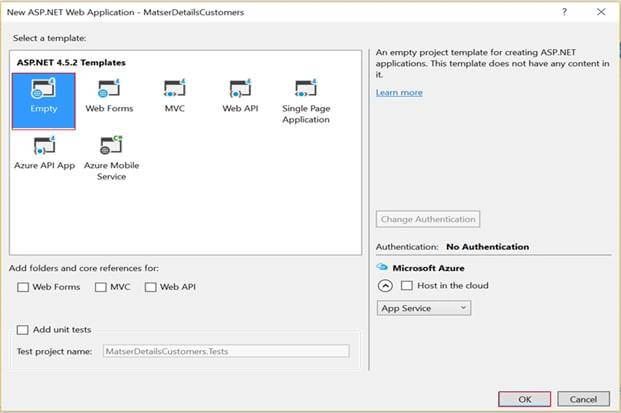
Next, new Window will pop up for selecting the template. We are going to choose Empty and click OK.
Angular Part
Here, we need to create a new folder, which includes two JS files respectively- Customer App.js and CustomerController.js.
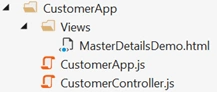
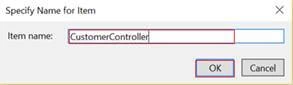
In order to create new JS files. Right click on CustomerApp folder > Add > JavaScript File.
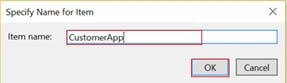
CustomerApp.js
- var app = angular.module('myApp', ['ngRoute', 'jqwidgets']);
- app.config(['$routeProvider', function($routeProvider) {
- $routeProvider.when('/MasterDetail', {
- templateUrl: '/CustomerApp/Views/MasterDetailsDemo.html',
- controller: 'CustomerController'
- }).otherwise({
- controller: 'CustomerController'
- });
- }]);
CustomerController.js
- app.controller('CustomerController', function($scope) {
- $scope.orderGrid = {};
- $scope.customerGrid = {};
- $scope.customers = [{
- "CustomerID": "ALFKI",
- "CompanyName": "Alfreds Futterkiste",
- "ContactName": "Maria Anders",
- "ContactTitle": "Sales Representative",
- "City": "Berlin",
- "Country": "Germany"
- }, {
- "CustomerID": "ANATR",
- "CompanyName": "Ana Trujillo Emparedados y helados",
- "ContactName": "Ana Trujillo",
- "ContactTitle": "Owner",
- "City": "Mxico D.F.",
- "Country": "Mexico",
- }, {
- "CustomerID": "ANTON",
- "CompanyName": "Antonio Moreno Taquera",
- "ContactName": "Antonio Moreno",
- "ContactTitle": "Owner",
- "City": "Mxico D.F.",
- "Country": "Mexico"
- }];
- $scope.orders = [{
- "OrderID": 10248,
- "CustomerID": "ALFKI",
- "EmployeeID": 5,
- "OrderDate": "1996-07-04 00:00:00",
- "RequiredDate": "1996-08-01 00:00:00",
- "ShippedDate": "1996-07-16 00:00:00",
- "ShipVia": 3,
- "Freight": 32.3800,
- "ShipName": "Vins et alcools Chevalier"
- }, {
- "OrderID": 10249,
- "CustomerID": "ALFKI",
- "EmployeeID": 6,
- "OrderDate": "1996-07-05 00:00:00",
- "RequiredDate": "1996-08-16 00:00:00",
- "ShippedDate": "1996-07-10 00:00:00",
- "ShipVia": 1,
- "Freight": 11.6100,
- "ShipName": "Toms Spezialitten"
- }, {
- "OrderID": 10250,
- "CustomerID": "ANATR",
- "EmployeeID": 4,
- "OrderDate": "1996-07-08 00:00:00",
- "RequiredDate": "1996-08-05 00:00:00",
- "ShippedDate": "1996-07-12 00:00:00",
- "ShipVia": 2,
- "Freight": 65.8300,
- "ShipName": "Hanari Carnes",
- }, {
- "OrderID": 10251,
- "CustomerID": "ANATR",
- "EmployeeID": 3,
- "OrderDate": "1996-07-08 00:00:00",
- "RequiredDate": "1996-08-05 00:00:00",
- "ShippedDate": "1996-07-15 00:00:00",
- "ShipVia": 1,
- "Freight": 41.3400,
- "ShipName": "Victuailles en stock"
- }, {
- "OrderID": 10252,
- "CustomerID": "ANTON",
- "EmployeeID": 4,
- "OrderDate": "1996-07-09 00:00:00",
- "RequiredDate": "1996-08-06 00:00:00",
- "ShippedDate": "1996-07-11 00:00:00",
- "ShipVia": 2,
- "Freight": 51.3000,
- "ShipName": "Suprmes dlices"
- }];
- $scope.ordersData = [];
- $scope.customerGridSettings = {
- width: 850,
- height: 250,
- source: $scope.customers,
- keyboardnavigation: true,
- columns: [{
- text: 'Company Name',
- datafield: 'CompanyName',
- width: 250
- }, {
- text: 'Contact Name',
- datafield: 'ContactName',
- width: 150
- }, {
- text: 'Contact Title',
- datafield: 'ContactTitle',
- width: 180
- }, {
- text: 'City',
- datafield: 'City',
- width: 120
- }, {
- text: 'Country',
- datafield: 'Country'
- }],
- rowselect: function(event) {
- var customerID = event.args.row.CustomerID;
- var records = new Array();
- var length = $scope.orders.length;
- for (var i = 0; i < length; i++) {
- var record = $scope.orders[i];
- if (record.CustomerID == customerID) {
- records[records.length] = record;
- }
- }
- $scope.ordersData = records;
- }
- };
- $scope.orderGridSettings = {
- width: 850,
- height: 250,
- source: $scope.ordersData,
- keyboardnavigation: true,
- columns: [{
- text: 'OrderID',
- datafield: 'OrderID',
- width: 100
- }, {
- text: 'OrderDate',
- datafield: 'OrderDate',
- cellsformat: 'd',
- width: 150
- }, {
- text: 'Shipped Date',
- datafield: 'ShippedDate',
- cellsformat: 'd',
- width: 150
- }, {
- text: 'Ship Name',
- datafield: 'ShipName'
- }]
- };
- });
Join the conversation! Your thoughts help the community grow.