
Today's article topic is customization possibility demonstration for user web interface of Microsoft CRM. As an example we'll use MS CRM integration with ASP.NET application, accessing customer data access, when customers are stored in Oracle 10g database. Let's begin:
1. First, let's create the table to store customer information in Oracle database. We'll use web application iSQL for table metadata manipulation: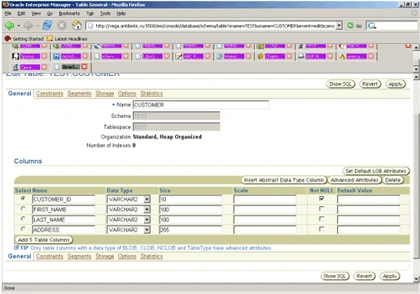
2. Table is now created and contains four fields: CUSTOMER_ID, FIRST_NAME, LAST_NAME and ADDRESS. Fill it with text data:
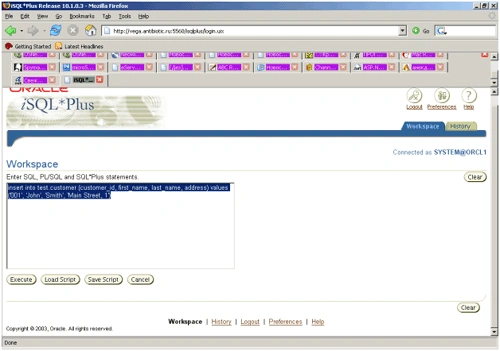
3. Now we'll work with data access to Oracle database from ASP.Net application. We should download from Oracle site http://www.oracle.com Windows Instant Client. We don't have to install it - just unpack all the files in the directory of your choice, for example c:\oracle and set environmental variable TNS_ADMIN, pointing to this directorty.
4. In c:\oracle directory (or where TNS_ADMIN point out) create file tnsnames.ora as following (change host and service names):
ORCL1 = (DESCRIPTION = (ADDRESS = (PROTOCOL = TCP)(HOST = oraclehost.youtdomain.com)(PORT = 1521))
(CONNECT_DATA = (SERVER = DEDICATED)
(SERVICE_NAME = ORCL1)
5. Make correction to windows registry to have MS SQL Linked Server work properly withOracle OLE DB Provider. In the hive KEY_LOCAL_MACHINE\SOFTWARE\Microsoft\MSDTC\MTxOCI make these changes:
OracleXaLib = "oracleclient8.dll"
OracleSqlLib = "orasql8.dll"
OracleOciLib = "oci.dll"
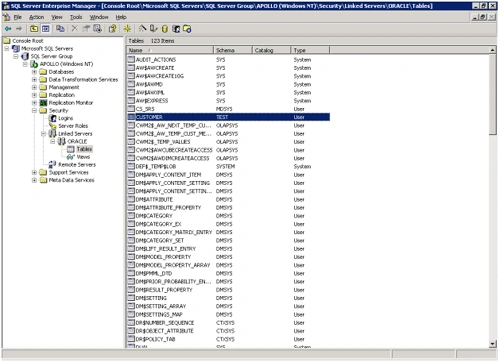
6. Now let's create Linked Server in MS SQL Server 2000:
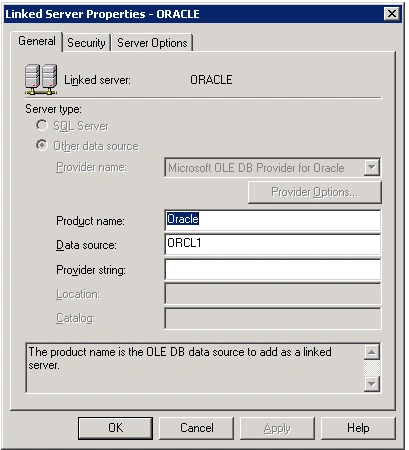
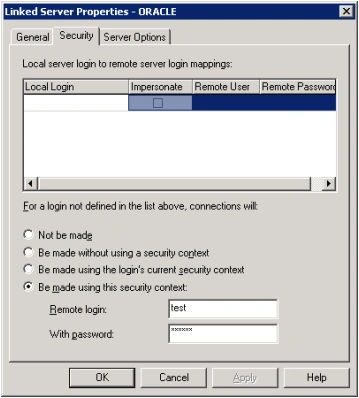
Note: in the Security tab we need to use security context with the credentials, having valid access to Oracle Database.
Join the conversation! Your thoughts help the community grow.