

Introduction
Windows services are long running processes that sit in the background doing their thing and not troubling anyone ... until they go wrong, and everyone starts scrambling. Services can be difficult to debug, and gaining insight into what is happening at a moment in time can be problematic. At best, visibility is usually relegated to spitting messages into the EventLog or a database and hitting refresh a dozen times (unless you have a situation where you are able to hook into remote debug, but that's another story...). The same can be true for other systems (for example ASP.NET) that are placed live on a remote server and then some unseen bug kicks in, that can't be replicated in your test environment and then.... BANG! .. .Oh dear! Here we go again.... <yup, been there...>.
This article demonstrates how to use a combination of Windows Communication Foundation (WCF) to send messages from any part of a system, either local, or remote, and then use SignalR and NancyFX to display the message in real time to a user (or yourself, doing the DevOps thing) in a browser. In addition to giving live insight into processes, the framework can also be used to facilitate central logging, and other general message processing.
Background
Over the years, I have had the need to be able to have a more real-time "deep view" into Windows services, plugin modules, remote applications etc ... not by digging through log tables, but by having a cool dashboard that I could put up on the wall that is a live insight to my running services and servers. This doesn't quite go that far, but does form the basis of a framework that could easily be built out to make something Matrix-like!
Here is an overview of the technologies used.
NancyFX -> this is a lightweight, drop-in web-server that is extremely easy to use. It is a framework for serving html page requests, and sending response. It is like IIS (Internet Information server), not MVC. The reason I use it in this case is that don't want to install IIS on the machine, and its self-contained within my service (or other app). It also comes without the heavy overhead that IIS has. IIS is great - but complete overkill for this particular type of job.
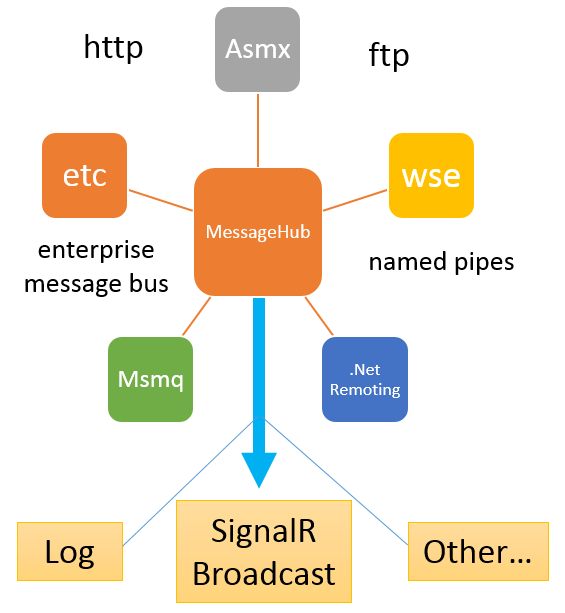
WCF and SignalR preform two different functions. WCF does a lot of heavy-lifting of FTP/HTTP/TCP/Enterprise-bus, etc and is extremely useful to getting messages from the outside world into one place.
SignalR does something very powerful, very simply - it enables bi-directional communication between server and browser.
The overall the process is as follows.
- WCF listens for incoming messages on named-pipe (but could be any protocol WCF supports)
- On receipt of message, it passes the message to SignalR.
- SignalR takes the message and broadcasts it to any connected clients in the browser.
I'm not going to go into the background of creating Windows services etc. - there're enough examples on CodeProject and the Interwebs in general. The best thing to do is to download the code, restore any nuget packages and play with it! What the article will do is show you how I put this solution together and talk you through the highlights, and possibilities. ... ok, let's get stuck in ... it is quite simple, and I'm sure you'll find a use for it :)
Startup
We have three main parts of the solution.
- WCF to accept incoming messages
- SignalR to send messages to the browser
- NancyFX to act as a web-host to serve the data to the browser
In my service, I have a start-up method where the scaffolding framework for these three components gets constructed.
Because there is the very slight possibility that a message might come into the stack before I am setup to deal with it. I put things together in the following order (the comments make the code self explanatory).
- public void DoStart()
- {
- // setup SignalR on port 8059
- string url = "http://localhost:8059";
- // start SignalR
- WebApp.Start(url);
- // setup NancyFX on port 8080
- string URL = "http://localhost:8080";
- Nancyhost = new NancyHost(new Uri(URL));
- // start Nancy
- Nancyhost.Start();
- // setup WCF listening server
- // nb1
- ServiceHost host = new ServiceHost(
- typeof(MessageHub),
- new Uri[]{
- new Uri("net.pipe://localhost")
- });
- // nb2
- host.AddServiceEndpoint(typeof(IMessageHub),
- new NetNamedPipeBinding(), "MessageHubEndPath");
- host.Open();
- }
There are two things to watch here.
- The serviceHost I am creating is using a simple class type I created called "MessageHub" ... it's important that while initiating the ServiceHost, you use the implementation of your class, *not* the Interface (see next..)
- When adding the endpoint for your WCF host, you use the Interface, not the implementation (flip flop...)
Note that in this example, I am using a "named pipe" as the message transport method. This is because in this instance I want to send inter-process messages between different services/possible asp code/desktop interaction etc. The beauty of WCF however is that you can use it to send/receive messages using a host of methods (named pipes, tcp, http,ftp....). The fantastic multiple protocol implementation of WCF makes it ideal for this project, especially if you want to scale it.
The message sink
For the sake of this article, I am keeping things simple. I assume that we have one or more services we want to monitor and get insight to. The first thing is to set up a simple interface to accept messages:
- [ServiceContract]
- public interface IMessageHub
- {
- [OperationContract]
- void MessageRelay(string ServiceName, string ProcessName, string Message,
- LogMessageType LMType);
- }
We then construct a class to handle the incoming WCF
- public class MessageHub : IMessageHub
- {
- // this is the main method that gets called by the contract
- public void MessageRelay(string ServiceName, string ProcessName, string Message,
- LogMessageType LMType = LogMessageType.Broadcast)
- {
- // depending on the message type received, we either use SignalR to send the
- // message to the browser, or log it, or both.
- if (LMType == LogMessageType.Broadcast)
- {
- BroadcastMessage(ServiceName, ProcessName, Message);
- }
- else if (LMType == LogMessageType.Log)
- {
- LogMessage(ServiceName, ProcessName, Message);
- }
- else if (LMType == LogMessageType.BroadcastAndLog)
- {
- BroadcastMessage(ServiceName, ProcessName, Message);
- LogMessage(ServiceName, ProcessName, Message);
- }
- }
So - that's the setup and message receiving taken care of ... next we'll discuss the route part, SignalR in a bit more detail.
The message router
To finish the class, we implement a simple broadcast of the message using SignalR.
- // take the message and send it out to all listening browser clients
- private void BroadcastMessage(string ServiceName, string ProcessName,
- string Message) {
- var context = GlobalHost.ConnectionManager.GetHubContext<logmessagehub>();
- context.Clients.All.addMessage(ServiceName, ProcessName, Message);
- }
- // simple method to log a message - into Log4Net for example
- private void LogMessage(string ServiceName, string ProcessName, string Message)
- {
- // log the message here if necessary for example
- }
- var context = GlobalHost.ConnectionManager.GetHubContext<logmessagehub>();

Ravi KPosted Apr 16, 2018, 3:14 AM
Hello Allen, I have developed a feature using the sample you have provided and its running perfect.. but on my production server where its IIS 7.5 and windows server 8 R2 ... the signalr/hubs file is not getting generated...
Thiruppathi RPosted Nov 10, 2016, 12:00 AM
Very Useful Article,thanks Allen